buzzcutlab vs Quickfix AI
Side-by-side comparison to help you choose the right product.

BuzzCut Lab is your essential guide to understanding clipper guard sizes and choosing the perfect buzz cut.
Last updated: March 1, 2026

Quickfix AI
Quickfix AI instantly diagnoses your computer's health and explains issues in plain English.
Last updated: February 28, 2026
Visual Comparison
buzzcutlab
Quickfix AI

Feature Comparison
buzzcutlab
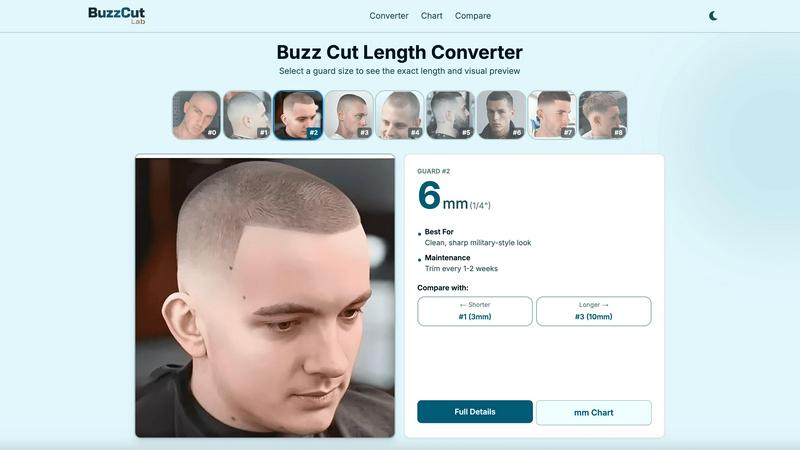
Buzz Cut Length Converter
This central tool allows users to select any standard guard size from #0 to #8 and instantly see its exact length in both millimeters and inches. It provides a clear visual preview of the hair length and details the best use cases and maintenance schedule for that specific guard, serving as the fundamental starting point for any buzz cut decision.
Face Shape Analyzer
Going beyond basic measurements, this feature offers personalized recommendations. Users can upload a photo to receive data-driven suggestions for the most flattering guard sizes and fade styles based on an analysis of their unique facial structure. It applies the foundational principle that certain cuts complement certain face shapes.
Hair Growth Timeline
This practical planning tool helps users visualize their hair's growth journey. By inputting a starting guard size and a target length, it generates a week-by-week timeline showing how the hair will progress, including recommended checkpoints for trimming to maintain a neat appearance as it grows out.
Visual Comparison Charts
Buzzcutlab provides detailed, side-by-side comparisons of popular guard sizes, such as #2 versus #3. These charts break down key aspects like length, scalp visibility, maintenance needs, and best-for scenarios, offering a clear, factual basis for choosing between similar lengths.
Quickfix AI
Comprehensive One-Click System Scan
Quickfix AI performs a full diagnostic check of your entire system with a single click. The scan gathers essential data from all critical areas including processor (CPU) usage and temperature, memory (RAM) pressure, graphics (GPU) load, storage disk health and available space, battery health and cycle count, and current network connection speeds. This provides a complete, unified snapshot of your computer's performance and health in one place, eliminating the need to check multiple system utilities.
AI-Powered Analysis in Plain English
This is the core intelligence of Quickfix AI. The tool doesn't just show you numbers and graphs; its built-in artificial intelligence reads the entire diagnostic report. It then explains what the data means in simple, non-technical language. You can ask questions about your system, and the AI will provide clear answers and specific, tailored recommendations for fixes or improvements, making technical troubleshooting accessible to all users.
Secure Remote Diagnostics via Sharing Code
This feature is designed for collaboration and IT support. Instead of requiring physical access to a computer, you can generate a secure, unique sharing code from within the Quickfix AI application. You can send this code to a technician or helper, who can then enter it into their own Quickfix AI tool to instantly and securely view the diagnostic report from the remote machine. This allows for fast, efficient troubleshooting from anywhere.
Detailed Performance and Health Dashboards
Quickfix AI presents all diagnostic information in a clean, organized, and visual dashboard. You can see at a glance the current utilization percentages of your CPU, Memory, and GPU. It clearly displays storage space used and available, battery health status with cycle count, and the status of key security features like Firewall and FileVault. This dashboard transforms complex system information into an easy-to-read status report.
Use Cases
buzzcutlab
First-Time Buzz Cut Attempt
An individual new to very short hair can use the Length Converter and Visual Charts to understand what each guard number actually means in practice. They can then use the Face Shape Analyzer to get a personalized recommendation, reducing the guesswork and anxiety of choosing a length for the first time.
Planning a Fade Haircut
Someone wanting a fade can utilize the platform to identify the correct guard sizes for the different sections of their fade (e.g., #1 on the sides, #3 on top). The comparison tools help clarify the visual difference between adjacent guards, which is crucial for a seamless blend.
Managing Hair Growth and Maintenance
A user with an existing buzz cut can employ the Grow-out Timeline to plan their next steps. Whether aiming to grow hair out evenly or maintain a specific length, this tool provides a week-by-week guide for when to trim and what to expect, ensuring the style looks intentional throughout the process.
Barber Reference and Client Consultation
Professional barbers can use Buzzcutlab as a quick reference guide for exact millimeter measurements and as a visual aid during client consultations. Showing clients the comparison charts or the grow-out timeline can help set clear expectations and facilitate a mutual understanding of the desired cut.
Quickfix AI
Personal Troubleshooting for Slow Performance
When your personal computer starts running slowly, freezing, or overheating, Quickfix AI is your first step. Instead of guessing, you run a scan. The AI will analyze the report and identify the exact cause, such as "Your CPU is at 89% due to 3 apps: Chrome (45%), Slack (28%), and Zoom (16%)." It then provides a straightforward recommendation like closing unnecessary browser tabs, giving you an immediate action to restore performance.
IT Support and Remote Assistance
IT professionals and support teams can use Quickfix AI to streamline helpdesk operations. When a user reports an issue, the support agent can simply send them a download link. The user runs Quickfix AI and provides the generated sharing code. The IT agent instantly receives the full diagnostic report, allowing them to diagnose problems like low memory, failing storage, or network issues remotely and accurately, reducing resolution time dramatically.
System Health Audit for Tech Enthusiasts
Gamers, developers, and power users who want to optimize their systems can use Quickfix AI for deep insights. It provides detailed metrics on GPU performance during games, memory pressure during coding sessions, and component temperatures. The AI can offer recommendations on settings adjustments or hardware upgrades based on actual usage data, helping enthusiasts maintain peak system performance and health.
Pre-Purchase Evaluation of Used Hardware
When considering buying a used laptop or computer, you can use Quickfix AI to check its true condition. Running the tool on the device will reveal critical health data that sellers might not disclose, such as battery health percentage and cycle count, hard drive or SSD health status, and overall system performance under load. This provides an objective report to inform your purchasing decision.
Overview
About buzzcutlab
Buzzcutlab is a foundational online resource dedicated to demystifying the buzz cut. It operates on the principle that achieving a great, personalized buzz cut starts with clear, accessible information. The platform is built for anyone interested in this classic hairstyle, from the individual attempting their first at-home cut to the seasoned barber seeking a reliable reference tool. Its core value lies in translating the often-confusing numbers and terms associated with clipper guards into practical, visual, and actionable knowledge. Buzzcutlab provides a comprehensive suite of free tools that guide users through every step: selecting the right length, understanding how it will look, and planning for maintenance and growth. By focusing on education over assumption, it empowers users to make confident decisions about their haircut, ensuring the final result is not just a short cut, but a style that genuinely suits them. It is the essential first stop for mastering the basics and executing a perfect buzz cut with precision and understanding.
About Quickfix AI
Quickfix AI is a fundamental tool designed to provide clear and immediate understanding of your computer's health and performance. It is an AI-powered system diagnostics application that performs a comprehensive scan of your machine, analyzing key components like the CPU, memory, storage, battery, and network. The core purpose of Quickfix AI is to demystify complex technical data. It translates raw system metrics into plain English explanations and actionable recommendations, making advanced diagnostics accessible to everyone. This tool is built for individuals who experience performance issues but lack the technical expertise to identify the root cause, as well as for tech enthusiasts and IT support teams who need a quick and reliable way to assess any system. Its main value proposition lies in delivering instant clarity. In under a minute, you can download the tool, run a scan, and receive a complete, easy-to-understand report on your system's status, empowering you to resolve problems and optimize performance with confidence.
Frequently Asked Questions
buzzcutlab FAQ
What does the guard number mean?
Guard numbers (#0 through #8) correspond to the plastic attachments that fit on hair clippers to control cutting length. The number indicates the size of the guard, with higher numbers leaving more hair. For example, a #1 guard typically cuts hair to 3mm, while a #4 guard leaves 13mm of length.
What's the difference between a #2 and a #3 guard?
The #2 guard cuts hair to 6mm (1/4 inch), offering a clean, sharp look with low scalp visibility. The #3 guard cuts to 10mm (3/8 inch), providing a slightly longer, softer appearance with minimal scalp visibility and requiring less frequent maintenance, typically every 2-3 weeks instead of 1-2.
Which guard size should I start with?
A good starting point for a first buzz cut is often a #3 or #4 guard, as these lengths are forgiving and allow you to adjust shorter later. For a more personalized recommendation, use the Face Shape Analyzer tool, which suggests suitable guard sizes based on your individual facial features.
How often should I trim my buzz cut?
Maintenance frequency depends on your chosen guard size and how neat you want to keep it. Shorter cuts (like #0 to #2) typically need a trim every 1-2 weeks to maintain a crisp look. Longer buzz cuts (like #3 to #5) can last 2-3 weeks between trims. The Length Converter tool provides specific guidance for each guard.
Quickfix AI FAQ
Is Quickfix AI free?
Yes, Quickfix AI offers a free version that includes the core system diagnostics scan, the AI analysis to explain your report in plain English, and basic recommendations. This allows anyone to download and understand their system's health at no cost.
Is my data secure?
Yes, Quickfix AI is designed with security in mind. The diagnostic scan runs locally on your machine. Your full system report is not automatically uploaded to any cloud server. Data is only shared if you explicitly choose to generate and provide a sharing code to someone you trust for support purposes.
Do I need technical knowledge?
No, you do not need any technical knowledge to use Quickfix AI. It is built specifically for users who are not experts. The AI interprets all the technical data and explains everything in simple, clear language, telling you what is wrong and what you can do about it.
What platforms are supported?
Quickfix AI is available for both Windows and macOS operating systems. You can download a dedicated version for your specific platform, whether you are using a personal Mac, a Windows PC, or managing machines in a professional environment.
Alternatives
buzzcutlab Alternatives
Buzzcutlab is an online platform in the lifestyle and entertainment category, serving as a comprehensive guide for mastering the buzz cut. It provides specialized tools like a guard size converter and a face shape analyzer to help users achieve a precise, personalized haircut. Users may seek alternatives for various reasons. Some may want a tool with a different feature set, such as more advanced style libraries or integration with other grooming apps. Others might look for platforms with different pricing models or those that cater to a broader range of haircut styles beyond the buzz cut. When evaluating other options, consider the core tools you need. A reliable guard length converter is fundamental. A personalized recommendation engine based on face shape is also valuable for a flattering result. Finally, look for clear, educational content that builds your confidence for a successful at-home cut.
Quickfix AI Alternatives
Quickfix AI is a productivity tool, specifically a browser extension, that uses artificial intelligence to help users write replies and manage communications faster. It falls into the category of productivity and management software, designed to save time for professionals and individuals who handle a high volume of online messages. People often look for alternatives to software like Quickfix AI for several common reasons. These can include budget constraints, a need for different or more advanced features, compatibility with specific platforms or operating systems, or a preference for a different user experience. Exploring options is a normal part of finding the right tool for your unique workflow. When evaluating an alternative, consider your core needs. Key factors are the specific websites and apps you need it to work with, the quality and tone of the AI-generated content, the overall cost and pricing model, and how easy the tool is to install and use daily. The best choice is the one that integrates smoothly into your existing routine.