BlitzCut vs Dubvid
Side-by-side comparison to help you choose the right product.

BlitzCut
BlitzCut is an AI video editor that quickly removes silences, adds captions, and transforms your clips into viral.
Last updated: February 26, 2026

Dubvid
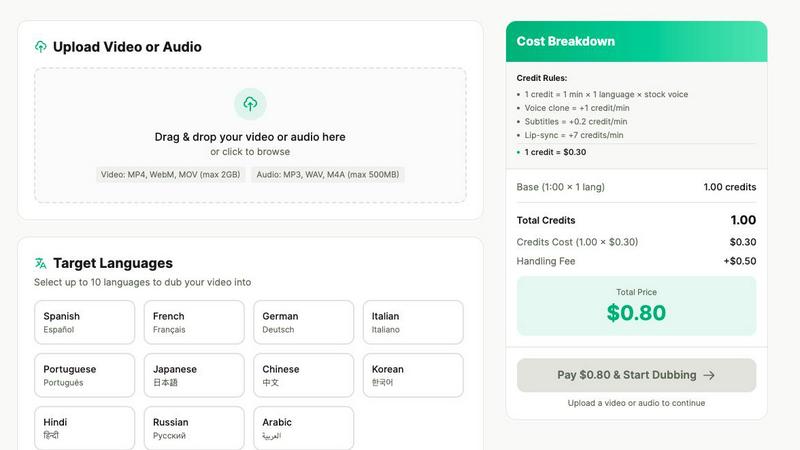
Dubvid dubs your audio and video into multiple languages with natural voices and optional lip-sync.
Last updated: February 27, 2026
Visual Comparison
BlitzCut

Dubvid
Feature Comparison
BlitzCut
Automatic Silence Removal
BlitzCut utilizes advanced AI technology to automatically detect and remove silent gaps in your video. This feature saves creators significant time by eliminating the need for manual silence trimming, which can take up to 20 minutes. The AI processes your video quickly, ensuring it remains engaging and concise.
AI Captions
With an impressive accuracy rate of over 95%, BlitzCut's AI captions feature generates styled captions that enhance the visual appeal of your videos. This functionality allows creators to add context and accessibility to their content without the hassle of manual captioning.
Text-Based Editing
BlitzCut's text-based editing feature allows users to edit videos by simply deleting sentences from the transcription. This intuitive approach streamlines the editing process, making it more user-friendly and efficient, especially for those who prefer working with text rather than video timelines.
2-Minute Workflow
The BlitzCut editing workflow is designed for speed and efficiency. From importing a video to exporting the final product, the entire process takes less than two minutes. This rapid turnaround empowers creators to produce and share content quickly, facilitating a more consistent posting schedule.
Dubvid
Multi-Language Dubbing
Dubvid allows you to translate and dub your video or audio content into over ten different languages from a single upload. You simply select your desired target languages from a list, and the platform's AI handles the translation and voice generation automatically. This feature is designed to maximize your potential audience reach by making your content accessible to viewers worldwide without creating separate videos for each language group.
Natural AI Voice Selection
The platform uses advanced text-to-speech technology to generate the dubbed audio. You can choose from a library of stock AI voices that are designed to sound natural, with appropriate tone, pacing, and emotional inflection. This ensures the translated dialogue does not sound robotic or disconnected, maintaining engagement and clarity for the viewer in the new language.
Optional Lip-Sync Technology
For videos where the speaker is visible, such as tutorials or talking-head presentations, Dubvid offers an optional premium lip-sync feature. This technology adjusts the timing and movement of the dubbed audio to better match the speaker's mouth movements on screen. This adds a significant layer of realism to the dubbed content, making it more professional and immersive for the audience.
Simple Credit-Based System
Dubvid operates on a transparent, pay-as-you-go pricing model using credits. One credit covers dubbing one minute of content into one language using a standard stock voice. Additional features like voice cloning, subtitles, and lip-sync cost extra credits per minute. This system is foundational because it allows users to pay only for what they use, with no subscriptions or long-term commitments, making professional dubbing financially accessible.
Use Cases
BlitzCut
Social Media Influencers
Social media influencers can use BlitzCut to quickly edit their videos for platforms like TikTok and Instagram. The app's automatic silence removal and AI captions allow them to produce engaging content efficiently, keeping their audience entertained without extensive editing time.
Content Creators
For content creators who produce educational or tutorial videos, BlitzCut provides an efficient way to enhance their presentations. By automating tedious tasks like captioning and silence removal, creators can focus on delivering quality content rather than getting caught up in the editing process.
Marketers
Digital marketers can leverage BlitzCut to create promotional videos that capture attention quickly. The ability to produce polished videos in under two minutes allows for rapid content deployment, which is essential for time-sensitive marketing campaigns.
Video Enthusiasts
Even casual video enthusiasts can benefit from BlitzCut's user-friendly features. The app simplifies the editing process, making it accessible for those without extensive video editing experience, enabling anyone to create polished videos effortlessly.
Dubvid
Content Creator Expansion
Individual creators on platforms like YouTube, Instagram, and TikTok can use Dubvid to dub their short-form videos, Reels, or Shorts into multiple languages. This directly multiplies their potential viewership and subscriber base by making content consumable for non-native speakers, leading to greater channel growth and audience engagement without recreating content from scratch.
Educational Course Localization
Educators and course creators can rapidly translate their lesson videos, tutorials, and webinars for students across the globe. By dubbing instructional content, they break down language barriers in learning, allowing them to sell courses to an international market and provide equal learning opportunities to a diverse, worldwide student body.
Business Support & Onboarding
Companies can localize their help center videos, product demos, and employee onboarding materials for different regional offices and customer bases. Providing support content in a user's native language reduces confusion, decreases support ticket volume, and improves the overall customer and employee experience, fostering better understanding and efficiency.
Podcast & Interview Accessibility
Podcasters and interviewers can repurpose their audio or video podcast episodes for new audiences by dubbing them into other languages. This allows them to expand their show's reach, attract international sponsors, and share conversations and ideas across cultural lines without the cost and effort of re-recording with multilingual hosts.
Overview
About BlitzCut
BlitzCut is an innovative AI-powered video editing tool designed to make professional video editing accessible to content creators of all levels. Whether you are a budding influencer, a seasoned marketer, or simply someone who enjoys creating videos, BlitzCut streamlines the editing process, allowing you to focus more on your creativity rather than getting bogged down by tedious editing tasks. With its mobile-first approach, BlitzCut is built for iPhone, iPad, and Mac users, enabling you to edit videos on the go. The platform is particularly tailored for social media content, providing features that automate time-consuming processes such as silence removal and captioning. By reducing the editing time to just two minutes per video, BlitzCut empowers creators to maintain a consistent posting schedule, enhancing their engagement and reach on platforms like TikTok, Instagram, and YouTube.
About Dubvid
Dubvid is a fundamental tool for making video and audio content understandable to people who speak different languages. At its core, it is an AI-powered platform that takes your original video or audio file and translates the speech into a new language using a synthetic voice. This process is called dubbing. The primary goal of Dubvid is to remove the traditional, complex barriers of dubbing, which typically require hiring voice actors, booking studio time, and managing lengthy editing projects. Instead, Dubvid provides a straightforward, web-based solution where creators, educators, and businesses can upload their media, select a target language, and receive a dubbed version in minutes. Its main value proposition is accessibility and speed, enabling anyone to scale their message internationally without specialized skills or a large budget. By focusing on a simple, credit-based pricing model and offering features like optional lip-synchronization, Dubvid serves as a foundational bridge over language barriers for a global digital audience.
Frequently Asked Questions
BlitzCut FAQ
What devices is BlitzCut available on?
BlitzCut is available as a free download for iPhone, iPad, and Mac, allowing users to edit their videos anytime and anywhere.
How does the AI silence removal feature work?
The AI silence removal feature automatically detects silent gaps in your video and removes them, drastically reducing the time required for editing. This process is done on-device, ensuring quick results without the need for uploads.
Can I export my videos directly to social media platforms?
Yes, BlitzCut allows you to export your edited videos in full quality HDR directly to popular platforms such as TikTok, Instagram, and YouTube, streamlining your posting process.
Is there a cost to use BlitzCut?
BlitzCut is free to download and use, making it an accessible option for content creators looking to enhance their video editing capabilities without financial barriers.
Dubvid FAQ
How does the free trial work?
The free trial offers 2 credits with no credit card required. This allows you to dub up to 60 seconds of your content (e.g., 1 minute into 1 language, or 30 seconds into 2 languages) to test the quality of the translation, voice output, and overall platform workflow before committing any funds.
What file formats and sizes does Dubvid support?
Dubvid supports common video and audio formats for upload, including MP4, MOV, WebM for video, and MP3 and WAV for audio. The maximum file size for upload is 500 megabytes, which accommodates a significant amount of high-quality content for processing.
What is the difference between stock voice and voice clone?
A stock voice is a pre-made, high-quality AI voice provided by Dubvid's system that you can select for your dubbing. Voice clone is a premium feature where you can create a synthetic replica of your own or a specific person's voice, which is then used for the dubbing to maintain brand consistency or personal connection.
How is the final cost for a project calculated?
The cost is calculated based on the total credits used. You start with a base of 1 credit per minute of audio dubbed per language. You then add credits for any premium features: +1 credit/min for voice clone, +0.2 credits/min for subtitles, and +7 credits/min for lip-sync. The total credits are multiplied by $0.30 per credit, and a fixed $0.50 handling fee is added per job.
Alternatives
BlitzCut Alternatives
BlitzCut is an AI-powered video editor designed to streamline the editing process for content creators. By automating tasks such as silence removal, transcription, and subtitle generation, BlitzCut allows users to produce engaging videos quickly and efficiently. It is particularly tailored for social media, making it an appealing choice for those who need to publish content regularly. Users often search for alternatives to BlitzCut for various reasons, including pricing, feature sets, and compatibility with different platforms. When selecting an alternative, it is essential to consider factors such as ease of use, the effectiveness of automation, and the specific needs of your content creation process. Look for a solution that aligns with your editing style and enhances your productivity without compromising your creative vision.
Dubvid Alternatives
Dubvid is an AI-powered tool in the content creation category, specifically designed for video and audio dubbing. It translates and recreates voices in multiple languages, aiming to simplify the process of making content globally accessible without traditional studio resources. Users often explore alternatives for various practical reasons. These can include budget constraints, as pricing models differ, or a need for specific features like support for more languages or different audio editing tools. Others might seek software that integrates better with their existing workflow or platforms they use. When evaluating different dubbing solutions, consider a few core aspects. Look at the quality and naturalness of the AI voices, the range of languages offered, and the overall ease of use. Also, assess the cost relative to your project volume and check for important capabilities like lip-sync adjustment or data security practices.