
Beesift vs Zovo
Side-by-side comparison to help you choose the right product.

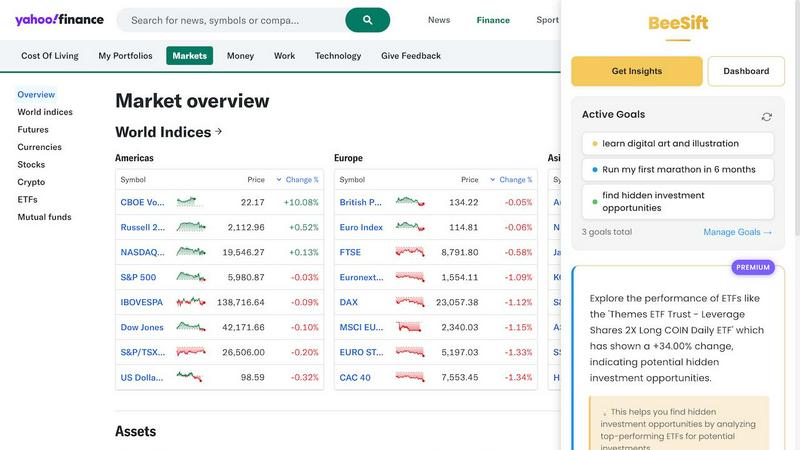
BeeSift extracts goal-aligned insights from any webpage, saving you time and helping you focus on what truly matters.
Last updated: March 1, 2026

Zovo offers 20 privacy-first Chrome extensions for developers and writers, unlocking tools with one simple subscription.
Last updated: February 26, 2026
Visual Comparison
Beesift
Zovo

Feature Comparison
Beesift
Goal-Aligned Insights
Beesift allows users to define specific goals, ensuring that the insights extracted from any webpage are directly relevant and actionable. This feature helps users avoid irrelevant information and focus solely on what matters, enhancing productivity and clarity.
Privacy First Design
With a strong commitment to user privacy, Beesift does not track browsing history or store data about the sites you visit. Your goals and the insights you gather are kept private, allowing you to work without concerns about data security.
Easy Activation
Activating Beesift is as simple as pressing Ctrl+Shift+K on any webpage. This straightforward shortcut transforms any site into a personalized insights platform, making the extraction of relevant information quick and hassle-free.
Comprehensive Knowledge Management
Every insight you save is automatically tagged to your defined goals, creating a well-organized knowledge repository. Whether you are building a fitness routine or diving into a new learning path, you can easily search for and access insights related to your objectives.
Zovo
BeLikeNative
BeLikeNative is a flagship extension that helps users improve their writing by providing instant rewrites in 80 different languages. This tool is designed for anyone looking to communicate more effectively in a foreign language or enhance their overall writing skills. With just one keystroke, users can transform their text to sound more natural, making it an essential tool for students, professionals, and anyone who values clear communication.
Tab Suspender Pro
Tab Suspender Pro is designed to optimize memory usage by automatically suspending inactive tabs. This feature is particularly beneficial for users who frequently multitask or work with numerous tabs open. By intelligently detecting which tabs are not in use, it frees up valuable system resources, helping to speed up your browser and enhance your overall browsing experience.
Clipboard History Pro
Clipboard History Pro ensures that users never lose track of copied text again. This feature allows for the storage of up to 10,000 clips, enabling instant searches and smart pasting of previously copied items. Ideal for writers, researchers, and anyone who regularly copies and pastes information, this tool significantly improves efficiency and accuracy when handling text.
JSON Formatter Pro
JSON Formatter Pro simplifies the process of working with JSON data by providing a user-friendly interface for formatting, validating, and exploring JSON files. It includes features for beautifying and minifying code, as well as tree exploration for easier navigation. This tool is particularly useful for developers and data analysts who need to handle JSON data regularly, offering a streamlined way to visualize and manipulate complex data structures.
Use Cases
Beesift
For Learners
Students can utilize Beesift to extract key concepts and recommended resources from educational content, making it easier to absorb information and develop learning paths tailored to their studies.
For Professionals
Industry professionals benefit from Beesift by cutting through the clutter of market analysis reports and industry news, allowing them to pinpoint trends and insights that are crucial for informed decision-making.
For Founders
Entrepreneurs and business founders can leverage Beesift to find essential implementation details, best practices, and solutions hidden within lengthy documentation, facilitating more effective project development and execution.
For Lifelong Learners
Individuals committed to personal growth can use Beesift to efficiently sift through vast amounts of content available on the web, extracting insights that align with their evolving goals and interests.
Zovo
Enhancing Language Skills
BeLikeNative can be used by language learners who want to practice writing in a new language. By providing instant rewrites, it helps users learn how to construct sentences and use vocabulary more effectively, making it a valuable tool for students and professionals alike.
Memory Management During Browsing
Tab Suspender Pro is perfect for users who often have multiple tabs open while working on projects. By suspending inactive tabs, it helps conserve memory and keeps the browser running smoothly, allowing for a more organized and efficient workflow.
Efficient Text Management
Clipboard History Pro is ideal for professionals and students who frequently copy and paste information. Whether compiling research notes or drafting documents, this tool ensures users can easily retrieve and manage their clipboard history, significantly enhancing productivity.
Simplifying Data Handling
JSON Formatter Pro is essential for developers who work with APIs or data interchange formats. It enables them to format and validate JSON data quickly, making it easier to debug and understand complex data structures, thus streamlining their development process.
Overview
About Beesift
Beesift is a revolutionary Chrome extension designed to combat the pervasive issue of information overload prevalent on the modern internet. This intelligent tool serves as a personal research assistant, meticulously filtering the content on any webpage to present only the insights that align with your specific goals. At its core, Beesift operates on a foundational principle: you define your objectives, and it diligently sifts through the digital noise to uncover the valuable information that propels you forward. It analyzes text from articles, forums, documentation, and research papers, activating via a simple keyboard shortcut. Instead of generating generic summaries, Beesift offers a concise list of actionable bullet points tailored to your aims. This not only saves you countless hours of reading but also empowers you to build a focused and searchable knowledge base. With privacy as a cornerstone of its design, Beesift ensures that your browsing history remains confidential. It is an essential tool for students, professionals, founders, and lifelong learners—anyone determined to extract significant value from the web efficiently and without distraction.
About Zovo
Zovo is an innovative suite of 20 Chrome extensions designed to enhance the productivity and efficiency of users while browsing the internet. Created by a solo developer with over a decade of experience and a robust track record of $400K earned on Upwork, Zovo stands out for its commitment to user privacy and community engagement. The flagship extension, BeLikeNative, empowers more than 3,300 users to write like native speakers in 80 languages with just one keystroke. The entire suite includes various tools such as Tab Suspender Pro, JSON Formatter Pro, and Clipboard History Pro, among others. Zovo prioritizes user feedback, allowing members to vote on features and shape the roadmap, ensuring that each extension meets real-world needs. With no data harvesting, no investors, and a strong focus on user-driven development, Zovo represents a refreshing approach to browser extensions that put users first.
Frequently Asked Questions
Beesift FAQ
How is this different from ChatGPT?
Unlike ChatGPT, which offers a general-purpose approach, Beesift is specifically designed to filter and provide insights relevant to your defined goals. It tailors its output to what you are actively working towards, ensuring greater focus and relevance.
Does it work on all websites?
Yes, Beesift is versatile and works seamlessly on any webpage, including articles, documentation, forums, and even social media. If content is accessible, Beesift can extract insights from it.
Is my data private?
Absolutely. Beesift processes page content to generate insights but does not store your browsing history or track which websites you visit. Your goals and saved insights are kept locally in your browser, ensuring your privacy.
Can I change my goals anytime?
Yes, you can update your goals as frequently as needed. Beesift adapts instantly, ensuring that the insights you extract are always aligned with your current focus and objectives.
Zovo FAQ
What kind of data does Zovo collect?
Zovo is committed to privacy and does not collect any user data. All data processed by the extensions remains on the user's device, ensuring complete confidentiality and security.
How often are new extensions released?
New extensions are typically released every month. Members receive early access to these tools, usually one to two weeks before they are available to the public.
Can I request features for Zovo extensions?
Yes, users are encouraged to submit feature requests directly. The developer reviews all requests, and the most requested features are prioritized in the development roadmap.
How can I contact support if I have issues?
Users can reach out directly to the developer via email or Discord for any questions or problems. There are no automated bots or ticket queues, ensuring a personal touch in customer support.
Alternatives
Beesift Alternatives
Beesift is a Chrome extension that belongs to the productivity and management category. It is designed to tackle the ever-growing issue of information overload by filtering web content to extract goal-aligned insights. Users often seek alternatives due to various reasons such as pricing constraints, specific feature requirements, or compatibility with different platforms. When looking for an alternative, it is important to consider factors such as ease of use, the effectiveness of its insight extraction capabilities, and how well it can align with your personal or professional objectives. Many users also prioritize privacy and security, ensuring that their browsing history remains confidential. Additionally, a user-friendly interface and quick access methods, such as keyboard shortcuts, can significantly enhance the overall experience. Ultimately, finding the right tool involves evaluating how well it meets your unique needs and supports your goals in a seamless and efficient manner.
Zovo Alternatives
Zovo is a suite of 20 privacy-focused Chrome extensions designed specifically for developers and writers. With tools like JSON Formatter, Tab Suspender, and Clipboard History, Zovo enhances productivity while prioritizing user privacy and data security. Users often seek alternatives to Zovo for various reasons, including pricing, feature sets, or compatibility with different platforms. It is essential to consider factors such as usability, the range of features, and the commitment to user privacy when evaluating alternatives to ensure that you find a solution that meets your specific needs. When searching for an alternative, it's crucial to identify what functionalities are most important to you. A good alternative should offer a similar level of privacy, a variety of tools, and a user-friendly experience. Additionally, consider whether the alternative has a community-driven approach to feature development, as this can enhance the overall user experience and provide tools that genuinely meet your needs.