BarBrain vs securememo.app
Side-by-side comparison to help you choose the right product.

BarBrain
BarBrain is a digital inventory tool that cuts your bar and restaurant counting time in half with reliable accuracy.
Last updated: April 4, 2026
securememo.app
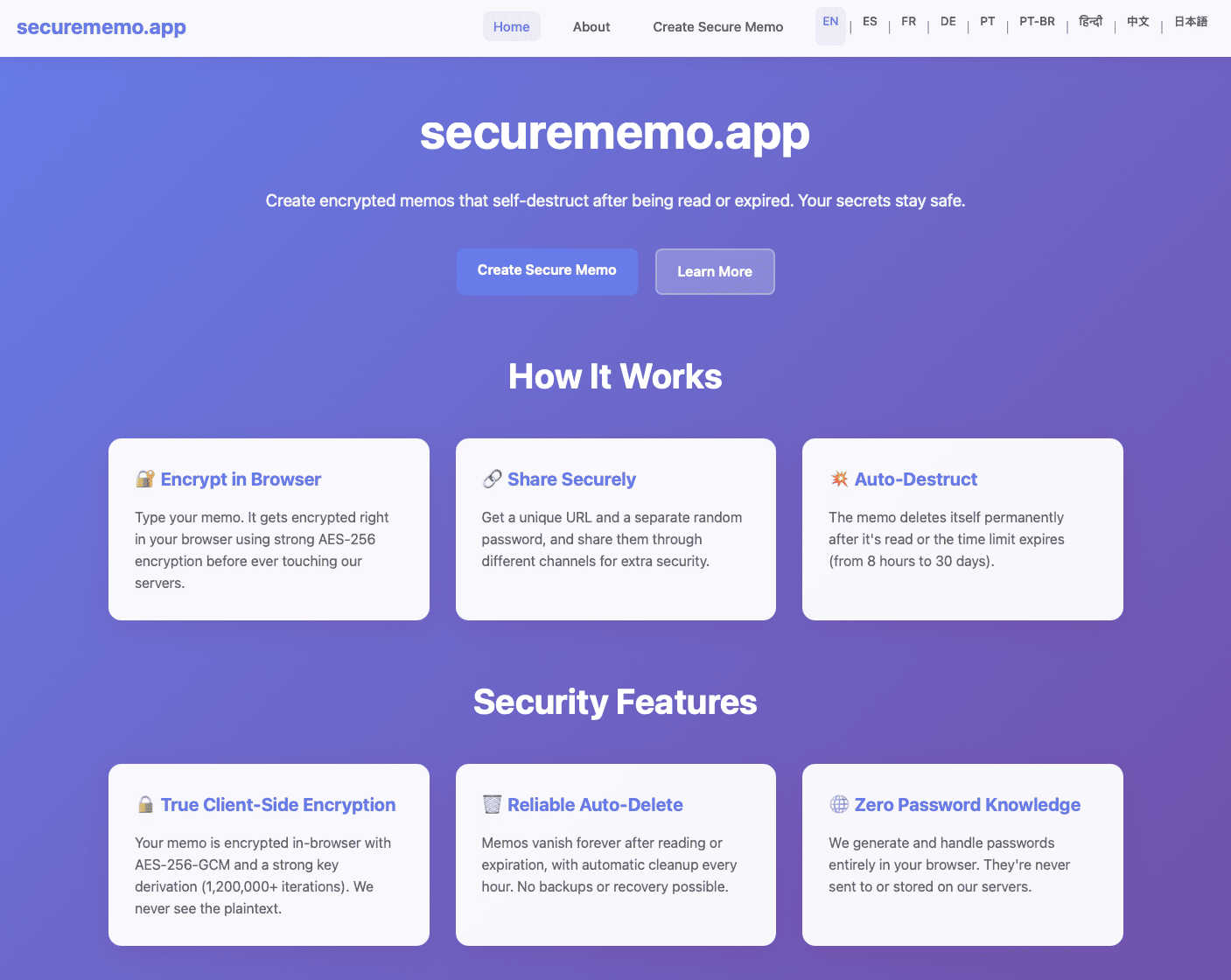
Securememo.app is a private, open source note service that encrypts your text before it leaves your device.
Visual Comparison
BarBrain

securememo.app
Feature Comparison
BarBrain
Parallel Counting on Multiple Devices
This feature allows inventory counts to be conducted simultaneously across several iOS and Android smartphones or tablets. By enabling multiple staff members to count different sections of the venue at the same time, the entire inventory process is dramatically accelerated. This collaborative approach cuts down total counting time by more than half, saving significant labor costs and freeing up management for other critical tasks.
Extensive Pre-Loaded Product Catalog
BarBrain comes integrated with a massive catalog of over 30,000 hospitality-specific products. This includes spirits, wines, beers, food items, and even housekeeping supplies. This vast library eliminates the need to manually enter every single product from scratch during setup. The catalog ensures consistency and accuracy, and the BarBrain team offers assistance to help customize the product list for any specific operation.
Automatic Inventory Reporting
Immediately after a count is completed, BarBrain automatically generates a comprehensive, finalized inventory report. This eliminates the hours traditionally spent on post-count data entry, cross-referencing, and manual calculation in spreadsheets. Operators receive a clean, accurate summary of stock levels, values, and variances, providing instant insight into their inventory status without any additional administrative work.
Fill-Level Slider for Open Items
Specifically designed for hospitality, this feature allows for the accurate counting of partially used products, like open bottles of liquor or food containers, with a single tap. Instead of estimating or struggling with complex fractions, users simply adjust a visual slider on their device to indicate the remaining fill level. This granular tracking is essential for calculating precise pour costs and identifying portion control issues.
securememo.app
Client-Side Encryption
This is the foundational security feature of securememo.app. All sensitive data is encrypted directly within your web browser before it is ever transmitted to the service's servers. This process uses strong cryptographic algorithms to scramble your note's content. Because encryption and decryption keys are never sent to or stored by securememo.app, the company has no technical ability to read your data. This "zero-knowledge" model ensures that your notes are completely inaccessible to anyone but you and the person with the correct password, providing a fundamental layer of privacy.
Self-Destructing Notes
Every memo created on securememo.app is designed to be ephemeral. Once a note is created and a unique link is generated, it is programmed to automatically delete itself after being read by the recipient. This feature ensures that sensitive information does not linger on servers indefinitely, drastically reducing the risk of exposure from data breaches or unauthorized access at a later date. It enforces the principle of data minimization, where information is only retained for as long as absolutely necessary.
Password-Protected Sharing
To share a memo, you generate two crucial elements: a unique link and a strong, random password. The password is created entirely on your device and must be communicated to the recipient through a separate, secure channel (like a phone call or a different messaging app). This two-factor access method means that even if the link were somehow intercepted, the content remains protected by the separate password. We never see or handle this password, cementing our zero-knowledge promise.
No-Account Anonymity
securememo.app requires no user registration, sign-up, or login. You can use the service completely anonymously. This design prioritizes user privacy by eliminating the collection of personal data like email addresses, usernames, or usage history. It also makes the service incredibly easy and fast to use; you can create and share a secure note within seconds without any commitment, lowering the barrier to adopting secure communication practices.
Use Cases
BarBrain
Independent Bars and Restaurants
For owner-operated establishments, BarBrain provides a professional and affordable system to gain control over inventory without complex training. It replaces error-prone spreadsheets and guesswork, giving solo entrepreneurs or small management teams the data they need to understand their exact cost of goods sold, minimize waste, and ultimately improve their bottom line with a tool built for their daily reality.
Multi-Location Restaurant Groups
BarBrain enables centralized, standardized inventory control across all venues within a group. Management can ensure consistent counting procedures and recipe costing from one location to the next. The platform provides a holistic, unified overview of stock levels, purchasing, and cost percentages across the entire business, facilitating better group-wide decision-making and supplier negotiations.
Hotels and Resorts
In the hotel environment, inventory needs extend beyond the kitchen and bar to include minibars, banquet supplies, and housekeeping items. BarBrain's extensive catalog and flexible structure allow it to manage a full range of Food & Beverage and operational inventory. It supports efficient counts across multiple revenue centers like different restaurants, bars, and event spaces within the same property.
High-Volume Nightclubs and Lounges
Venues with fast-paced service and high product turnover benefit greatly from BarBrain's speed and accuracy. The ability to conduct quick, parallel counts at the end of a busy night ensures timely reporting. Real-time tracking of high-value spirit bottles helps prevent shrinkage and provides clear insight into profitability per SKU, which is crucial in a volume-driven business.
securememo.app
Sharing Login Credentials
Instead of sending a password over email or an unsecured chat, you can use securememo.app. Place the username and password in an encrypted note, share the link, and tell the recipient the password via phone or Signal. Once they read it, the note self-destructs, leaving no trace of your credentials on any server. This is a foundational best practice for IT administrators, team managers, or anyone needing to grant temporary access.
Sending Confidential Documents or Text
Professionals such as lawyers, journalists, or healthcare workers can share sensitive drafts, contracts, or personal information securely. By pasting the text or instructions into a secure memo, they ensure that only the intended recipient can view the content and that it is not stored permanently, complying with basic principles of client confidentiality and data protection.
One-Time Private Communication
For situations requiring a discreet conversation that shouldn't be stored in regular chat histories, securememo.app is ideal. This could be for sharing a Wi-Fi password with a guest, sending a private note to a family member, or providing feedback that is meant to be read once and forgotten. It serves as a digital equivalent of a whispered conversation or a note passed and then shredded.
Secure Data Backup for Personal Use
You can create an encrypted note containing critical information like recovery codes, safe combination numbers, or important account details. You can then save the link and password in separate, secure locations (like a password manager and a physical safe). This creates a secure, off-site backup that is inaccessible to anyone without both components, adding a layer of resilience to your personal data management.
Overview
About BarBrain
BarBrain is inventory management software built from the ground up for the unique demands of the hospitality industry. It addresses the fundamental pain points faced by bar and restaurant owners who struggle with time-consuming manual counts, inaccurate spreadsheets, and a lack of visibility into their true costs. Unlike generic warehouse software, BarBrain understands the core operations of food and beverage service, including partial bottles, recipe costing, and perishable goods. The platform is designed for simplicity and efficiency, enabling teams to conduct stocktakes in minutes instead of hours. Its primary value proposition is delivering reliable, actionable data to protect profit margins. By providing exact cost-per-drink and dish calculations, real-time waste and shrinkage alerts, and centralized supplier ordering, BarBrain gives operators the clarity they need to make smarter business decisions. It is suitable for a wide range of establishments, from single-location cocktail bars and restaurants to multi-site hotel groups and restaurant chains, all seeking to streamline operations and stop leaving money on the table.
About securememo.app
In an era where digital privacy is often compromised, securememo.app provides a fundamental solution for secure communication. It is a privacy-focused web service designed for creating and sharing encrypted, self-destructing notes directly from your browser. The core principle is simple yet powerful: to give individuals complete control over their sensitive information. This tool is built for anyone who needs to share confidential data—such as passwords, financial details, personal messages, or private documents—without leaving a permanent, vulnerable record online. Its main value proposition lies in its commitment to a "zero-knowledge" architecture. This means all encryption and decryption happen locally on your device. The service itself cannot access the content of your notes, your passwords, or any personal identifying information, as no user accounts are required. By prioritizing client-side encryption and ephemeral notes, securememo.app returns to the basics of private communication: only the intended sender and recipient should be able to read a message, and it should not persist beyond its useful life. Available in over 20 languages, it lowers the barrier to secure sharing for a global audience, making robust privacy accessible and straightforward for everyone, from tech novices to security-conscious professionals.
Frequently Asked Questions
BarBrain FAQ
How does BarBrain save time during inventory?
BarBrain saves time through several key mechanisms. First, the parallel counting feature allows multiple staff to count simultaneously. Second, the pre-loaded product catalog speeds up the counting process as items are easily searchable. Most significantly, it completely eliminates post-count data processing by automatically generating the final report the moment the count is finished, saving hours of manual spreadsheet work.
Can BarBrain handle both food and beverage inventory?
Yes, absolutely. BarBrain is specifically designed for the full spectrum of hospitality inventory. Its catalog and functionality cover all beverage categories (spirits, wine, beer, non-alcoholic) and food items. The fill-level slider is particularly useful for tracking open food containers, while the system's core logic handles recipe costing for both kitchen dishes and bar cocktails.
Is my data secure with BarBrain?
BarBrain is built with data security as a priority. The company employs standard enterprise-grade security practices to protect customer information. Your inventory data, recipes, and cost figures are stored securely. You maintain full ownership and control of your operational data, which is used solely to provide you with the insights and reporting within the BarBrain platform.
What kind of support is offered during setup and use?
BarBrain offers comprehensive support to ensure a smooth start. This begins with a personalized demo to understand your needs. During account setup, you can choose to do it yourself or receive direct assistance from the BarBrain team. Ongoing support is available to answer questions and help you maximize the software's value for your specific operation.
securememo.app FAQ
How does client-side encryption work?
Client-side encryption means the encryption process happens on your device (in your web browser) before any data is sent to our servers. When you type a note, your browser uses a strong encryption key (derived from the password you or the system generate) to scramble the text. Only this encrypted, unreadable data is transmitted and stored. We never receive the original plain text or the encryption key, so we have no ability to decrypt or read your information. Decryption happens only in the recipient's browser when they enter the correct password.
What happens to a note after it self-destructs?
When a note is set to self-destruct, it is permanently and irrevocably deleted from our servers after it is read by the recipient. Our system is designed to immediately purge all data associated with that unique link. Once this process is complete, the link becomes invalid, and the encrypted content is gone forever. We do not keep backups of destroyed notes, ensuring the ephemeral nature of the service is maintained as a core privacy feature.
Is it really secure if I share the password separately?
Yes, this is a fundamental security practice known as "out-of-band" secret sharing. The security of your note relies on two factors: possession of the unique link and knowledge of the password. By sharing the password through a different communication channel (e.g., phone, encrypted messaging app), you ensure that an attacker who might intercept the link alone cannot access the content. This two-piece verification is a simple yet highly effective method for securing digital communication.
Do you store any of my personal data?
We store minimal, non-personal operational data. Specifically, we only store the encrypted text of your note and its configuration (like the self-destruct setting) for its limited lifetime. We do not require or store email addresses, names, IP addresses (beyond basic server logs for security, which are quickly anonymized), or any account information. The random password is never sent to our servers. Our no-account model is intentionally designed to collect as little data as possible.