
Avif2Png vs Img Editor
Side-by-side comparison to help you choose the right product.
Avif2Png
Convert your AVIF images to the widely compatible PNG format online for free.
Last updated: March 1, 2026

Img Editor
Create breathtaking AI-generated images in seconds with Img Editor's powerful and intuitive technology.
Last updated: February 28, 2026
Visual Comparison
Avif2Png
Img Editor

Feature Comparison
Avif2Png
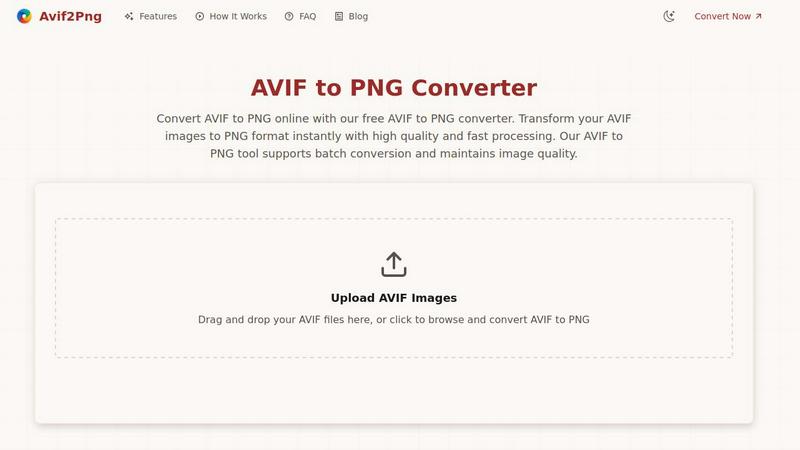
Free Online Conversion
Avif2Png operates entirely online and is completely free to use. There is no requirement to register for an account, subscribe to a service, or download any software. This removes the foundational barrier to entry, allowing anyone with an internet connection and a file to convert to access the tool instantly. The free model ensures that the essential task of format conversion is accessible to students, hobbyists, and professionals alike without any cost considerations.
Batch File Processing
A key feature that enhances productivity is the ability to process multiple AVIF images simultaneously. Instead of converting files one by one, which is time-consuming, users can upload several AVIF files at once. The tool will then convert the entire batch to PNG format in a single operation. This batch conversion capability is a fundamental efficiency booster for users dealing with collections of images, such as from a photo shoot or a set of web graphics.
Quality-Preserving Conversion
The conversion process from AVIF to PNG is designed to be lossless concerning the visual data. This means that the tool decodes the AVIF file and re-encodes it into the PNG format without applying compression that degrades the image's sharpness, color accuracy, or detail. The resulting PNG file maintains the visual integrity of the original AVIF image, which is crucial for professional work where quality cannot be compromised.
Secure and Private Processing
Security is treated as a basic requirement. Uploaded AVIF files and the resulting PNG conversions are handled securely on the server. Crucially, the files are not stored indefinitely. They are automatically deleted from the servers shortly after the conversion process is complete. This approach ensures user privacy and data security, providing peace of mind that personal or professional images are not retained or misused.
Img Editor
Text to Image
Img Editor offers a robust text-to-image feature that enables users to input descriptive prompts and receive stunning AI-generated images in response. This functionality is particularly useful for artists and designers who wish to visualize concepts without the need for extensive graphic design skills.
Image Editing
The platform includes powerful image editing tools that allow users to refine and enhance their generated images. From adjusting colors to cropping and applying filters, Img Editor equips users with the essential tools to perfect their visuals easily.
Prompt Generator
Img Editor features an intuitive prompt generator that helps users brainstorm ideas and create effective prompts for image generation. This tool is especially beneficial for those who may struggle with wording or who seek inspiration to generate unique images.
High-Quality Outputs
Users can choose from various image quality settings, including 1K, 2K, and 4K outputs. The flexibility in quality options ensures that users can produce images that meet their specific needs, whether for personal use or professional projects.
Use Cases
Avif2Png
Ensuring Universal Web Compatibility
Web developers and content creators use Avif2Png to guarantee that images display correctly across all web browsers and devices. While modern browsers support AVIF, many older browsers and some content management systems (CMS) or email clients do not. Converting AVIF assets to PNG ensures that every site visitor, regardless of their browser version, sees the images as intended, which is a foundational principle of accessible web design.
Preparing Graphics for Design and Editing
Graphic designers and digital artists often receive or create assets in AVIF for its size benefits. However, when they need to edit these images in popular software like Adobe Photoshop, GIMP, or Canva, or when the project requires features like transparency (alpha channels), PNG is the required and reliable format. Avif2Png provides the essential first step to make these modern files editable in standard design ecosystems.
Facilitating Print and Publication Workflows
Print services, publishing platforms, and document creation software frequently have strict format requirements, with PNG being a universally accepted standard for high-quality raster graphics. Converting AVIF images to PNG ensures they are compatible with these professional workflows, preventing last-minute format errors and ensuring the final printed or published material reflects the intended image quality.
Simplifying Cross-Platform Sharing
For general users, sharing an image via email, messaging apps, or social media can be problematic if the recipient's device or app cannot open the AVIF format. This leads to confusion and failed communication. Using Avif2Png to convert to PNG before sharing is a basic and effective solution, as PNG is readable on virtually every computer, smartphone, and tablet, ensuring the image can be viewed by anyone.
Img Editor
Artistic Visualization
Artists can leverage Img Editor to transform their creative ideas into visual representations, making it easier to conceptualize projects or share their visions with collaborators. This is especially useful for sketching out ideas before committing them to traditional media.
Graphic Design Projects
Graphic designers can utilize Img Editor to generate unique graphics for marketing materials, websites, or social media campaigns. The ability to create custom visuals quickly can significantly enhance their workflow and productivity.
Marketing and Advertising
Marketers can harness the power of Img Editor to create eye-catching and relevant visuals for their campaigns. With the tool's user-friendly interface, they can produce compelling images that resonate with their target audiences and enhance brand messaging.
Educational Content Creation
Educators and content creators can use Img Editor to generate illustrative images for presentations, lesson plans, or online courses. The platform allows for quick creation of visuals that can enhance learning experiences and engage students effectively.
Overview
About Avif2Png
Avif2Png is a fundamental online utility designed to solve a specific and growing need in digital image management: converting modern AVIF image files into the widely compatible PNG format. At its core, this tool addresses a basic compatibility gap. The AVIF (AV1 Image File Format) is a newer image standard known for its excellent compression, which means smaller file sizes with high quality. However, its adoption is not yet universal across all software, operating systems, and web browsers. PNG (Portable Network Graphics), on the other hand, is a foundational format with near-universal support. Avif2Png provides the essential bridge between these two formats. It is built for anyone who has an AVIF file but needs to use it in an environment where PNG is required. This includes web developers ensuring their site images display for all visitors, graphic designers preparing assets for clients using various software, and general users who need to share or print an image without compatibility issues. The main value proposition of Avif2Png lies in its straightforward, secure, and efficient conversion process that maintains visual quality, supports multiple files at once, and requires no technical expertise or software installation.
About Img Editor
Img Editor is a groundbreaking and entirely free AI image generation platform that serves as a creative ally for individuals across various artistic fields. Whether you are an artist aiming to visualize intricate ideas, a designer in search of distinctive graphics, or a marketer looking to craft engaging visuals for campaigns, Img Editor is tailored to meet these diverse needs. By harnessing advanced AI technology, the platform quickly transforms your concepts into breathtaking images. Users can generate up to 10 images daily without any cost, and additional generations can be unlocked through community contributions. This makes Img Editor an accessible solution for anyone who desires to create high-quality visuals without the financial strain typically associated with similar tools. Its user-friendly interface is designed to accommodate all skill levels, ensuring that everyone can navigate its features effortlessly and bring their creative visions to life.
Frequently Asked Questions
Avif2Png FAQ
What is the difference between AVIF and PNG formats?
AVIF is a modern image format that uses advanced compression (based on the AV1 video codec) to create very small file sizes while maintaining high image quality. PNG is an older, well-established format that uses lossless compression, meaning it preserves all image data perfectly but often results in larger files than AVIF. The core difference is that AVIF prioritizes efficiency, while PNG prioritizes universal compatibility and perfect quality preservation.
Is there a limit to the number or size of files I can convert?
Based on the provided information, Avif2Png is a free tool that supports batch conversion, implying you can convert multiple files at once. However, most online tools have practical limits on individual file size or the total size of a batch upload to ensure server stability and fast processing for all users. For specific limits, it is best to check the tool's website interface at the time of use.
Are my uploaded images kept private and secure?
Yes. A fundamental principle of Avif2Png is user privacy and security. The service is designed to automatically delete your uploaded AVIF files and the converted PNG files from its servers shortly after the conversion process is complete. This means your images are not stored long-term, shared, or used for any other purpose, ensuring your data remains confidential.
Do I need to install any software to use Avif2Png?
No. Avif2Png is a web-based application that runs entirely in your internet browser. There is no need to download, install, or update any software on your computer, phone, or tablet. This makes it a fundamentally accessible tool that works across different operating systems (Windows, macOS, Linux, etc.) as long as you have a modern web browser.
Img Editor FAQ
Is Img Editor really free to use?
Yes, Img Editor is completely free to use, allowing users to generate up to 10 images daily without any cost. Users can also earn additional generations by contributing to the community.
Do I need any technical skills to use Img Editor?
No, Img Editor is designed with a user-friendly interface that caters to individuals of all skill levels. Whether you are a beginner or an experienced designer, you will find it easy to navigate and utilize the platform's features.
What quality options are available for generated images?
Img Editor offers various quality settings, including 1K, 2K, and 4K outputs. Users can select the quality that best suits their needs, whether for casual use or professional-grade projects.
Can I edit images after generating them?
Yes, Img Editor includes image editing tools that allow users to refine and enhance their generated images. You can adjust colors, apply filters, and make other modifications to achieve the desired look.
Alternatives
Avif2Png Alternatives
Avif2Png is a specialized online tool in the image conversion category. It focuses on a single, important task: transforming AVIF image files into the widely supported PNG format. This solves a common compatibility issue, as AVIF's superior compression is not yet universally recognized by all software and devices. Users often explore alternatives for various practical reasons. Some may require offline software for regular use without an internet connection. Others might need conversion to different formats beyond PNG, or seek tools with integrated image editing capabilities. Specific workflow needs, like different batch processing limits or platform availability, also drive the search for other options. When evaluating other conversion tools, consider a few core principles. The tool should reliably maintain the visual quality of your original image during the conversion process. Security is paramount, so understand how your uploaded files are handled. Finally, assess if the tool's features, such as batch processing speed and output format options, align with your specific project requirements.
Img Editor Alternatives
Img Editor is an innovative, free AI image generation platform designed to help users from diverse creative backgrounds create stunning visuals effortlessly. It falls under the category of image and photo editing tools, providing capabilities for both image generation and editing. Users often seek alternatives to Img Editor for various reasons, such as pricing structures, specific feature sets, or compatibility with different platforms. As the creative landscape evolves, individuals may find themselves in need of a tool that better aligns with their unique requirements, whether that involves advanced editing options, improved collaboration features, or enhanced user interfaces. When choosing an alternative to Img Editor, it is essential to consider several factors. Users should evaluate the range of features offered, including the quality of image generation and editing capabilities. Additionally, the platform's user-friendliness, community engagement opportunities, and any associated costs should be taken into account. Ultimately, selecting the right tool will depend on the specific needs and goals of the user, ensuring that they find a platform that effectively supports their creative endeavors.