AskFormulas vs BRCKS
Side-by-side comparison to help you choose the right product.
AskFormulas
AskFormulas creates and tests your spreadsheet formulas for you, guaranteeing accuracy and saving time.
Last updated: February 28, 2026

BRCKS is a construction project platform that connects your team's WhatsApp updates into one organized hub without disruption.
Last updated: April 4, 2026
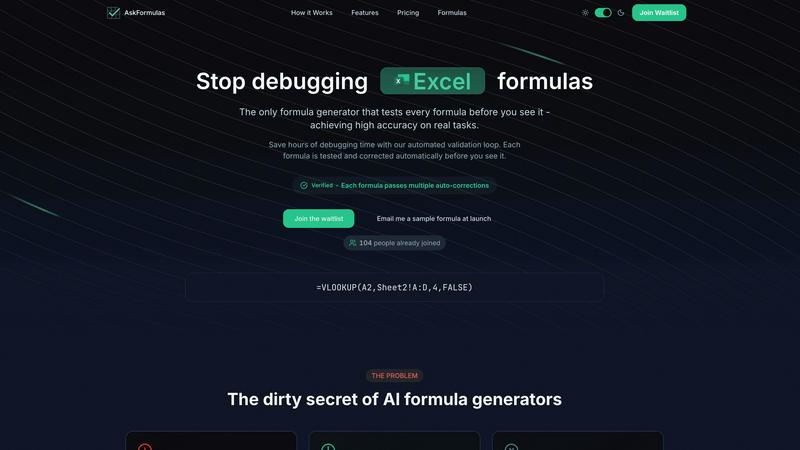
Visual Comparison
AskFormulas
BRCKS

Feature Comparison
AskFormulas
Verified Formula Validation
Every formula generated by AskFormulas undergoes a strict, automated three-step validation process before you see it. First, your natural language request is parsed into precise formula intent. Second, the proposed formula is executed in a secure sandbox using template data to simulate real-world conditions. Third, any errors detected are automatically corrected through multiple iterations. This loop continues until the formula passes all tests, at which point it earns the "Verified" badge, ensuring high accuracy and reliability for your real tasks.
Natural Language to Formula Conversion
You do not need to know spreadsheet syntax to use AskFormulas. The platform features an intuitive input system where you simply describe your goal in plain English. For example, you can type "sum all values in column B where column A contains the word Sales" and the AI will handle the complex task of translating that intent into the correct formula syntax, such as =SUMIF(A:A,"*Sales*",B:B). This removes the barrier of memorizing function names and structures.
Cross-Platform Syntax Handling
AskFormulas seamlessly supports both Microsoft Excel and Google Sheets. A simple one-click toggle allows you to switch between the two platforms. The system automatically adjusts the formula syntax to match the conventions and specific functions of your chosen spreadsheet software, whether it's VLOOKUP for Excel or ARRAYFORMULA for Sheets. This ensures you get a formula that works correctly in your specific environment without manual adjustments.
Smart Error Detection and Correction
The tool proactively identifies and fixes common formula errors as part of its validation loop. When a generated formula results in an error like #REF! or #VALUE! during testing, the system doesn't just report it. It analyzes the cause and automatically creates a corrected version, retesting it until it works. This smart correction mechanism is what drives the high accuracy rate, saving you from the manual debugging process.
BRCKS
BRCKS Bot for WhatsApp
The BRCKS Bot allows your team to update projects directly from WhatsApp, the tool they already use daily. By simply texting the bot, users can log tasks, check off checklist items, ask for project information, and share updates. This feature eliminates the need for app switching and ensures all communication, even if it starts on WhatsApp, is automatically captured and organized within the main BRCKS platform, creating a complete project record without changing team habits.
Checklists and Task Management
This feature provides a structured way to assign, track, and monitor tasks and daily site activities. Project managers can create detailed checklists for each phase of work, assign them to specific team members or trades, and see real-time progress as items are completed. It replaces informal, unreliable to-do lists and verbal instructions with a clear, accountable system that ensures every critical action is documented and followed through, from first fix to final sign-off.
Client Portal
The Client Portal offers homeowners and clients a beautiful, read-only window into their project's progress. They can view key updates, see photos of milestones, and stay informed without gaining access to internal team tools or communication. This feature keeps clients positively engaged and in the loop, managing their expectations transparently while preventing them from disrupting the operational workflow of the construction team.
Unified Project Feed and Files
This is the central hub of a BRCKS project. The Feed collates all project updates, messages, completed tasks, and shared files into one chronological timeline. Combined with a dedicated space for all project files, notes, and meeting recordings, it ensures that every piece of information is stored in one searchable location. This eliminates time wasted digging through emails and separate apps, giving the entire team a single source of truth.
Use Cases
AskFormulas
Financial Modeling and Analysis
Financial analysts and accountants can use AskFormulas to quickly build accurate and complex models. Instead of manually constructing error-prone formulas for projections, valuations, or ratio analysis, they can describe the logic in plain language. The tool generates validated formulas for functions like XNPV, IRR, or sophisticated INDEX-MATCH combinations, ensuring data integrity and saving significant time in model development and auditing.
Business Reporting Automation
Managers and revenue operations teams often spend hours compiling weekly or monthly reports. AskFormulas streamlines this by automating formula creation for summarizing sales data, calculating growth percentages, or pulling specific records with VLOOKUP. By generating verified formulas to aggregate and analyze data from multiple sheets, it enables faster report generation with reduced risk of manual errors.
Data Cleaning and Organization
Marketing professionals, researchers, or administrators frequently need to clean and organize large datasets. AskFormulas can instantly create formulas for tasks like extracting text, converting date formats, removing duplicates, or categorizing data based on conditions. Describing the cleanup goal, such as "combine first name and last name from columns A and B," yields a ready-to-use, validated formula, speeding up data preparation.
Accessibility for Non-Experts
Small business owners, students, or professionals in non-technical roles who lack deep Excel or Sheets expertise can achieve advanced results. They can perform tasks like calculating inventory totals, creating simple budgets, or finding specific customer information without learning complex syntax. AskFormulas acts as an on-demand expert, translating their business needs into working formulas with guaranteed accuracy.
BRCKS
Streamlining Day-to-Day Site Communication
Site managers and foremen use BRCKS to replace chaotic group chats and sporadic emails. Daily instructions, material requests, and progress photos are all posted in the project feed or via the BRCKS Bot. This ensures every subcontractor receives the same information, questions are answered visibly for all, and a clear, searchable record of all daily communication is maintained, drastically reducing miscommunication and repeated conversations.
Managing Subcontractor Work and Accountability
Main contractors use BRCKS to onboard and manage all subcontracting trades efficiently. They can invite unlimited subcontractors for free, assigning them specific checklists and tasks relevant to their scope. Subcontractors can access their schedules, mark tasks complete, and raise issues within the platform. This creates formal accountability, provides a clear view of who is responsible for what, and streamlines the process of tracking work completion across multiple trades.
Keeping Homeowners Informed and Confident
Builders and renovators use the BRCKS Client Portal to provide a professional client experience. Instead of fielding constant phone calls for updates, they can direct clients to the portal to see recent photos, completed milestones, and general progress notes. This transparent approach builds trust, reduces administrative time spent on client updates, and minimizes misunderstandings about the project's status and next steps.
Centralizing Project Documentation and Decisions
Project leads use BRCKS as the definitive archive for all project-related information. Meeting notes, approved drawings, material specifications, change order requests, and site photographs are all uploaded and stored in the project files. When questions arise about past decisions or specific details, team members can quickly search and find the correct document or note, preventing errors and disputes based on outdated or incorrect information.
Overview
About AskFormulas
AskFormulas is a fundamental tool designed to solve the most common and frustrating problem in spreadsheet work: broken formulas. It is an AI-powered formula generator that goes beyond simple text-to-code conversion. Its core innovation is a rigorous, automated validation process that tests and corrects every single formula before it is presented to you. This ensures the formulas you receive are not just syntactically correct, but functionally accurate and ready to use. Unlike other generators that can have error rates of 40-60%, AskFormulas delivers reliable results you can trust immediately.
The tool is built for anyone who uses Excel or Google Sheets, from complete beginners to seasoned professionals. If you are a financial analyst building complex models, a business manager automating reports, a marketer analyzing data, or a small business owner without deep technical expertise, AskFormulas simplifies your workflow. You describe what you need in plain English through a natural language input. The AI interprets your request, generates the appropriate formula, and then runs it through a secure sandbox environment with synthetic test data. If errors are found, the system auto-corrects them in an iterative loop until the formula is verified. The final output comes with a clear "Verified" badge, guaranteeing it has been tested and works. By eliminating the hours typically spent debugging #REF! and #VALUE! errors, AskFormulas returns the focus to your actual work, making spreadsheet management more efficient and less stressful.
About BRCKS
BRCKS is a fundamental construction project management and communication platform designed to bring order and clarity to residential building projects. It is built for the entire project team: from main contractors and site managers to every subcontracting trade and the homeowners themselves. The core problem BRCKS solves is communication chaos. In construction, critical information, tasks, photos, and decisions are typically scattered across WhatsApp messages, personal emails, and various documents, leading to missed details, delays, and costly rework. BRCKS provides a single, centralized platform to keep all project conversations, checklists, tasks, files, photos, and meeting notes in one accessible place. Its unique value proposition is achieving this consolidation without disrupting existing workflows. The platform integrates seamlessly with tools teams already use, like WhatsApp, through the BRCKS Bot, allowing updates to flow automatically into the managed platform. This back-to-basics approach means no complex training is needed. BRCKS is designed to be simple, practical, and immediately useful, helping construction teams save time, reduce risk, and deliver projects more smoothly by ensuring nothing gets lost and everyone is on the same page.
Frequently Asked Questions
AskFormulas FAQ
How accurate are the generated formulas?
AskFormulas is designed for exceptionally high accuracy. Unlike standard AI generators, every formula undergoes an automated validation and correction loop in a simulated spreadsheet environment. This process tests the formula with synthetic data and auto-corrects any errors multiple times until it works perfectly. The result is a "Verified" formula that has been proven functional before you ever see it, drastically reducing the 40-60% error rate common in other tools.
Does it work with both Excel and Google Sheets?
Yes, AskFormulas provides full support for both Microsoft Excel and Google Sheets. The interface includes a simple toggle to switch between the two platforms. When you select your preferred software, the system automatically generates the formula using the correct syntax and function names specific to that platform, ensuring seamless compatibility whether you use =VLOOKUP in Excel or =ARRAYFORMULA(VLOOKUP(...)) in Sheets.
How many formulas can I generate?
The number of formulas you can generate per month depends on your chosen subscription plan. The Starter plan includes 500 formulas per month, the Pro plan offers 2,000, and the Team plan provides 6,000 formulas to be shared among up to 5 team members. This tiered structure ensures there is a suitable plan for individual users, power users, and small teams with varying needs.
What happens if my formula has an error?
If a generated formula contains an error during AskFormulas's internal validation testing, you will never see the broken version. The system's smart error detection identifies issues like #REF! or #VALUE! and automatically initiates corrections. It iteratively adjusts the formula and retests it within the secure sandbox until a fully functional, error-free version is achieved. Only this validated, working formula is then presented to you with the "Verified" badge.
BRCKS FAQ
How does BRCKS work with WhatsApp?
BRCKS integrates with WhatsApp through the BRCKS Bot. Your team members can simply send a message to the bot as they normally would in a group chat. The bot intelligently logs these updates, tasks, or photos directly into the corresponding project within the BRCKS platform. This means communication stays on the familiar tool, but all the information is automatically organized and saved in one central, manageable place for the project manager.
Do my subcontractors have to pay to use BRCKS?
No, one of the foundational principles of BRCKS is that subcontractors get full and free access to the projects they are working on. You can invite every trade without any extra cost. They can view their tasks, access the project calendar, upload files, and mark off checklists at no charge. You only pay for the seats required by your own core company team members who need full administrative access.
Is BRCKS difficult to learn and implement?
BRCKS is designed with a back-to-basics, practical approach specifically for construction teams. The interface is built to be intuitive and straightforward. Most importantly, because it works alongside tools like WhatsApp via the BRCKS Bot, there is little to no disruption to existing workflows. Teams can start benefiting from organized communication without lengthy training sessions or a steep learning curve, adopting it naturally as they work.
What kind of projects is BRCKS best suited for?
BRCKS is purpose-built for residential construction projects. This includes new home builds, renovation projects, extension work, and refurbishments. It is ideal for main contractors, small to medium-sized building firms, and the trades that work with them. The platform scales to manage multiple projects simultaneously, making it suitable for builders and project managers overseeing several residential jobs at once.
Alternatives
AskFormulas Alternatives
AskFormulas is a productivity tool designed to create and verify formulas for Excel and Google Sheets. It belongs to the category of software that helps users automate and simplify spreadsheet tasks. People often seek alternatives to tools like this for various reasons, such as budget constraints, a need for different features, or specific platform requirements that may not be fully met. When evaluating other options, it's wise to consider a few core principles. First, assess the tool's accuracy and whether it validates its outputs, as unreliable formulas can create more work. Second, ensure it supports the spreadsheet platform you use daily. Finally, consider the overall value, balancing cost against the time and frustration the tool saves you in your workflow. The goal is to find a solution that integrates smoothly into your process. A good tool should reduce complexity, not add to it. By focusing on these foundational aspects—reliability, compatibility, and value—you can make a sound decision that enhances your productivity with spreadsheets.
BRCKS Alternatives
BRCKS is a construction project management and communication software. It falls into the category of productivity and management tools designed specifically for the building industry. Its purpose is to centralise day-to-site communication, tasks, and documentation that often get scattered across emails, messaging apps, and paper. Users may look for alternatives to BRCKS for various practical reasons. These can include budget constraints, the need for different feature sets, or specific requirements like integration with other business platforms. Some teams might also seek tools that cater to different project scales or company sizes beyond residential construction. When evaluating alternatives, focus on core needs. Consider the software's ease of use for your entire team, its ability to organise conversations and files securely, and how well it tracks tasks and decisions. The goal is to find a practical solution that brings clarity and reduces miscommunication on site, without unnecessary complexity.