Alertr: Inventory Management vs Rocket Source
Side-by-side comparison to help you choose the right product.

Alertr: Inventory Management
Alertr tracks your inventory and tells you exactly what to reorder and when to prevent stockouts.
Last updated: March 26, 2026

Rocket Source
Rocket Source analyzes Amazon data to find profitable wholesale products for your business.
Last updated: February 28, 2026
Visual Comparison
Alertr: Inventory Management
Rocket Source
Feature Comparison
Alertr: Inventory Management
Daily Inventory Sync & Sell Rate Calculation
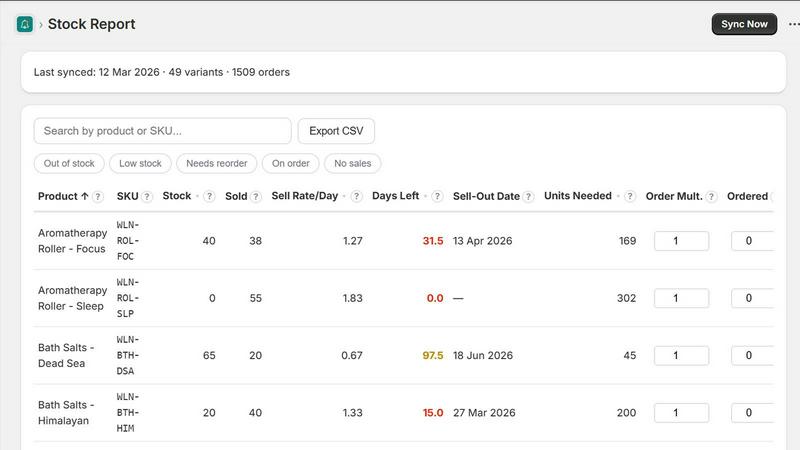
Alertr automatically connects to your Shopify store to pull product and order data every single day. It uses this fresh information to perform a critical calculation: determining the sell rate for each of your SKUs. This means you always have an accurate, up-to-date understanding of how quickly each item is moving, which forms the foundational data for all smart reordering decisions, eliminating reliance on outdated spreadsheets or manual estimates.
Smart Reorder Alerts via Email & Slack
This is the core automation that prevents stockouts. Based on your calculated sell rates and configurable settings like lead time and reorder point, Alertr proactively monitors your inventory levels. When stock for a product dips below your predefined threshold, it instantly sends you a clear alert. These notifications can be delivered directly to your email or into a designated Slack channel, telling you precisely which item needs attention and how many units you should order to replenish safely.
Centralized Inventory Dashboard
Gain immediate visibility over your entire product catalog in one unified view. The Alertr dashboard displays all your SKUs alongside key metrics like current stock level, days of stock remaining, sell rate, and suggested reorder quantity. You can quickly filter this view to see only items that are low in stock, need reordering, or are out of stock, allowing for efficient and focused inventory management without jumping between different reports or screens.
Configurable Thresholds & CSV Export
Alertr adapts to your specific business needs. You have full control to set important parameters like the sales lookback period for calculating sell rates, supplier lead times, and how frequently you receive alerts. For reporting or creating purchase orders, you can export your complete inventory data—including all calculated metrics—to a CSV file with one click, ensuring you have the records you need for external processes or analysis.
Rocket Source
Bulk Supplier Catalog Analysis
This is the foundational feature of Rocket Source. Instead of manually looking up individual products, users can upload an entire supplier spreadsheet or catalog file. The software then processes this list at scale, scanning millions of products by matching them to live Amazon data. This bulk analysis capability is what turns a task that could take days into one that takes minutes, enabling sellers to review vast numbers of potential products quickly and efficiently.
Comprehensive Profitability Metrics
Rocket Source provides the essential financial data needed to make a sound purchasing decision. It goes beyond just the sale price by integrating crucial cost factors like the current Buy Box price, estimated FBA fees, and referral fees. By calculating the net profit margin for each product based on your target cost from the supplier, it gives you a clear, data-backed view of which items are truly profitable before you ever place an order.
In-Depth Product & Market Intelligence
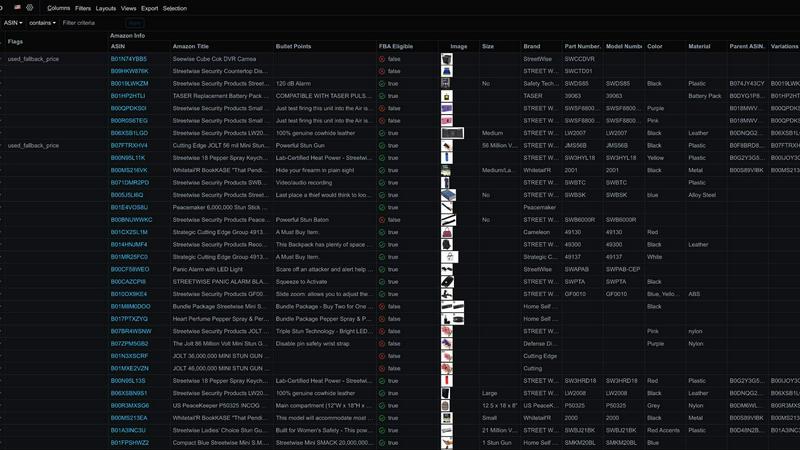
The tool delivers over 90 data points per product, offering a deep understanding of the market landscape. This includes the sales rank (BSR), category placement, number of competing offers, and product dimensions. Crucially, it also flags potential restrictions like brand gating or Hazmat requirements. This intelligence helps sellers assess not just profitability, but also demand, competition level, and any Amazon-compliance hurdles.
Variation and Listing Detail Detection
Rocket Source automatically identifies complex product listings, such as those with variations (e.g., different sizes or colors under one parent ASIN). It details the number of variations and the pack quantity. This feature is vital for wholesale sellers to ensure they source the correct specific variation from their supplier and accurately forecast sales for that particular item, preventing listing mismatches and inventory errors.
Use Cases
Alertr: Inventory Management
Replacing Manual Spreadsheet Tracking
Merchants who currently track inventory using manual spreadsheets face constant challenges with stale data and human error. Alertr automates this entire process by syncing daily sales data directly from Shopify, calculating sell rates automatically, and providing a live dashboard. This eliminates hours of manual data entry and reconciliation, ensuring decisions are based on accurate, real-time information rather than outdated guesses.
Proactively Preventing Lost Sales from Stockouts
A common pain point is discovering a product is out of stock only after a customer attempts to buy it, resulting in a lost sale. Alertr addresses this by continuously monitoring inventory levels against sales velocity. It provides early warning alerts while you still have time to reorder, ensuring popular items are always available for purchase and protecting your revenue stream from avoidable interruptions.
Finding a Simple, Affordable Alternative to Stocky
With Shopify's native Stocky app shutting down, many merchants need a new solution. Alertr serves as a direct and simpler alternative, handling the essential workflows of sell rate tracking, reorder alerts, and dashboard visibility. It offers this core functionality at a transparent and more affordable price point, making it an ideal replacement for those seeking effective inventory management without excessive complexity or cost.
Streamlining Team Communication for Reordering
For businesses where multiple team members are involved in inventory management, communication gaps can lead to delays. Alertr’s Slack integration sends reorder alerts directly into a team channel. This creates a shared, immediate, and actionable notification system, ensuring the right person sees the alert and can act on it promptly, streamlining the entire procurement workflow.
Rocket Source
Evaluating New Supplier Partnerships
When a seller receives a massive catalog from a potential new wholesale supplier, manually vetting it is impractical. With Rocket Source, the seller can upload the entire file and within minutes receive a analyzed report highlighting which products have the best profit margins, healthy demand, and low competition, allowing for a swift and informed decision on whether to pursue the partnership.
Streamlining Regular Reordering
For established sellers, maintaining profitable inventory levels requires constant re-evaluation of best-selling products. Before placing a reorder with a supplier, a seller can run the relevant SKUs through Rocket Source to confirm the current Buy Box price, check for any new restrictions, and verify that the profit margins still meet their targets, ensuring continued profitability.
Identifying Underserved Niches
A seller looking to expand their catalog can use Rocket Source's filtering on data points like "Top Level Category" and "BSR Percentage" to find products with good sales ranks in popular categories but with a relatively low number of total offers. This helps identify niches with strong demand but less intense competition, revealing hidden wholesale opportunities.
Avoiding Costly Compliance Mistakes
Before purchasing a large quantity of a product, a seller can use Rocket Source to check for critical eligibility flags. The software will highlight if a product is gated by a brand, requires Amazon approval, or is classified as Hazmat. This allows the seller to avoid investing in inventory they may not be able to list or that incurs special handling fees.
Overview
About Alertr: Inventory Management
Alertr: Inventory Management is a straightforward Shopify application designed to solve a fundamental problem for online store owners: knowing when to reorder products before you run out of stock. Built from a real-world workflow that saves a direct-to-consumer brand hours each week, Alertr provides simple inventory intelligence without complex setup or training. It is built for Shopify merchants of all sizes who are tired of manual stock checks, stale spreadsheets, and the high cost or reactive nature of other tools.
The app's core value proposition is proactive, data-driven reorder alerts. It automatically syncs with your Shopify store daily, analyzing product data and recent orders to calculate precise sell rates for each SKU. Using these sell rates along with your configurable thresholds for lead time and safety stock, Alertr predicts potential stockouts and sends clear notifications via email or Slack. This tells you exactly what to reorder and in what quantity, transforming inventory management from a guessing game into a predictable, automated process. With its clear dashboard and affordable pricing, Alertr empowers merchants to prevent lost sales, reduce administrative overhead, and maintain optimal stock levels with confidence.
About Rocket Source
Rocket Source is a fundamental software tool designed for Amazon sellers who engage in wholesale sourcing. Its primary function is to automate and simplify the analysis of supplier product catalogs. For sellers, manually checking thousands of SKUs for profitability is a time-consuming and error-prone task. Rocket Source solves this by scanning these supplier lists against live Amazon data, transforming hours of work into minutes. It is built for both new and experienced Amazon FBA (Fulfillment by Amazon) and FBM (Fulfilled by Merchant) sellers who want to build a sustainable, data-driven wholesale business. The core value proposition is clear: it replaces guesswork with concrete data, allowing sellers to make sourcing decisions based on actual profit potential, current market competition, and Amazon's specific rules. By providing over 90 critical data points for each product, it empowers users to efficiently identify genuine opportunities while avoiding costly mistakes, thereby maximizing profitability and minimizing risk in their inventory investments.
Frequently Asked Questions
Alertr: Inventory Management FAQ
How does Alertr calculate when to alert me to reorder?
Alertr uses a straightforward, foundational formula. First, it calculates the daily sell rate for each SKU by analyzing your recent sales history (over a lookback period you can configure). It then multiplies this sell rate by your configured supplier lead time (in days) to determine how much stock you'll likely sell while waiting for new inventory. When your current stock level falls below this calculated quantity plus any safety buffer you set, Alertr triggers a reorder alert. This ensures you're notified with enough lead time to prevent a stockout.
What happens during the 14-day free trial?
The 14-day free trial gives you full access to all features of the Alertr Pro plan. You can connect your Shopify store, configure your reorder thresholds, set up email and Slack alerts, and use the dashboard and export tools. There is no credit card required to start the trial. This period allows you to fully test how Alertr integrates into your workflow and proves its value in preventing stockouts before any commitment is required.
Can I use Alertr if I have a very large number of SKUs?
Yes. The Pro plan supports an unlimited number of SKUs. Whether you have dozens or thousands of products, Alertr will sync data for all of them daily, calculate individual sell rates, and monitor each one against your reorder thresholds. The dashboard is designed to handle large catalogs efficiently, with filtering and search tools to help you manage your inventory at scale without performance issues.
How does Alertr differ from Shopify's built-in inventory tools?
Shopify's basic inventory tools are primarily reactive; they show you current stock levels but do not proactively analyze sales trends or predict future stockouts. Alertr adds a vital layer of intelligence. It analyzes your historical sales data to calculate sell rates, uses that data to forecast when you'll run out, and proactively sends alerts before it happens. This shift from reactive monitoring to proactive forecasting is the key difference that saves time and prevents lost sales.
Rocket Source FAQ
What type of files can I analyze with Rocket Source?
Rocket Source is designed to analyze supplier catalog files, which are typically provided in spreadsheet formats like CSV or Excel (.xlsx). You can upload these files directly to the platform. The software will read the product identifiers (like UPCs, EANs, or ISBNs) or titles within your file and match them to corresponding products on Amazon to pull in all the relevant data.
How current is the Amazon data provided?
Rocket Source integrates with Amazon's live marketplace data. This means the information you receive, such as Buy Box prices, sales ranks (BSR), and offer counts, is updated in real-time or near real-time. This ensures you are making sourcing decisions based on the most current market conditions and not on outdated or estimated information.
Does Rocket Source work for both FBA and FBM sellers?
Yes, Rocket Source is a valuable tool for both Fulfillment by Amazon (FBA) and Fulfilled by Merchant (FBM) business models. The profitability calculations can account for FBA fees, which is crucial for FBA sellers. For FBM sellers, the tool provides all the same market intelligence on price, demand, and competition, allowing them to calculate their own shipping and handling costs into the final profit margin.
What are "Flags" in the data points?
Flags are potential warning signs or important notifications about a product that Rocket Source detects. These are derived from Amazon's data and can include critical information such as whether a product is subject to "Brand Gating" (requiring approval to sell), is classified as hazardous materials (Hazmat), or is part of the "Small and Light" program. Reviewing flags helps you avoid products that could lead to listing problems or unexpected fees.
Alternatives
Alertr: Inventory Management Alternatives
Alertr: Inventory Management is a Shopify app focused on proactive inventory alerts. It belongs to the category of inventory management and reorder tools, designed to help store owners prevent stockouts by notifying them when products are running low. Its core promise is simplicity and proactive monitoring, moving beyond manual checks and stale spreadsheets. Users often explore alternatives for several practical reasons. Budget is a primary concern, as some businesses may have outgrown a simple tool or require more advanced features like purchase order generation or multi-warehouse support. Others might be seeking an all-in-one platform that bundles inventory with other operations, or they may need compatibility with sales channels beyond Shopify. When evaluating any alternative, focus on your core needs. Consider the accuracy of demand forecasting, the flexibility of alert thresholds, and the ease of receiving those alerts. Assess the setup complexity and ongoing management time required. Ultimately, the right tool should reliably solve the stockout problem without creating new administrative burdens, fitting both your operational workflow and your budget.
Rocket Source Alternatives
Rocket Source is a specialized software tool in the e-commerce category, designed to help Amazon sellers analyze wholesale supplier catalogs. It automates the process of checking product viability by pulling live data like pricing and fees, saving sellers significant manual effort. Users often explore alternatives for various reasons. These can include budget constraints, as pricing models differ between tools. Others may seek different feature sets, like integration with other platforms or specific data points not offered. The need for a different user experience or scalability for a growing business also drives this search. When evaluating an alternative, focus on core functionality. Ensure the tool provides accurate, live Amazon data for profit calculation. Consider the ease of uploading and processing supplier lists. Finally, assess the tool's ability to filter results to match your specific business criteria, such as minimum profit margins or sales velocity.