
AI Formatter vs Zovo
Side-by-side comparison to help you choose the right product.
AI Formatter
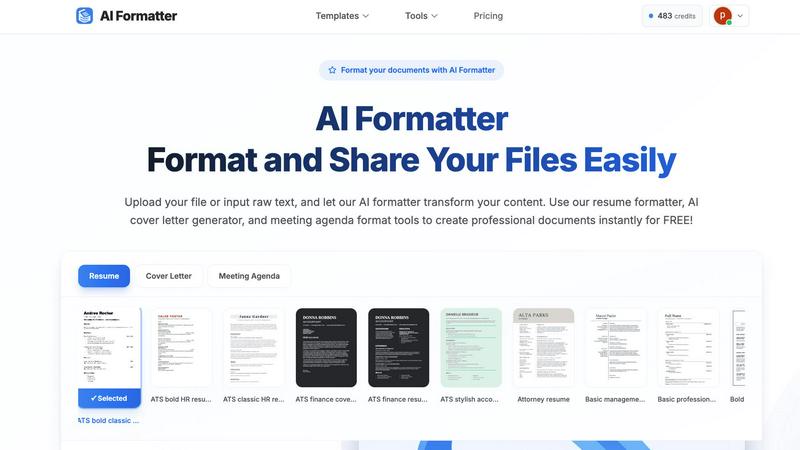
AI Formatter transforms your raw text into professional documents instantly using customizable templates.
Last updated: March 1, 2026

Zovo offers 20 privacy-first Chrome extensions for developers and writers, unlocking tools with one simple subscription.
Last updated: February 26, 2026
Visual Comparison
AI Formatter
Zovo

Feature Comparison
AI Formatter
AI-Powered Formatting Engine
The central feature of AI Formatter is its intelligent formatting engine. This technology analyzes the raw text or content from uploaded documents, understands its structure and context, and automatically applies appropriate styling, layout, and organization. It intelligently distinguishes between headings, body text, lists, and other elements, transforming a basic text file into a professionally structured document that adheres to standard formatting conventions, all without manual intervention.
Extensive Template Library
AI Formatter provides access to a vast library of over 100 professionally designed templates. This library covers essential document types such as resumes, cover letters, meeting agendas, and invoices. Each template is crafted to meet industry standards and is optimized for specific purposes, like ensuring resumes pass through Applicant Tracking Systems (ATS). This gives users a strong, visually appealing starting point tailored to their exact needs.
Real-Time Online Editor
After the AI formats the content into a selected template, users have full control through the integrated real-time online editor. This tool allows for complete customization, enabling users to adjust fonts, colors, spacing, and layout elements. You can tweak the AI-generated format, add or remove sections, and fine-tune the document until it meets your personal or organizational branding requirements, all within your web browser.
Multi-Format Export and Sharing
Once a document is finalized, AI Formatter offers flexible output options. Users can download their formatted documents in multiple common file formats, including Microsoft Word (.docx), PDF, and plain text (.txt). This ensures compatibility with any application or submission system. Additionally, the platform includes secure sharing capabilities, allowing users to generate shareable links for their documents, streamlining collaboration and distribution.
Zovo
BeLikeNative
BeLikeNative is a flagship extension that helps users improve their writing by providing instant rewrites in 80 different languages. This tool is designed for anyone looking to communicate more effectively in a foreign language or enhance their overall writing skills. With just one keystroke, users can transform their text to sound more natural, making it an essential tool for students, professionals, and anyone who values clear communication.
Tab Suspender Pro
Tab Suspender Pro is designed to optimize memory usage by automatically suspending inactive tabs. This feature is particularly beneficial for users who frequently multitask or work with numerous tabs open. By intelligently detecting which tabs are not in use, it frees up valuable system resources, helping to speed up your browser and enhance your overall browsing experience.
Clipboard History Pro
Clipboard History Pro ensures that users never lose track of copied text again. This feature allows for the storage of up to 10,000 clips, enabling instant searches and smart pasting of previously copied items. Ideal for writers, researchers, and anyone who regularly copies and pastes information, this tool significantly improves efficiency and accuracy when handling text.
JSON Formatter Pro
JSON Formatter Pro simplifies the process of working with JSON data by providing a user-friendly interface for formatting, validating, and exploring JSON files. It includes features for beautifying and minifying code, as well as tree exploration for easier navigation. This tool is particularly useful for developers and data analysts who need to handle JSON data regularly, offering a streamlined way to visualize and manipulate complex data structures.
Use Cases
AI Formatter
Job Application Preparation
Job seekers can use AI Formatter to quickly convert their work history and skills into a polished, ATS-optimized resume and a matching cover letter. By uploading an old resume or pasting raw text, the tool formats the content into a professional template designed to pass automated screenings and catch a recruiter's eye, significantly improving application quality and saving hours of manual formatting work.
Business Meeting Management
Professionals and team leaders can streamline their meeting preparation. By inputting rough notes or bullet points, AI Formatter's meeting agenda tool structures the information into a clear, formal agenda with sections for topics, objectives, time allocations, and action items. This creates a professional document that sets clear expectations and improves meeting efficiency.
Academic Paper Formatting
Students and researchers can utilize AI Formatter to ensure their essays, reports, and research papers meet strict formatting guidelines. Instead of manually adjusting margins, headings, citations, and references, they can input their content and let the AI apply a consistent and correct academic format, allowing them to concentrate on their research and writing.
Small Business Administration
Small business owners and freelancers can generate professional invoices and receipts effortlessly. By inputting client details, services rendered, amounts due, and payment terms, the AI invoice generator creates a clean, branded invoice document. This presents a professional image to clients and helps maintain organized financial records without needing complex accounting software.
Zovo
Enhancing Language Skills
BeLikeNative can be used by language learners who want to practice writing in a new language. By providing instant rewrites, it helps users learn how to construct sentences and use vocabulary more effectively, making it a valuable tool for students and professionals alike.
Memory Management During Browsing
Tab Suspender Pro is perfect for users who often have multiple tabs open while working on projects. By suspending inactive tabs, it helps conserve memory and keeps the browser running smoothly, allowing for a more organized and efficient workflow.
Efficient Text Management
Clipboard History Pro is ideal for professionals and students who frequently copy and paste information. Whether compiling research notes or drafting documents, this tool ensures users can easily retrieve and manage their clipboard history, significantly enhancing productivity.
Simplifying Data Handling
JSON Formatter Pro is essential for developers who work with APIs or data interchange formats. It enables them to format and validate JSON data quickly, making it easier to debug and understand complex data structures, thus streamlining their development process.
Overview
About AI Formatter
AI Formatter is a cloud-based software tool designed to simplify and accelerate the process of creating professional documents. At its core, it is an intelligent formatting assistant that uses artificial intelligence to transform unformatted text or uploaded files into polished, ready-to-use documents. The fundamental value of AI Formatter lies in its ability to save significant time and effort, automating a task that is often tedious and complex. It is built for a wide range of users, including job seekers needing ATS-friendly resumes, professionals preparing business reports or meeting agendas, academics formatting papers, and small businesses creating invoices. By providing a straightforward platform where users can upload content, select a professional template, and receive a perfectly formatted document in seconds, AI Formatter removes the technical barriers of document design. This allows individuals and organizations to focus on their content's substance rather than its style, ensuring their documents always make a strong, positive impression.
About Zovo
Zovo is an innovative suite of 20 Chrome extensions designed to enhance the productivity and efficiency of users while browsing the internet. Created by a solo developer with over a decade of experience and a robust track record of $400K earned on Upwork, Zovo stands out for its commitment to user privacy and community engagement. The flagship extension, BeLikeNative, empowers more than 3,300 users to write like native speakers in 80 languages with just one keystroke. The entire suite includes various tools such as Tab Suspender Pro, JSON Formatter Pro, and Clipboard History Pro, among others. Zovo prioritizes user feedback, allowing members to vote on features and shape the roadmap, ensuring that each extension meets real-world needs. With no data harvesting, no investors, and a strong focus on user-driven development, Zovo represents a refreshing approach to browser extensions that put users first.
Frequently Asked Questions
AI Formatter FAQ
What file formats can I upload to AI Formatter?
AI Formatter supports a variety of common document formats for upload. You can directly upload files in PDF, Microsoft Word (.doc and .docx), and plain text (.txt) formats. The platform is designed to extract and process the text content from these files to be reformatted according to your chosen template.
How does AI Formatter help with ATS (Applicant Tracking Systems)?
AI Formatter templates are specifically designed to be ATS-optimized. This means they use clean, simple layouts, standard fonts, and proper heading structures that automated resume screening software can easily read and parse. By formatting your resume with one of these templates, you significantly increase the chances that your resume's content will be correctly interpreted and ranked by an ATS.
Is my document content secure and private?
Yes, AI Formatter is a cloud-based SaaS tool developed with security in mind. The platform processes your documents securely. You maintain ownership of your content, and it is not shared with third parties. The secure sharing feature also allows you to control access when you generate shareable links for your formatted documents.
Can I customize the document after the AI formats it?
Absolutely. The AI provides a perfectly formatted first draft based on your content and selected template. You then have full access to a real-time online editor where you can make any adjustments you need. This includes changing text, fonts, colors, spacing, and layout, giving you complete control over the final appearance of your document.
Zovo FAQ
What kind of data does Zovo collect?
Zovo is committed to privacy and does not collect any user data. All data processed by the extensions remains on the user's device, ensuring complete confidentiality and security.
How often are new extensions released?
New extensions are typically released every month. Members receive early access to these tools, usually one to two weeks before they are available to the public.
Can I request features for Zovo extensions?
Yes, users are encouraged to submit feature requests directly. The developer reviews all requests, and the most requested features are prioritized in the development roadmap.
How can I contact support if I have issues?
Users can reach out directly to the developer via email or Discord for any questions or problems. There are no automated bots or ticket queues, ensuring a personal touch in customer support.
Alternatives
AI Formatter Alternatives
AI Formatter is a productivity tool that uses artificial intelligence to automatically format raw text and documents. It falls into the category of document creation and formatting software, helping users quickly produce professional resumes, cover letters, and business documents from basic inputs. Users often explore alternatives to find a solution that better fits their specific needs. Common reasons include budget constraints, the desire for different features like more template variety or integration with other platforms, or a preference for a different user interface. Some may seek tools with a stronger focus on collaborative editing or offline functionality. When evaluating other options, consider the core capabilities that matter most to your workflow. Key factors include the quality and breadth of templates, the level of customization available, the supported file formats for import and export, and the overall ease of use. Security features for handling sensitive documents and the transparency of pricing models are also important practical considerations.
Zovo Alternatives
Zovo is a suite of 20 privacy-focused Chrome extensions designed specifically for developers and writers. With tools like JSON Formatter, Tab Suspender, and Clipboard History, Zovo enhances productivity while prioritizing user privacy and data security. Users often seek alternatives to Zovo for various reasons, including pricing, feature sets, or compatibility with different platforms. It is essential to consider factors such as usability, the range of features, and the commitment to user privacy when evaluating alternatives to ensure that you find a solution that meets your specific needs. When searching for an alternative, it's crucial to identify what functionalities are most important to you. A good alternative should offer a similar level of privacy, a variety of tools, and a user-friendly experience. Additionally, consider whether the alternative has a community-driven approach to feature development, as this can enhance the overall user experience and provide tools that genuinely meet your needs.