
Square Face Generator
Create square avatars, pixel PFPs, and chibi icons online for free with instant PNG export and no signup needed.
VisitPublished on:
April 22, 2026
Category:
About Square Face Generator
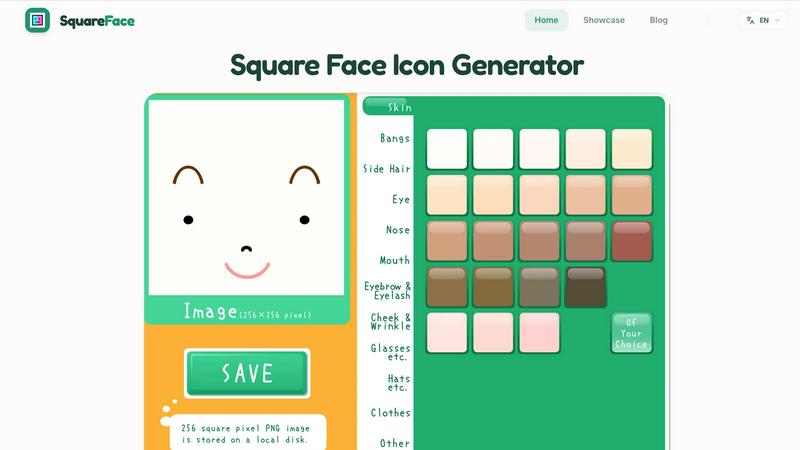
Square Face Generator is a free, browser-based avatar creation tool designed to help you build distinctive square-style profile pictures in seconds. At its core, this tool solves a simple problem: creating a clean, readable avatar that works across multiple platforms without needing to install software, create an account, or navigate complex editing suites. The generator lets you choose from several distinct styles, including classic square faces, retro 8-bit pixel art, chibi anime characters, 3D cube-inspired avatars, pixel PFPs, round style icons, and even pixel cats. Each style is fully customizable, allowing you to adjust facial features, colors, and details until the avatar matches your personal brand or online identity. The tool is built for speed and accessibility. It works entirely in your browser on both desktop and mobile devices, supports multiple languages, and requires no signup or login. When you finish creating, you can export a clean 512x512 PNG file instantly. This makes Square Face Generator ideal for Discord users, Twitch streamers, X (formerly Twitter) creators, forum members, gamers, and anyone who wants a playful, nostalgic, or consistent online presence. The tool positions itself as a modern, practical alternative to platforms like Picrew, offering a faster, more focused workflow without sacrificing creative control. Whether you need one avatar or a matching set for multiple profiles, this generator gives you a foundational starting point that you can refine further on specialized pages for square PFPs, round crops, or small icons.
Features of Square Face Generator
Multiple Icon Styles
Choose from a growing library of visual styles that go beyond basic square faces. You can create pixel portraits for a retro gaming look, chibi anime icons for a cute aesthetic, retro 8-bit faces for nostalgia, or 3D cube-inspired avatars for a modern twist. Each style comes with its own set of adjustable parameters, so you can fine-tune the appearance without starting from scratch. This variety ensures that the tool serves different communities, from Discord gamers to professional creators.
Browser-Based Editing with No Signup
The entire generator runs directly in your web browser, meaning there is nothing to download, install, or configure. You can open the tool on any device with an internet connection, including smartphones and tablets, and start editing immediately. There is no account creation, email verification, or payment required. This removes friction from the creative process, letting you go from idea to finished avatar in under a minute. The tool also supports multiple languages, making it accessible to a global audience.
Clean 512x512 PNG Export
When your avatar is complete, you can export it as a 512x512 pixel PNG file. This resolution is ideal for profile pictures on Discord, X, Twitch, YouTube, and most forums because it provides enough detail to look sharp on high-resolution screens while remaining small enough for fast uploads. The PNG format preserves transparency and color accuracy, ensuring your avatar looks the same across different platforms. You can download the file once and reuse it anywhere without needing to resize or re-export.
Consistent Style for Matching Profile Sets
Because the generator uses a unified design system, you can easily create multiple avatars that share a consistent visual theme. This is especially useful for creators who want matching profile pictures for their social media accounts, gaming profiles, and community forums. You can adjust colors, facial features, and style elements across different avatars while keeping the same underlying square format. This consistency helps build brand recognition and makes your online identity instantly recognizable.
Use Cases of Square Face Generator
Discord Profile Pictures
Discord users need avatars that remain readable at small sizes in server lists and profile slots. Square Face Generator creates clean, centered faces that work perfectly in Discord's circular crop. You can export a 512x512 PNG and upload it directly to Discord without any additional editing. The tool's pixel and chibi styles are especially popular for gaming communities, while the classic square style works well for professional or mixed-use servers. You can also create matching avatars for friends or server members to build a cohesive community identity.
Twitch and Streaming Avatars
Streamers on Twitch and other platforms often use square avatars as their primary profile image or as an overlay element. Square Face Generator lets you create a distinctive avatar that stands out in the crowded streaming landscape. The retro 8-bit and 3D cube styles are particularly effective for capturing viewer attention. You can customize colors to match your channel's branding, then export the PNG for use on your Twitch profile, channel panels, and social media links. The tool's speed means you can update your avatar between streams without downtime.
Creator Profiles on X and YouTube
Social media creators need avatars that convey personality while remaining professional. Square Face Generator provides a middle ground between generic icons and overly complex illustrations. You can create a face icon that represents your brand, using the chibi or pixel styles for a playful touch or the classic square style for a cleaner look. The consistent square format ensures your avatar looks good in both the circular crop used by X and the square format used by YouTube. Export once and reuse across all your creator profiles.
Gaming Forums and Communities
Many gaming forums and community platforms use square avatars as the default profile picture format. Square Face Generator gives you a fast way to create a unique avatar that reflects your gaming persona. You can choose a pixel PFP style to match retro games, a 3D cube style for modern titles, or a pixel cat style for a more whimsical identity. The tool's no-signup workflow means you can create a new avatar for each community or game without managing multiple accounts. This flexibility is ideal for active forum members who participate in several different communities.
Frequently Asked Questions
Is Square Face Generator really free to use?
Yes, Square Face Generator is completely free to use. There are no hidden costs, subscription fees, or premium features locked behind a paywall. You can access all styles, customization options, and the PNG export without paying anything. The tool does not require you to create an account or provide any personal information. This makes it accessible to anyone with an internet connection, regardless of budget.
Do I need to download any software to use this tool?
No, you do not need to download or install any software. Square Face Generator runs entirely in your web browser. This means it works on any device with a modern browser, including Windows, Mac, Linux, Chromebooks, tablets, and smartphones. You simply visit the website, click the preview to start creating, and begin editing immediately. There is no setup process, no plugins, and no system requirements beyond a stable internet connection.
What file format does the exported avatar use?
The tool exports your avatar as a 512x512 pixel PNG file. PNG is a widely supported image format that preserves transparency and color information without compression artifacts. This resolution is specifically chosen because it works well for profile pictures on most social media platforms, including Discord, X, Twitch, YouTube, and gaming forums. You can upload the file directly without needing to resize or convert it.
Can I use the avatars I create for commercial purposes?
Yes, you can use the avatars you create with Square Face Generator for any personal or commercial purpose. This includes using them as your profile picture on social media, as part of your brand identity, in streaming overlays, or in any other context. There are no licensing restrictions on the images you generate. However, you should not claim that the tool itself or its underlying design system is your own creation. The output belongs to you, but the tool remains the property of its developers.