
FanPage vs The Ultimate Piano
Side-by-side comparison to help you choose the right product.

FanPage
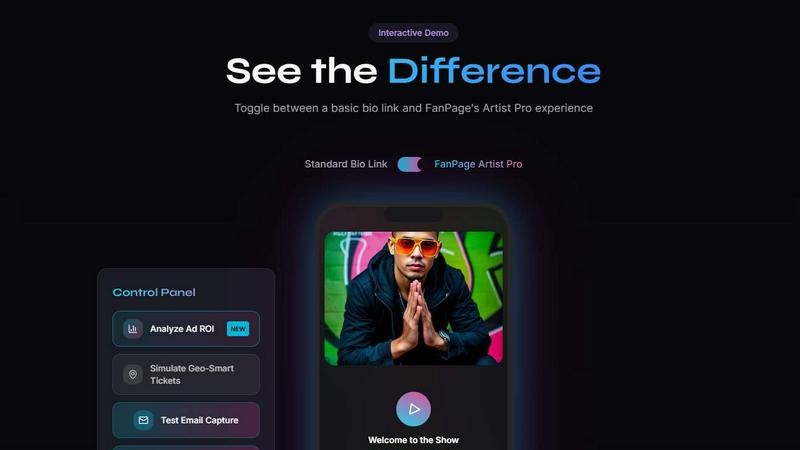
FanPage is a link-in-bio platform that helps musicians track growth, sell products, and manage tour RSVPs seamlessly.
Last updated: February 26, 2026

The Ultimate Piano
Learn piano online with realistic sound, interactive lessons, and instant feedback.
Last updated: March 4, 2026
Visual Comparison
FanPage
The Ultimate Piano

Feature Comparison
FanPage
Smart Deep Linking
Smart Deep Linking automatically directs users to their preferred music apps such as Spotify, Apple Music, or YouTube instead of redirecting them to a web browser. This seamless integration enhances user experience, encouraging fans to listen to music without unnecessary delays.
Geo-Fenced Tour Dates
This feature allows artists to display tour dates tailored to the location of their fans. By automatically showing the nearest show and including a "buy tickets" button, artists can increase attendance and engagement at their live events.
Social Unlocks
Social Unlocks enable artists to exchange exclusive content for social media follows, subscriptions, or email signups. This strategic approach helps musicians grow their fanbase organically while offering value to their audience.
Playlist Tracker
The Playlist Tracker feature provides real-time monitoring of Spotify playlist follower growth. It visually represents this data through beautiful charts, allowing artists to track their music's performance and make informed marketing decisions.
The Ultimate Piano
Browser-Based Piano with Realistic Sound
Play a high-quality, responsive piano directly in your web browser. There is nothing to install. You can use your mouse, computer keyboard, or connect a physical MIDI keyboard for a more authentic playing experience. The tool uses beautiful, realistic piano samples to ensure every note you play sounds authentic and inspiring, providing a solid foundation for effective practice.
Interactive Learning Modes for Scales and Chords
Move beyond random practice with structured, interactive learning modes. Select from 14 different scale types or any chord, and The Ultimate Piano will instantly visualize it across the keyboard, lighting up the correct keys. The Scale Trainer provides detailed performance analysis, helping you practice correctly and build muscle memory for essential musical patterns from the ground up.
Real-Time Chord Detection and Music Theory Display
Understand the harmony of your playing as it happens. As you play notes on the keyboard, The Ultimate Piano analyzes them in real time and displays the name of the chord you are creating. Simultaneously, you can see the notes you play displayed on a traditional sheet music staff. This immediate feedback bridges the gap between playing by ear and understanding written music theory.
Integrated Audio, YouTube, and MIDI Practice Tools
Practice in a musical context by playing along with your own material. Load any MP3 audio file or paste a YouTube URL to practice along with tutorials or songs. You can slow down playback, set loop points, and save markers. Additionally, you can load MIDI files to watch falling notes on the keyboard, perfect for learning complex pieces section by section at your own pace.
Use Cases
FanPage
Promoting New Music Releases
Artists can use FanPage to create a centralized hub for their latest music releases. By utilizing Smart Deep Linking, fans can instantly access new songs on their preferred platforms, enhancing the likelihood of streams and shares.
Managing Tour Promotions
Musicians can list their upcoming tour dates on FanPage, utilizing geo-fenced features to ensure fans are aware of shows in their area. This targeted promotion can lead to increased ticket sales and fan engagement.
Selling Digital Products
With the integrated Marketplace, artists can sell digital products such as music downloads, merchandise, or educational courses directly on their profile. This feature allows musicians to monetize their skills and connect with fans in new ways.
Building a Community
FanPage offers tools for building paid communities where fans can interact with artists and each other. By creating exclusive content and experiences, musicians can foster a loyal fanbase that supports their work.
The Ultimate Piano
Beginner Pianist Building Foundational Skills
A new student can use the platform to learn the layout of the keyboard, understand basic note names, and start playing simple melodies. The interactive scale and chord trainers provide guided practice for essential techniques, while the Kids Mode with animal icons makes initial learning engaging and fun for younger users, establishing a strong and enjoyable foundation.
Music Student Studying Theory and Ear Training
A student enrolled in music classes can use the chord explorer and real-time detection to visualize and understand harmonic progressions from their lessons. The ear training module allows them to systematically practice identifying intervals and chords by ear, strengthening the crucial connection between what they hear and what they understand theoretically.
Hobbyist Musician Learning Songs by Ear
An enthusiast wanting to learn their favorite songs can load the audio file or a YouTube video of the song into the platform. By slowing down the playback and using the loop function, they can work on difficult passages note-by-note. The real-time chord detection helps them figure out the song's harmony, enabling them to play along accurately and build their repertoire.
Teacher Providing Interactive Visual Lessons
A piano teacher can use The Ultimate Piano during online or in-person lessons to demonstrate concepts visually. They can instantly show scales, chords, and their relationships on the keyboard for a student. The falling notes from a MIDI file can help a student follow along with a piece, making abstract instructions concrete and accelerating the learning process.
Overview
About FanPage
FanPage is an innovative link-in-bio tool designed specifically for musicians, transforming how artists connect with their fans. Unlike traditional bio links that offer a one-size-fits-all approach, FanPage leverages intelligent automation to create a personalized experience for each visitor. This platform allows artists to showcase their music, tour dates, and merchandise, all in one beautifully designed link page. With features such as Smart Deep Linking, geo-fenced tour dates, and precise server-side tracking, artists can effectively measure their marketing efforts and understand their return on investment (ROI). Additionally, the integrated Marketplace provides musicians the opportunity to sell digital products, create courses, and build paid communities without incurring transaction fees on Pro plans. FanPage is not just a tool; it is a comprehensive growth engine for musicians looking to deepen engagement, boost sales, and cultivate a loyal fanbase.
About The Ultimate Piano
The Ultimate Piano is a foundational, browser-based piano practice platform designed to make learning and improving at the piano accessible to everyone. It operates entirely within your web browser, eliminating the need for complex software downloads or installations. This tool is built for pianists and music learners at all stages, from absolute beginners taking their first steps to experienced musicians looking to refine their skills and theory knowledge. Its core value proposition is providing a complete, interactive practice studio that you can access instantly from any device with an internet connection. By connecting a MIDI keyboard or simply using your computer keyboard, you gain access to a suite of educational tools that visualize music theory in real-time. The Ultimate Piano focuses on the essential elements of musical growth: understanding what you play with chord detection, building technique with scale trainers, developing critical listening skills with ear training, and applying your skills in context by playing along with your own music or tutorials. It transforms abstract concepts into visual, interactive lessons, offering a back-to-basics, effective path to mastering the piano.
Frequently Asked Questions
FanPage FAQ
What is FanPage?
FanPage is a link-in-bio tool specifically designed for musicians to connect with fans, promote music, manage tours, and sell digital products, all while providing personalized user experiences.
How does Smart Deep Linking work?
Smart Deep Linking automatically opens music apps like Spotify or Apple Music instead of a web browser, providing a faster and more seamless listening experience for fans.
Can I sell products on FanPage?
Yes, FanPage includes an integrated Marketplace where artists can list and sell digital products, courses, and create paid communities directly on their profiles without transaction fees on Pro plans.
How does FanPage help track my marketing performance?
FanPage utilizes server-side tracking (CAPI) to provide accurate ad attribution and insights into playlist growth, allowing artists to calculate their true ROI from marketing efforts.
The Ultimate Piano FAQ
Do I need to install anything to use Ultimate Piano?
No, The Ultimate Piano requires no installation whatsoever. It is a fully web-based application that runs directly in your internet browser (like Chrome, Safari, or Firefox). You can start practicing immediately by visiting the website, making it incredibly accessible and convenient for instant practice sessions anywhere.
Can I connect my MIDI keyboard to Ultimate Piano?
Yes, you can connect a USB MIDI keyboard directly to your computer. The Ultimate Piano will automatically detect it, allowing you to play the virtual piano with your physical keyboard for a realistic and responsive practice experience. The platform also supports connecting a sustain pedal via MIDI for more expressive playing.
What chords and scales can I learn with Ultimate Piano?
The platform offers a comprehensive chord explorer and a scale trainer featuring 14 different scale types, including major, minor, pentatonic, blues, and modal scales. You can select any root note and see the scale or chord visualized across the keyboard, hear it played, and use the trainer to practice it with performance feedback.
Can I practice along with my own songs or YouTube videos?
Absolutely. The Ultimate Piano includes a built-in audio player for MP3 files and a dedicated YouTube player. You can upload your own audio files or paste any YouTube video link directly into the tool. You can then slow down the playback, set A-B loop points to repeat sections, and practice along at a comfortable tempo.
Alternatives
FanPage Alternatives
FanPage is the ultimate link-in-bio platform designed specifically for musicians. It serves as a comprehensive tool for artists to track playlist growth, manage their tour RSVPs, and sell digital products all in one user-friendly interface. By utilizing intelligent automation, FanPage personalizes the experience for each visitor, setting it apart from traditional link-in-bio solutions. Users often seek alternatives to FanPage for various reasons, including pricing, feature sets, or specific platform needs. As artists evaluate other options, it’s crucial to consider factors such as ease of use, the ability to track engagement metrics, customization capabilities, and transaction fees associated with digital sales. A well-rounded alternative should cater to the unique requirements of musicians while offering competitive features and pricing.
The Ultimate Piano Alternatives
The Ultimate Piano is a browser-based tool in the Audio & Music and Education & Learning categories. It allows pianists to practice online with interactive features like chord detection, scale training, and MIDI support, all without needing to install software. Users often explore alternatives for various practical reasons. These can include budget considerations, as some may seek a completely free option or a different pricing model. Others might need specific features not available here, prefer a downloadable application over a web tool, or require compatibility with a different operating system or device. When evaluating other options, focus on your core learning goals. Consider the essential tools you need, such as MIDI keyboard support, the quality of sound samples, and the depth of music theory instruction. Also, assess the user interface for clarity and whether the platform's teaching approach aligns with a fundamental, back-to-basics learning style.