HarvestMyData vs SocialCal
Side-by-side comparison to help you choose the right product.

HarvestMyData
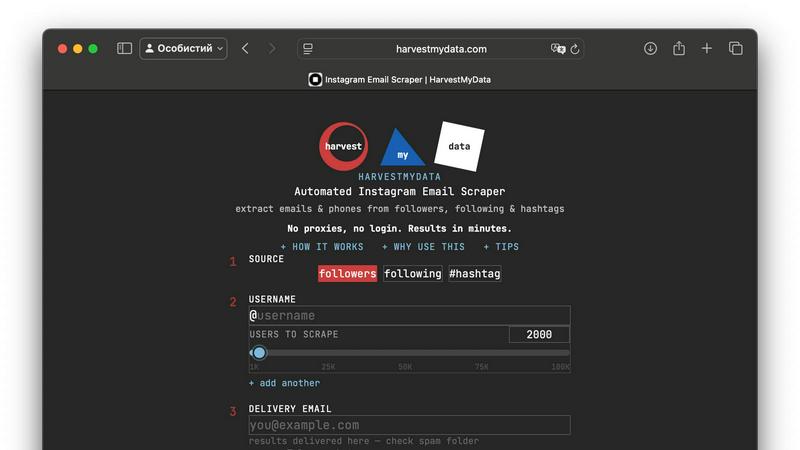
HarvestMyData quickly extracts Instagram followers' emails and business info without proxies or logins, delivering.
Last updated: February 26, 2026

SocialCal
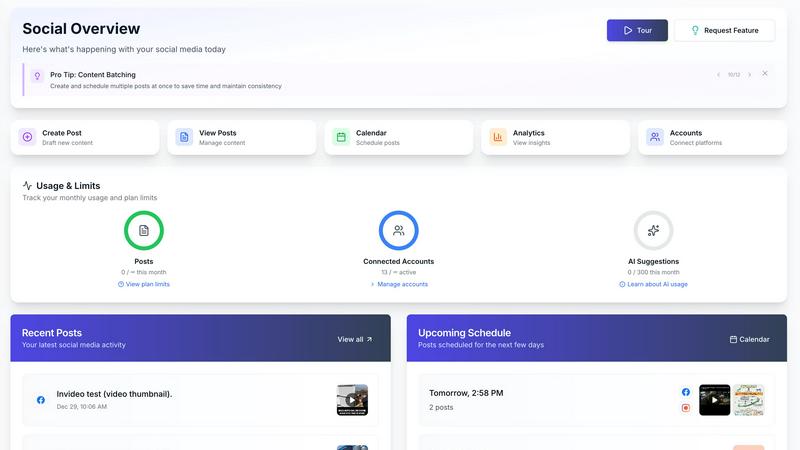
SocialCal schedules and publishes your content to ten platforms with one click.
Last updated: February 28, 2026
Visual Comparison
HarvestMyData
SocialCal
Feature Comparison
HarvestMyData
10% Average Email Discovery Rate
HarvestMyData boasts an impressive average email discovery rate of 10%, which can increase to 30% for business accounts. This feature ensures that users can access a significant number of potential leads, making their outreach efforts more effective.
Zero Technical Setup Required
One of the standout features of HarvestMyData is its simplicity. Users do not need to worry about technical setups, such as proxies or Instagram logins. The platform is designed to be accessible for everyone, regardless of their technical expertise.
Lightning-Fast Processing
HarvestMyData delivers results quickly, with most scraping jobs completed in under five minutes. This speed allows users to gather and utilize data promptly, enhancing their marketing strategies and outreach efforts efficiently.
Batch Processing Capabilities
The tool supports batch processing, allowing users to scrape up to seven accounts simultaneously. This feature is especially beneficial for businesses or individuals looking to scale their lead generation efforts without sacrificing time or quality.
SocialCal
Multi-Platform Publishing
SocialCal allows you to publish content to ten different social media platforms with a single click. This includes major networks like Instagram, X (Twitter), LinkedIn, TikTok, YouTube, and newer platforms like Threads and Bluesky. This feature eliminates the repetitive task of logging into each platform individually, copying content, and manually posting. It streamlines your workflow, ensuring your message reaches your entire audience across all channels simultaneously, saving you hours of work each week.
Drag & Drop Visual Calendar
The platform features an intuitive visual calendar that uses a drag-and-drop interface for scheduling. This allows you to plan your content strategy visually over days, weeks, or months. You can easily move posts around to optimize your publishing timeline, see your content mix at a glance, and ensure a consistent posting schedule. This visual approach to planning makes content management straightforward and helps maintain a balanced and strategic presence across all your connected accounts.
AI-Powered Caption Writer
SocialCal includes an AI caption writer tool to help you overcome creative blocks and save time. You can generate engaging captions in multiple tones and styles tailored to your brand voice. This feature assists in crafting compelling text for your posts, ensuring your content is not only visually scheduled but also contextually strong. It is a valuable tool for maintaining a consistent and engaging narrative across all your social media updates.
Unified Analytics Dashboard
Track and measure the performance of your content across all connected platforms from one centralized analytics dashboard. This feature provides clear insights into key metrics like engagement, reach, and audience growth. By consolidating data from ten different platforms, it gives you a holistic view of your social media strategy's effectiveness, allowing you to make informed decisions and refine your content based on what resonates best with your audience.
Use Cases
HarvestMyData
Cold Email Campaigns
Marketers can leverage HarvestMyData to build targeted email lists for cold email outreach. By extracting emails from relevant Instagram accounts, they can reach potential customers more effectively and increase conversion rates.
Influencer Outreach
For brands looking to collaborate with influencers, HarvestMyData provides a quick way to gather contact information. Users can scrape relevant accounts to find influencers who align with their brand values and marketing goals.
Competitor Analysis
Businesses can use HarvestMyData to analyze their competitors' followers and engagement. By understanding who is following competitors, companies can identify potential customers and refine their marketing strategies accordingly.
Market Research
HarvestMyData is a valuable tool for conducting market research. By extracting data from various accounts within a specific niche, users can gain insights into trends, audience preferences, and competitor strategies.
SocialCal
For Solopreneurs and Content Creators
Individual creators and solopreneurs can manage their entire personal brand across multiple platforms without being overwhelmed. SocialCal allows them to batch-create content, schedule it efficiently using the visual calendar, and maintain a consistent online presence. This frees up over 15 hours a week, which can be redirected towards content creation, community engagement, or other business tasks, all while growing their audience effectively.
For Small Marketing Teams and Agencies
Small teams and digital agencies can manage multiple client accounts from a single SocialCal dashboard. The platform streamlines client management by allowing teams to organize, schedule, and preview content for different brands in one place. This centralized approach improves collaboration, ensures timely posting for all clients, and provides consolidated analytics reports to demonstrate campaign value and ROI efficiently.
For Businesses Managing Product Launches
Businesses planning a coordinated product or campaign launch across social media can use SocialCal to schedule all related content in advance. The multi-platform publishing ensures announcements go live simultaneously everywhere. The visual grid planner helps preview the Instagram feed aesthetic, and the first-comment feature keeps captions clean by auto-posting hashtags in comments, creating a professional and synchronized launch strategy.
For Repurposing Long-Form Content
Creators and marketers can efficiently repurpose long-form content, like a YouTube video or blog post, into multiple social media snippets. SocialCal allows you to schedule the main video on YouTube, create teaser clips for TikTok and Instagram Reels, post key quotes on X (Twitter) and LinkedIn, and share images on Pinterest, all from one dashboard. This maximizes the reach and lifespan of your core content.
Overview
About HarvestMyData
HarvestMyData is an innovative tool designed to automate the process of collecting leads from public Instagram accounts. It simplifies the lead generation process for businesses, marketers, and influencers by scraping followers and following lists to extract valuable information such as emails, bios, business contacts, and Linktree URLs. With HarvestMyData, users can save time and resources that would otherwise be spent on manual data collection. Whether you are looking to enhance your cold email campaigns, conduct competitor analysis, or build targeted email lists for your niche, this tool provides a fast, efficient, and user-friendly solution. With its straightforward pay-per-job pricing and ability to handle large volumes of data, HarvestMyData makes it easy for anyone to access crucial contact information without any technical hurdles.
About SocialCal
SocialCal is a comprehensive social media management platform designed to simplify and centralize the workflow for content creators, marketers, and businesses. It addresses the fundamental challenge of managing multiple social media accounts by unifying content creation, scheduling, and analytics into a single, powerful dashboard. The platform supports posting across ten major platforms, including Facebook, Instagram, Threads, TikTok, YouTube, LinkedIn, Pinterest, Telegram, Bluesky, and X (Twitter). Its primary value proposition is efficiency. By eliminating the need to juggle multiple apps and logins, SocialCal saves users significant time, up to 15 hours or more per week. This allows them to focus on creating quality content and engaging with their audience. Built with a back-to-basics, user-friendly approach, it is specifically designed for solopreneurs, creators, and small teams who need powerful functionality without the complexity or high cost of enterprise-grade software. SocialCal provides the essential tools for scheduling, organizing, and repurposing content, all built for simplicity, speed, and tangible results.
Frequently Asked Questions
HarvestMyData FAQ
How does HarvestMyData work?
HarvestMyData functions by allowing users to input a public Instagram username or hashtag to scrape followers, following lists, or posts. It then extracts relevant data and delivers it in a structured CSV file.
Is there a limit to how many accounts I can scrape?
Users can scrape up to 100,000 followers per job. Additionally, HarvestMyData supports batch processing, enabling users to scrape multiple accounts at once, streamlining the data collection process.
Do I need an Instagram account to use HarvestMyData?
No, users do not need an Instagram account or any proxies to utilize HarvestMyData. The tool operates independently, allowing anyone to extract data from public Instagram accounts without additional setup.
What kind of data can I expect to receive?
When you use HarvestMyData, you can expect a CSV file containing usernames, full names, public emails, follower counts, bios, categories, and more. This comprehensive data set enables effective lead generation and analysis.
SocialCal FAQ
Which social media platforms does SocialCal support?
SocialCal supports posting and scheduling to ten major platforms: X (Twitter), Instagram, Facebook, LinkedIn, YouTube, TikTok, Threads, Bluesky, Pinterest, and Telegram. This covers feeds, stories, reels, videos, pins, and threads, providing wide coverage for your social media strategy.
How does SocialCal save me time?
SocialCal saves time by centralizing all your social media tasks. Instead of logging into ten different apps, you create content once in the dashboard and publish it everywhere with one click. Features like bulk scheduling, the drag-and-drop calendar, and AI caption writing automate and streamline planning and publishing, potentially saving users 15 or more hours every week.
Is SocialCal suitable for managing multiple clients?
Yes, SocialCal is built to handle multiple clients efficiently. The platform includes client profile management, allowing you to separate and organize content, schedules, and analytics for different brands or clients all from one master account. This makes it an ideal and affordable tool for freelancers, consultants, and small agencies.
Can I preview my posts before they go live?
Absolutely. SocialCal offers a preview function that lets you see exactly how your post will appear on each platform before it is published. This includes a specialized Visual Grid Planner for Instagram, which shows how individual posts will look together in your feed, allowing for perfect aesthetic planning.
Alternatives
HarvestMyData Alternatives
HarvestMyData is a data extraction tool designed for marketing professionals and businesses seeking to enhance their lead generation efforts. It specializes in scraping public Instagram accounts to collect valuable information such as email addresses, bios, and business contacts. Users often seek alternatives due to various reasons, including pricing concerns, specific feature requirements, or the need for compatibility with different platforms and data sources. When choosing an alternative, it is essential to consider factors such as ease of use, data accuracy, speed of processing, and whether the service meets your specific marketing needs.
SocialCal Alternatives
SocialCal is a social media management tool that helps you schedule and publish content to multiple platforms from one central dashboard. It belongs to the category of software designed to save time and streamline the workflow for anyone active on social media. People often look for different tools for various reasons. Your budget, the specific social media platforms you use, or the need for certain advanced features can all lead you to explore other options. It's a normal part of finding the right tool for your unique needs and goals. When evaluating any social media scheduler, consider a few key points. Look at the platforms it supports to ensure it works where your audience is. Check the pricing to see if it fits your budget. Finally, assess the core features like scheduling, analytics, and content creation aids to see if they match your workflow.