Seedance 2 AI Video Generator vs X11.social
Side-by-side comparison to help you choose the right product.

Seedance 2 AI Video Generator
Seedance 2.0 turns your text, images, or clips into professional cinematic videos quickly and easily.
Last updated: March 1, 2026

X11.social
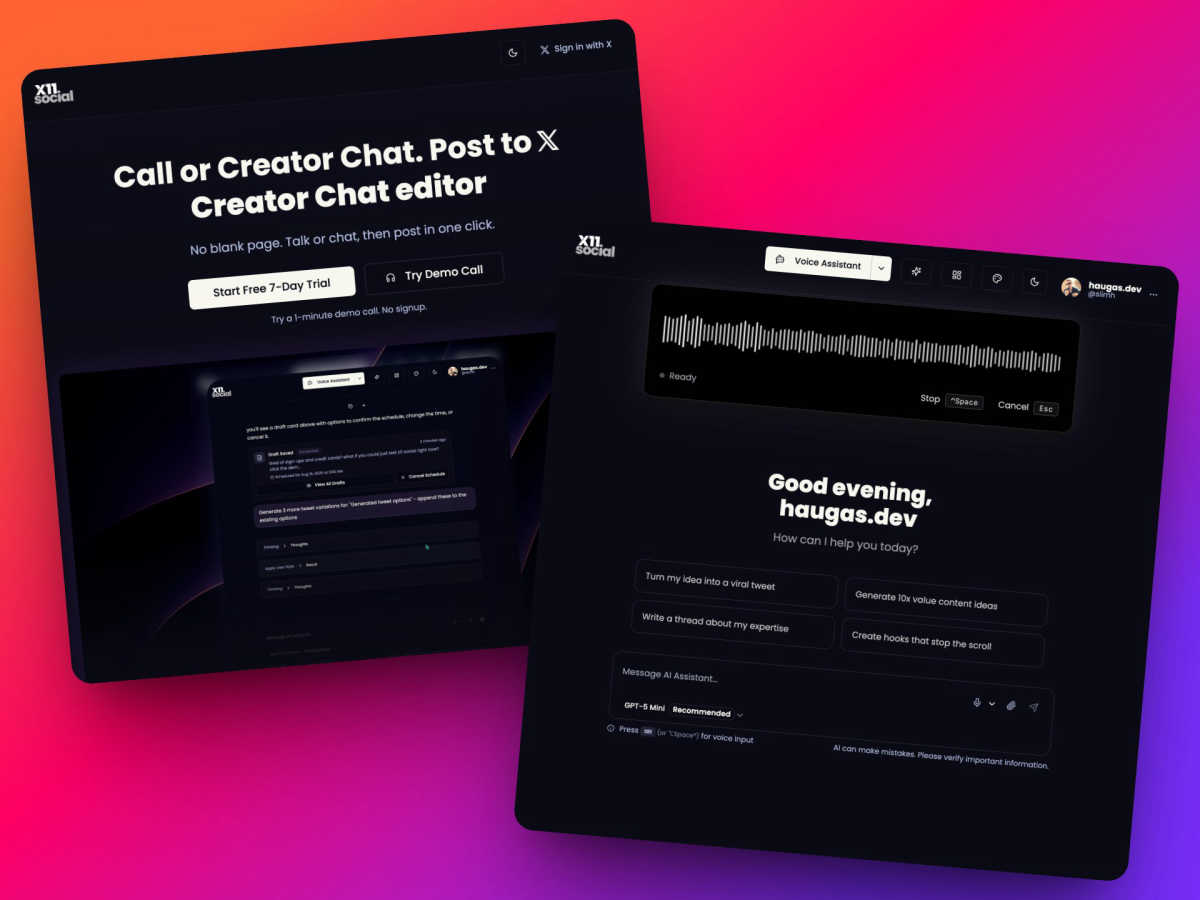
X11.social helps you grow your X account by creating quality posts using just your voice or a simple chat.
Last updated: March 1, 2026
Visual Comparison
Seedance 2 AI Video Generator

X11.social
Feature Comparison
Seedance 2 AI Video Generator
Multimodal Input Flexibility
Seedance 2.0 offers three distinct generation modes to suit different creative starting points. You can begin with a text prompt to create a video from a concept, use an image to animate and extend a specific visual style, or upload existing footage to restyle and modify it. This flexibility ensures that whether you have a clear idea, a visual reference, or raw material, the tool can accommodate your workflow and help bring your vision to life efficiently.
Reference-First Generation for Consistency
A standout feature is the reference-first workflow, which significantly reduces guesswork. By uploading a reference image or video, you anchor the AI's output to specific visual elements like character appearance, art style, color palette, and camera angles. This leads to much higher consistency across generated frames compared to relying on text prompts alone, making it ideal for projects requiring stable characters or a cohesive look throughout a scene.
Integrated Audio-Video Synthesis
The tool goes beyond silent clips by offering joint audio and video generation in a single pass. This includes the ability to generate synchronized sound effects, background music, and voiceovers. Notably, it supports accurate lip-sync for over ten languages, allowing for the creation of talking-head videos or narrated content that feels polished and professionally assembled without needing separate audio editing software.
High-Quality Output Specifications
Seedance 2.0 is built for professional use, supporting video outputs of up to 1080p resolution at a cinema-standard 24 frames per second for smooth motion. It offers versatile aspect ratios including 16:9, 9:16, and 1:1, optimized for everything from widescreen displays to social media stories. Videos are generated in the universal MP4 (H.264) format, ensuring compatibility with all major platforms and editing suites right from export.
X11.social
Call to Tweet
This is the cornerstone feature of X11.social. Users can simply dial a dedicated phone number from any device and speak their thoughts aloud. The AI system listens, transcribes the conversation, and intelligently refines the raw speech into coherent, polished posts ready for X. It captures the natural flow of ideas, making content creation possible during commutes, walks, or any situation where typing is impractical. The AI learns your speaking style to ensure the final posts sound authentically like you.
Creator Chat Editor
For users who prefer typing, the platform offers a familiar, chat-like text interface. This editor simplifies the drafting process, mimicking the ease of sending a text message. It is enhanced with smart action buttons that appear contextually, allowing for immediate tasks like publishing, scheduling, adjusting the tone of a post, or attaching media. This feature streamlines the workflow from idea to published content in a seamless, intuitive environment.
Context-Aware Browser Extension
The free Chrome extension acts as an AI assistant on any webpage. By pressing a hotkey (like Alt+Space), users can activate a chat terminal or voice assistant directly over the content they are viewing, whether it's a YouTube video, article, or tweet. The AI understands the context of the page and can summarize it, extract key points, and instantly transform that information into draft posts or threads, eliminating the need for copy-pasting or switching tabs.
Virality Analytics
This proactive feature helps users improve their content before it goes live. The analytics system evaluates draft posts to predict their potential performance. It can identify elements that might cause a post to "flop" and provides suggestions for fixes. This allows creators to refine hooks, adjust messaging, and optimize their content for better engagement based on data-driven insights, turning guesswork into a more strategic publishing process.
Use Cases
Seedance 2 AI Video Generator
Social Media Content Creation
Creators and influencers can rapidly produce engaging, platform-specific video content for Instagram Reels, TikTok, or YouTube Shorts. By quickly iterating on text prompts or animating still images, they can maintain a consistent posting schedule with high-quality, eye-catching clips that resonate with their audience, all without a full production crew or extensive editing time.
Marketing and Advertising Campaigns
Marketing teams and agencies can use Seedance 2.0 to prototype and produce ad creatives at speed. The ability to generate multiple versions of a product demo or promotional clip allows for efficient A/B testing. The reference-first workflow ensures brand assets and mascots remain visually consistent across different ad variations, streamlining the campaign development process.
Concept Visualization and Storyboarding
Filmmakers, writers, and designers can bring their ideas to life visually during the pre-production phase. By inputting descriptive text or concept art, they can generate short, cinematic clips that help visualize scenes, characters, or moods. This is invaluable for pitching ideas, creating dynamic storyboards, and aligning creative vision before committing to expensive live-action shoots.
Educational and Explainer Video Production
Educators and corporate trainers can create clear, engaging explainer videos. The integrated audio generation and lip-sync capabilities are particularly useful for creating narrated content or animated presentations. Complex topics can be broken down into short, visually compelling videos that enhance learning and retention for viewers.
X11.social
For the Commuting Professional
Individuals who spend time driving or using public transport can safely capture their business insights, industry commentary, or professional updates. By using the Call to Tweet feature, they can dictate posts hands-free. The AI transcribes and polishes these thoughts, allowing them to publish consistent, valuable content to build their professional brand on X without ever needing to type during their commute.
For the Content Creator and Influencer
Creators who need to maintain a high volume of consistent, engaging posts can use X11.social to streamline their workflow. They can use the daily braindump calls to capture a week's worth of ideas in one session or employ the browser extension to instantly turn interesting videos and articles into viral threads. This system helps overcome creative blocks and ensures a steady pipeline of content.
For the Idea Generator During Activities
People who get their best ideas during physical activities like exercising, walking the dog, or cooking can immediately capture those fleeting thoughts. Instead of trying to remember an idea until later, they can call in or use voice commands via the mobile browser to log their insight. This ensures that spontaneous creativity is never lost and can be developed into content.
For the Strategic Scheduler
Users who want to maintain a consistent posting schedule but have irregular working hours can leverage the smart scheduling and auto-schedule features. They can batch-create content through calls or the chat editor and instruct the AI to schedule posts for optimal times. The AI can even prompt users if they forget to create content, helping build and maintain a reliable posting habit.
Overview
About Seedance 2 AI Video Generator
Seedance 2 AI Video Generator is a comprehensive software tool designed to transform creative ideas into polished, cinematic videos through artificial intelligence. At its core, it simplifies the complex process of video production by allowing users to generate content from three primary inputs: written text descriptions, reference images, or existing source footage. This all-in-one platform is engineered for speed and efficiency, enabling a fast workflow that bypasses the need for heavy, traditional editing software and technical expertise. The main value proposition of Seedance 2.0 lies in its emphasis on control and consistency. Unlike tools that rely solely on unpredictable text prompts, Seedance 2.0 utilizes reference-driven generation to anchor the style, characters, and visual feel of the output, resulting in more reliable and coherent videos. It is built specifically for creators, marketers, and agencies who require high-quality video output at scale for purposes like advertising, social media content, and product demonstrations without incurring significant production time or overhead. By combining multiple generation modes with features like integrated audio synthesis and multilingual lip-sync, it provides a production-ready solution for turning concepts into finished clips swiftly.
About X11.social
X11.social is a content creation platform built on a simple, foundational principle: great ideas should never be lost. It addresses the core problem faced by individuals, creators, and professionals who use X (formerly Twitter): the friction of capturing thoughts when they occur. The traditional process of stopping an activity, opening an app, and typing out a post is often inconvenient, leading to forgotten insights and missed opportunities for engagement. X11.social removes this barrier by turning spontaneous conversation into polished, ready-to-publish content. It is designed for busy people who think of content while driving, exercising, or during other hands-off activities. The platform's primary value proposition is enabling consistent, high-quality posting that maintains your authentic voice, without the traditional time investment or hassle. By leveraging intuitive input methods like phone calls and chat interfaces, it transforms the fleeting moment of inspiration into a tangible social media asset, helping users grow their presence through more frequent and authentic communication.
Frequently Asked Questions
Seedance 2 AI Video Generator FAQ
What are the main input methods for Seedance 2.0?
Seedance 2.0 provides three primary input methods: Text-to-Video, Image-to-Video, and Video-to-Video. You can start generation by typing a descriptive text prompt, uploading a reference image to animate, or providing source footage to restyle or extend. This multimodal approach offers maximum flexibility depending on your available assets and creative goals.
How does Seedance 2.0 ensure character and style consistency?
The platform uses a reference-first generation model. When you provide a reference image or video clip, the AI uses it as a visual anchor. This guides the output to maintain consistent details like a character's appearance, clothing, art style, and color scheme throughout the generated video, leading to more coherent and reliable results than text prompts alone can guarantee.
What video quality and format does it output?
Seedance 2.0 can generate videos at a maximum resolution of 1080p (Full HD) with a frame rate of up to 24fps for smooth, cinematic playback. It supports common aspect ratios like 16:9, 9:16, and 1:1. All videos are exported in the widely compatible MP4 format using the H.264 codec, ready for use on social media, websites, or in professional editing software.
Does Seedance 2.0 include audio generation?
Yes, it features integrated audio-video synthesis. This means it can generate synchronized audio elements alongside the video in a single process. This includes sound effects, background music, and voiceovers with accurate lip-sync support for over ten languages, allowing you to create fully realized video clips without needing separate audio production tools.
X11.social FAQ
How does the Call to Tweet feature work?
You call a dedicated local phone number provided by X11.social. As you speak about your ideas, the AI listens and transcribes your conversation in real-time. After the call, the AI processes the transcription, breaking it down into coherent points, refining the language, and formatting it into draft posts that sound like you. These drafts are then sent to you for review and easy publishing directly to your X account.
Is there a free way to try X11.social?
Yes, there are two main ways to try it for free. First, you can experience a 5-minute demo call without any signup or credit card required. Second, all paid plans include a full 7-day free trial. Additionally, the context-aware browser extension is completely free to install and use, allowing you to test the core AI assistant functionality on any webpage.
What is the difference between the Creator Chat and the Browser Extension?
The Creator Chat is the primary web-based editor within your X11.social dashboard, ideal for drafting and managing posts in a dedicated workspace. The Browser Extension is a tool for content capture and creation outside the dashboard. It allows you to generate posts from any online content (like videos or articles) directly from that page, making it perfect for spontaneous idea capture while browsing the web.
Can I schedule posts in advance with X11.social?
Absolutely. Smart scheduling is a core feature included in all plans. Within the Creator Chat editor or via voice command, you can instruct the AI to schedule your polished posts for specific dates and times in the future. This allows for strategic content planning and consistent audience engagement without requiring you to be online at the moment of posting.
Alternatives
Seedance 2 AI Video Generator Alternatives
Seedance 2 AI Video Generator is a tool in the AI video creation category. It allows users to transform text descriptions, images, and existing video clips into cinematic-style videos. The platform emphasizes a fast, all-in-one workflow with features for maintaining visual consistency and providing easy control over the output. Users often explore alternatives for various practical reasons. These can include budget constraints, as pricing models differ widely between services. Others may seek specific features not offered, require integration with different platforms, or need a user interface that better matches their skill level and creative process. When evaluating other options, consider your primary needs. Look at the core capability to generate video from your preferred inputs, like text or images. Assess the quality and style of the output, the speed of generation, and the overall ease of use. Also, review the cost structure and any limitations on usage to find a tool that aligns with your project scale and frequency.
X11.social Alternatives
X11.social is a content creation tool designed to help users grow their presence on X (formerly Twitter). It belongs to the category of social media management and content automation platforms. Its primary goal is to turn spontaneous ideas into polished posts with minimal effort. Users often explore alternatives for various reasons. These can include budget constraints, a need for different features, or a requirement to manage multiple social platforms beyond just X. The specific needs of a business or creator will heavily influence the best tool for them. When evaluating an alternative, consider your core needs. Key factors include the primary social platforms you use, your preferred content creation method (voice, text, or visual), your budget, and the level of automation and scheduling you require. The right tool should fit seamlessly into your existing workflow.