HeyVid vs Refbox
Side-by-side comparison to help you choose the right product.

HeyVid is your all-in-one AI tool for effortlessly generating high-quality videos and images from text and images in minutes.
Last updated: April 4, 2026

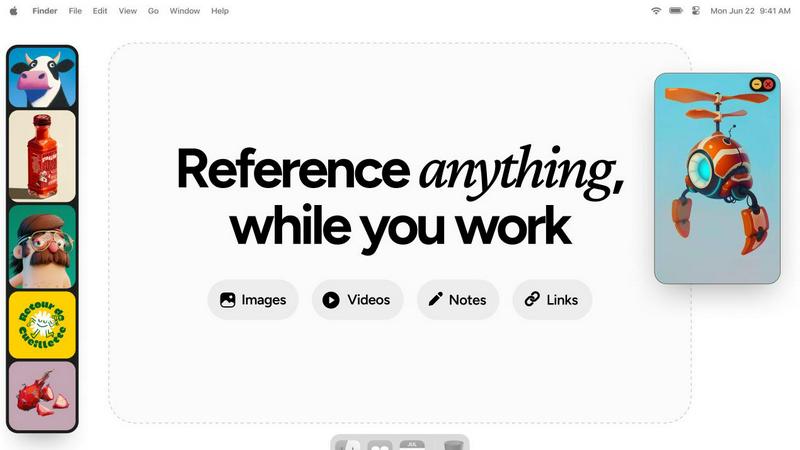
Refbox is a floating app that keeps your reference images and notes visible above any workspace.
Last updated: February 28, 2026
Visual Comparison
HeyVid

Refbox
Feature Comparison
HeyVid
Text to Video
This feature allows users to convert written content into engaging videos. Simply input your text, and HeyVid transforms it into a dynamic visual presentation, complete with animations and voiceovers, making it ideal for content creators and marketers who want to enhance their messaging.
Image to Video
With the Image to Video feature, users can animate their still images effortlessly. This tool takes static images and brings them to life through various transitions and effects, which is perfect for social media campaigns or promotional materials.
AI Image Refiner & Stylizer
The AI Image Refiner & Stylizer feature enables users to enhance and stylize their images easily. By applying advanced algorithms, HeyVid can refine images, improving quality and adding artistic touches that make visuals more appealing for any project.
AI Music Generation
HeyVid also includes an AI Music Generation tool, allowing users to create custom soundtracks for their videos. This feature ensures that every piece of content is complemented by unique music, enhancing the overall viewing experience and helping to convey the desired mood.
Refbox
Always-on-Top Floating Frames
This is the foundational feature of Refbox. It allows you to pin any image, GIF, or video reference into a resizable frame that stays visible above all other application windows. This eliminates the need for disruptive window switching, keeping your reference material directly in your line of sight as you work in your primary creative software, preserving your focus and workflow continuity.
Centralized Reference Library (The Box)
All your media is gathered into a central, organized sidebar called the Box. You can import references by dragging files from your computer, pasting image links or screenshots from the web, or using the clipboard. This creates a single source of truth for your project's inspiration, moving you away from scattered folders and browser tabs to a streamlined, searchable collection.
Multiple Viewing Modes
Refbox provides flexible ways to interact with your references. View your entire collection in a dense Masonry grid within the Box, float individual items as separate windows, or use a full-screen gallery mode ideal for secondary monitors. You can also flip through items like a slideshow for quick comparison, ensuring you have the right visual context at any moment.
Integrated Notes and Tools
Beyond images, Refbox lets you create markdown-enabled notes with styling and checklists, turning it into a full reference hub. Practical tools are built-in, including a color picker to sample colors from any media, GIF frame-by-frame playback, pixel-perfect rendering for pixel art, and the ability to crop images or take website screenshots directly by pasting a URL.
Use Cases
HeyVid
Marketing Campaigns
HeyVid can be used to create compelling marketing videos that capture the attention of potential customers. By utilizing the platform's various video generation tools, businesses can produce promotional content that stands out on social media and other channels.
Educational Content
Educators can leverage HeyVid to develop engaging tutorials and presentations. The platform's ease of use allows teachers to convert lesson plans into video format, making learning more interactive and accessible for students.
Product Launches
Businesses preparing for product launches can utilize HeyVid to create stunning visual announcements. The combination of video, images, and custom music ensures that the launch content is professional and captivating, helping to generate buzz and anticipation.
Social Media Content Creation
Content creators can maximize their social media presence by using HeyVid to produce short-form videos and eye-catching thumbnails. The platform's quick generation capabilities make it easy to keep content fresh and relevant across various social media platforms.
Refbox
Digital Illustration and Concept Art
Illustrators and concept artists can keep mood boards, anatomical references, color palettes, and style guides pinned around their canvas. This allows for constant visual comparison and inspiration without breaking concentration to search through files, enabling a more fluid and accurate creative process from sketch to final piece.
UI/UX and Graphic Design
Designers can float brand guidelines, logo variations, typography samples, and competitor website screenshots directly over their design tools like Figma or Adobe XD. This ensures every design decision is made with immediate reference to critical assets and specifications, boosting both speed and consistency in the design workflow.
3D Modeling and Animation
3D artists and animators can pin orthographic reference images, texture maps, character turnarounds, and motion study videos next to their 3D viewport. Having these crucial references always visible allows for more accurate modeling, sculpting, and animation, as artists can match proportions, poses, and movements without guesswork.
Motion Graphics and Video Editing
Editors and motion designers can keep storyboards, style frames, asset lists, and video clips accessible in floating windows above their timeline software. This facilitates quick visual checks and ensures the final product aligns perfectly with the planned creative direction, all while maintaining an efficient editing flow.
Overview
About HeyVid
HeyVid is an innovative AI-powered platform designed to simplify the process of video and image creation. It allows users to generate high-quality multimedia content quickly and effortlessly, catering to a wide range of needs from social media posts to educational materials. With an intuitive interface, HeyVid is suitable for everyone from beginners to seasoned professionals. The platform supports various functionalities like text-to-video, image-to-video, and image refinement, making it a versatile tool for marketers, content creators, educators, and businesses. The main value proposition lies in its ability to turn creative ideas into visually appealing content in just a few clicks, all while maintaining a professional standard that helps users stand out in a crowded digital space.
About Refbox
Refbox is a fundamental desktop application designed to solve a persistent problem in creative workflows: the disruptive act of window switching. At its core, Refbox is a floating reference manager that allows artists, designers, animators, and other visual professionals to keep their inspiration and resources visible at all times. It functions by letting users pin images, GIFs, videos, and notes into always-on-top frames that float above any other application. This foundational approach eliminates the need to constantly alt-tab between a creative software and a folder, browser, or note-taking app, thereby preserving a state of deep focus and flow.
The tool is built for professionals across disciplines like 3D art, animation, UI/UX design, illustration, concept art, motion graphics, photography, and pixel art. Its main value proposition is organized visual access without distraction. Users can gather media from the web, their computer, or clipboard into a central sidebar and then choose how to view it: in a Masonry grid, as individual floating windows on the desktop, or in a full-screen gallery for secondary monitors. By integrating markdown-enabled notes and clickable bookmarks directly into the reference ecosystem, Refbox consolidates the entire inspirational toolkit into one always-accessible space. It is the essential companion for any creative who needs their references at their fingertips, not buried in tabs and folders.
Frequently Asked Questions
HeyVid FAQ
What types of content can I create with HeyVid?
HeyVid allows you to create a variety of content including videos from text, images into videos, and refined images. You can also generate music to accompany your videos, making it a comprehensive tool for multimedia content creation.
Is HeyVid suitable for beginners?
Absolutely! HeyVid is designed with an intuitive interface that makes it easy for users of all skill levels to create professional-quality content. The platform provides step-by-step guidance, ensuring that even beginners can navigate and utilize its features effectively.
Can I customize the videos and images I create?
Yes, HeyVid offers extensive customization options. You can adjust elements such as aspect ratio, resolution, and add watermarks. This allows users to tailor their content to match their brand identity or personal style.
Is there a free version of HeyVid available?
While specific details about a free version were not provided, HeyVid offers various pricing plans, including promotional discounts. It is advisable to check their website for current deals and whether a trial or free version is available.
Refbox FAQ
What types of files does Refbox support?
Refbox supports a wide range of media essential for creative work. You can import standard image files (JPG, PNG, WebP, SVG), animated GIFs, and various video formats. It also supports text-based notes and can generate image screenshots directly from website URLs you paste into the application.
How does Refbox help maintain focus?
Refbox is built on the principle of reducing friction. By allowing references to float in always-on-top windows, it completely eliminates the disruptive cycle of minimizing your work to find a file or browser tab. Your inspiration stays visually accessible, which helps you maintain a state of deep focus, or flow, for much longer periods.
Can I use Refbox with multiple monitors?
Yes, Refbox is excellent for multi-monitor setups. You can use the full-screen gallery mode to turn a secondary monitor into a dedicated reference display. Alternatively, you can spread individual floating frames across multiple screens, organizing your workspace to keep your primary screen clear for your main creative application.
Is there a way to organize different projects?
Yes, Refbox uses a system called Collections. You can create different Collections for each project, client, or theme. Switching between these Collections is instant with a single click, allowing you to keep your references neatly separated and quickly access the exact set of visuals you need for your current task.
Alternatives
HeyVid Alternatives
HeyVid is an all-in-one AI video and image generator designed to help users create high-quality visual content quickly and effortlessly. It falls within the productivity and management category, catering to individuals and businesses looking to enhance their visual storytelling capabilities. Despite its robust features, users often seek alternatives for various reasons, including pricing structures, specific functionalities, or compatibility with their preferred platforms. When searching for alternatives to HeyVid, it is essential to consider factors such as ease of use, the quality of generated content, and the range of features offered. Additionally, assessing customer support, pricing plans, and the availability of trial versions can help ensure that the chosen solution meets your unique needs and expectations.
Refbox Alternatives
Refbox is a fundamental desktop application in the productivity and management category. It serves as a floating reference manager, designed to keep images, notes, and videos visible above other software to prevent disruptive window switching and maintain creative focus. Users may look for alternatives for foundational reasons like budget, specific feature needs, or compatibility with their operating system. Some may require a simpler tool, while others seek more advanced organizational capabilities not present in their current solution. When evaluating an alternative, consider the core need: persistent visual access to reference material. Key factors include the ability to keep content always on top, support for various file types, and organizational methods that fit your workflow without adding complexity or distraction.