BarBrain vs Refbox
Side-by-side comparison to help you choose the right product.

BarBrain
BarBrain is a digital inventory tool that cuts your bar and restaurant counting time in half with reliable accuracy.
Last updated: April 4, 2026

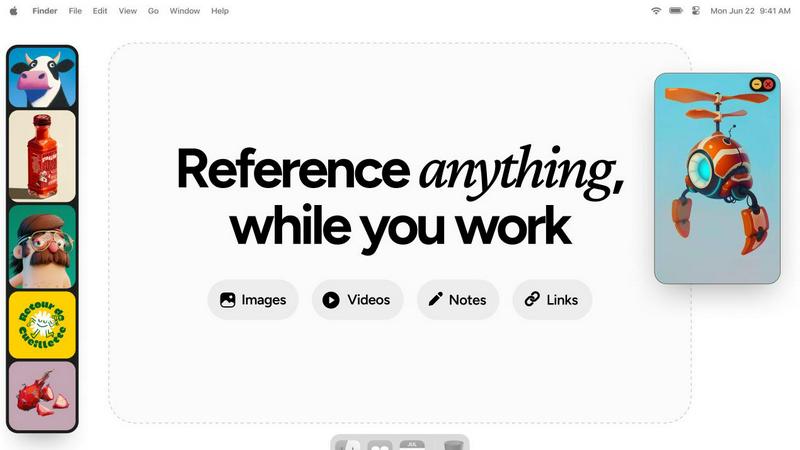
Refbox is a floating app that keeps your reference images and notes visible above any workspace.
Last updated: February 28, 2026
Visual Comparison
BarBrain

Refbox
Feature Comparison
BarBrain
Parallel Counting on Multiple Devices
This feature allows inventory counts to be conducted simultaneously across several iOS and Android smartphones or tablets. By enabling multiple staff members to count different sections of the venue at the same time, the entire inventory process is dramatically accelerated. This collaborative approach cuts down total counting time by more than half, saving significant labor costs and freeing up management for other critical tasks.
Extensive Pre-Loaded Product Catalog
BarBrain comes integrated with a massive catalog of over 30,000 hospitality-specific products. This includes spirits, wines, beers, food items, and even housekeeping supplies. This vast library eliminates the need to manually enter every single product from scratch during setup. The catalog ensures consistency and accuracy, and the BarBrain team offers assistance to help customize the product list for any specific operation.
Automatic Inventory Reporting
Immediately after a count is completed, BarBrain automatically generates a comprehensive, finalized inventory report. This eliminates the hours traditionally spent on post-count data entry, cross-referencing, and manual calculation in spreadsheets. Operators receive a clean, accurate summary of stock levels, values, and variances, providing instant insight into their inventory status without any additional administrative work.
Fill-Level Slider for Open Items
Specifically designed for hospitality, this feature allows for the accurate counting of partially used products, like open bottles of liquor or food containers, with a single tap. Instead of estimating or struggling with complex fractions, users simply adjust a visual slider on their device to indicate the remaining fill level. This granular tracking is essential for calculating precise pour costs and identifying portion control issues.
Refbox
Always-on-Top Floating Frames
This is the foundational feature of Refbox. It allows you to pin any image, GIF, or video reference into a resizable frame that stays visible above all other application windows. This eliminates the need for disruptive window switching, keeping your reference material directly in your line of sight as you work in your primary creative software, preserving your focus and workflow continuity.
Centralized Reference Library (The Box)
All your media is gathered into a central, organized sidebar called the Box. You can import references by dragging files from your computer, pasting image links or screenshots from the web, or using the clipboard. This creates a single source of truth for your project's inspiration, moving you away from scattered folders and browser tabs to a streamlined, searchable collection.
Multiple Viewing Modes
Refbox provides flexible ways to interact with your references. View your entire collection in a dense Masonry grid within the Box, float individual items as separate windows, or use a full-screen gallery mode ideal for secondary monitors. You can also flip through items like a slideshow for quick comparison, ensuring you have the right visual context at any moment.
Integrated Notes and Tools
Beyond images, Refbox lets you create markdown-enabled notes with styling and checklists, turning it into a full reference hub. Practical tools are built-in, including a color picker to sample colors from any media, GIF frame-by-frame playback, pixel-perfect rendering for pixel art, and the ability to crop images or take website screenshots directly by pasting a URL.
Use Cases
BarBrain
Independent Bars and Restaurants
For owner-operated establishments, BarBrain provides a professional and affordable system to gain control over inventory without complex training. It replaces error-prone spreadsheets and guesswork, giving solo entrepreneurs or small management teams the data they need to understand their exact cost of goods sold, minimize waste, and ultimately improve their bottom line with a tool built for their daily reality.
Multi-Location Restaurant Groups
BarBrain enables centralized, standardized inventory control across all venues within a group. Management can ensure consistent counting procedures and recipe costing from one location to the next. The platform provides a holistic, unified overview of stock levels, purchasing, and cost percentages across the entire business, facilitating better group-wide decision-making and supplier negotiations.
Hotels and Resorts
In the hotel environment, inventory needs extend beyond the kitchen and bar to include minibars, banquet supplies, and housekeeping items. BarBrain's extensive catalog and flexible structure allow it to manage a full range of Food & Beverage and operational inventory. It supports efficient counts across multiple revenue centers like different restaurants, bars, and event spaces within the same property.
High-Volume Nightclubs and Lounges
Venues with fast-paced service and high product turnover benefit greatly from BarBrain's speed and accuracy. The ability to conduct quick, parallel counts at the end of a busy night ensures timely reporting. Real-time tracking of high-value spirit bottles helps prevent shrinkage and provides clear insight into profitability per SKU, which is crucial in a volume-driven business.
Refbox
Digital Illustration and Concept Art
Illustrators and concept artists can keep mood boards, anatomical references, color palettes, and style guides pinned around their canvas. This allows for constant visual comparison and inspiration without breaking concentration to search through files, enabling a more fluid and accurate creative process from sketch to final piece.
UI/UX and Graphic Design
Designers can float brand guidelines, logo variations, typography samples, and competitor website screenshots directly over their design tools like Figma or Adobe XD. This ensures every design decision is made with immediate reference to critical assets and specifications, boosting both speed and consistency in the design workflow.
3D Modeling and Animation
3D artists and animators can pin orthographic reference images, texture maps, character turnarounds, and motion study videos next to their 3D viewport. Having these crucial references always visible allows for more accurate modeling, sculpting, and animation, as artists can match proportions, poses, and movements without guesswork.
Motion Graphics and Video Editing
Editors and motion designers can keep storyboards, style frames, asset lists, and video clips accessible in floating windows above their timeline software. This facilitates quick visual checks and ensures the final product aligns perfectly with the planned creative direction, all while maintaining an efficient editing flow.
Overview
About BarBrain
BarBrain is inventory management software built from the ground up for the unique demands of the hospitality industry. It addresses the fundamental pain points faced by bar and restaurant owners who struggle with time-consuming manual counts, inaccurate spreadsheets, and a lack of visibility into their true costs. Unlike generic warehouse software, BarBrain understands the core operations of food and beverage service, including partial bottles, recipe costing, and perishable goods. The platform is designed for simplicity and efficiency, enabling teams to conduct stocktakes in minutes instead of hours. Its primary value proposition is delivering reliable, actionable data to protect profit margins. By providing exact cost-per-drink and dish calculations, real-time waste and shrinkage alerts, and centralized supplier ordering, BarBrain gives operators the clarity they need to make smarter business decisions. It is suitable for a wide range of establishments, from single-location cocktail bars and restaurants to multi-site hotel groups and restaurant chains, all seeking to streamline operations and stop leaving money on the table.
About Refbox
Refbox is a fundamental desktop application designed to solve a persistent problem in creative workflows: the disruptive act of window switching. At its core, Refbox is a floating reference manager that allows artists, designers, animators, and other visual professionals to keep their inspiration and resources visible at all times. It functions by letting users pin images, GIFs, videos, and notes into always-on-top frames that float above any other application. This foundational approach eliminates the need to constantly alt-tab between a creative software and a folder, browser, or note-taking app, thereby preserving a state of deep focus and flow.
The tool is built for professionals across disciplines like 3D art, animation, UI/UX design, illustration, concept art, motion graphics, photography, and pixel art. Its main value proposition is organized visual access without distraction. Users can gather media from the web, their computer, or clipboard into a central sidebar and then choose how to view it: in a Masonry grid, as individual floating windows on the desktop, or in a full-screen gallery for secondary monitors. By integrating markdown-enabled notes and clickable bookmarks directly into the reference ecosystem, Refbox consolidates the entire inspirational toolkit into one always-accessible space. It is the essential companion for any creative who needs their references at their fingertips, not buried in tabs and folders.
Frequently Asked Questions
BarBrain FAQ
How does BarBrain save time during inventory?
BarBrain saves time through several key mechanisms. First, the parallel counting feature allows multiple staff to count simultaneously. Second, the pre-loaded product catalog speeds up the counting process as items are easily searchable. Most significantly, it completely eliminates post-count data processing by automatically generating the final report the moment the count is finished, saving hours of manual spreadsheet work.
Can BarBrain handle both food and beverage inventory?
Yes, absolutely. BarBrain is specifically designed for the full spectrum of hospitality inventory. Its catalog and functionality cover all beverage categories (spirits, wine, beer, non-alcoholic) and food items. The fill-level slider is particularly useful for tracking open food containers, while the system's core logic handles recipe costing for both kitchen dishes and bar cocktails.
Is my data secure with BarBrain?
BarBrain is built with data security as a priority. The company employs standard enterprise-grade security practices to protect customer information. Your inventory data, recipes, and cost figures are stored securely. You maintain full ownership and control of your operational data, which is used solely to provide you with the insights and reporting within the BarBrain platform.
What kind of support is offered during setup and use?
BarBrain offers comprehensive support to ensure a smooth start. This begins with a personalized demo to understand your needs. During account setup, you can choose to do it yourself or receive direct assistance from the BarBrain team. Ongoing support is available to answer questions and help you maximize the software's value for your specific operation.
Refbox FAQ
What types of files does Refbox support?
Refbox supports a wide range of media essential for creative work. You can import standard image files (JPG, PNG, WebP, SVG), animated GIFs, and various video formats. It also supports text-based notes and can generate image screenshots directly from website URLs you paste into the application.
How does Refbox help maintain focus?
Refbox is built on the principle of reducing friction. By allowing references to float in always-on-top windows, it completely eliminates the disruptive cycle of minimizing your work to find a file or browser tab. Your inspiration stays visually accessible, which helps you maintain a state of deep focus, or flow, for much longer periods.
Can I use Refbox with multiple monitors?
Yes, Refbox is excellent for multi-monitor setups. You can use the full-screen gallery mode to turn a secondary monitor into a dedicated reference display. Alternatively, you can spread individual floating frames across multiple screens, organizing your workspace to keep your primary screen clear for your main creative application.
Is there a way to organize different projects?
Yes, Refbox uses a system called Collections. You can create different Collections for each project, client, or theme. Switching between these Collections is instant with a single click, allowing you to keep your references neatly separated and quickly access the exact set of visuals you need for your current task.
Alternatives
BarBrain Alternatives
BarBrain is a specialized inventory management tool designed specifically for the hospitality industry. It falls into the category of productivity and management software, helping bars and restaurants count stock, calculate costs, and manage supplier orders efficiently. Users often explore alternatives for various practical reasons. These can include budget constraints, the need for different feature sets like integrated point-of-sale, or specific platform requirements such as mobile-only access. Every business has unique operational workflows and financial considerations. When evaluating other options, focus on core needs. Look for tools built for hospitality that understand pours and recipes, prioritize ease of use to minimize training time, and provide clear visibility into cost control and waste. The right solution should simplify your processes, not add complexity.
Refbox Alternatives
Refbox is a fundamental desktop application in the productivity and management category. It serves as a floating reference manager, designed to keep images, notes, and videos visible above other software to prevent disruptive window switching and maintain creative focus. Users may look for alternatives for foundational reasons like budget, specific feature needs, or compatibility with their operating system. Some may require a simpler tool, while others seek more advanced organizational capabilities not present in their current solution. When evaluating an alternative, consider the core need: persistent visual access to reference material. Key factors include the ability to keep content always on top, support for various file types, and organizational methods that fit your workflow without adding complexity or distraction.