PseudoRun vs The Ultimate Piano
Side-by-side comparison to help you choose the right product.

PseudoRun
Master IGCSE pseudocode with a free, ad-free editor for real-time practice and debugging.
Last updated: March 1, 2026

The Ultimate Piano
Learn piano online with realistic sound, interactive lessons, and instant feedback.
Last updated: March 4, 2026
Visual Comparison
PseudoRun
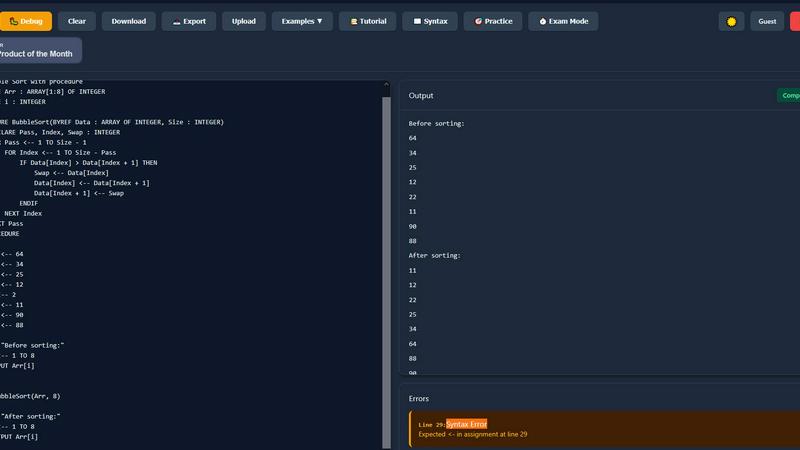
The Ultimate Piano

Feature Comparison
PseudoRun
IGCSE Exam-Focused Editor
The editor is built from the ground up to adhere strictly to the Cambridge IGCSE Computer Science pseudocode specifications. This ensures that every command, syntax rule, and structure you practice is exactly what will be expected in your exams. You learn the correct conventions from the start, eliminating confusion and building exam-ready confidence through consistent, specification-perfect practice.
Real-Time Syntax Validation
As you type your pseudocode, PseudoRun provides instant feedback by checking for syntax errors and logical mistakes. This immediate validation acts like a guiding tutor, helping you correct errors on the fly and understand the proper structure of IGCSE pseudocode. It transforms learning from a passive to an active process, reinforcing correct habits as you write.
Step-by-Step Debugger with Variable Tracking
Master complex algorithms by executing your code line-by-line. This powerful debugger allows you to observe the flow of execution and watch how variable values change at each step. This deep, visual understanding is crucial for grasping loops, conditionals, and procedures, turning abstract concepts into clear, traceable logic.
Comprehensive IGCSE Practice Library
Access over 50 curated examples and exercises that cover the entire IGCSE syllabus, including key topics like arrays, file handling, and procedures. This library provides structured practice from basic to advanced levels, allowing you to apply concepts in exam-style scenarios and solidify your understanding through hands-on problem-solving.
The Ultimate Piano
Browser-Based Piano with Realistic Sound
Play a high-quality, responsive piano directly in your web browser. There is nothing to install. You can use your mouse, computer keyboard, or connect a physical MIDI keyboard for a more authentic playing experience. The tool uses beautiful, realistic piano samples to ensure every note you play sounds authentic and inspiring, providing a solid foundation for effective practice.
Interactive Learning Modes for Scales and Chords
Move beyond random practice with structured, interactive learning modes. Select from 14 different scale types or any chord, and The Ultimate Piano will instantly visualize it across the keyboard, lighting up the correct keys. The Scale Trainer provides detailed performance analysis, helping you practice correctly and build muscle memory for essential musical patterns from the ground up.
Real-Time Chord Detection and Music Theory Display
Understand the harmony of your playing as it happens. As you play notes on the keyboard, The Ultimate Piano analyzes them in real time and displays the name of the chord you are creating. Simultaneously, you can see the notes you play displayed on a traditional sheet music staff. This immediate feedback bridges the gap between playing by ear and understanding written music theory.
Integrated Audio, YouTube, and MIDI Practice Tools
Practice in a musical context by playing along with your own material. Load any MP3 audio file or paste a YouTube URL to practice along with tutorials or songs. You can slow down playback, set loop points, and save markers. Additionally, you can load MIDI files to watch falling notes on the keyboard, perfect for learning complex pieces section by section at your own pace.
Use Cases
PseudoRun
Independent Exam Preparation for Students
IGCSE students can use PseudoRun for self-directed study and revision. The platform allows them to practice past paper questions, work through syllabus topics at their own pace, and utilize the exam timer to simulate real test conditions. This builds both competence and time-management skills crucial for exam success.
Classroom Teaching and Demonstrations
Educators can leverage PseudoRun as an interactive teaching tool during lessons. It is perfect for live-coding demonstrations, where teachers can write pseudocode on the fly, use the step-by-step debugger to explain algorithm flow, and instantly validate student suggestions, making abstract concepts tangible for the entire class.
Homework and Assignment Completion
Students can complete their Computer Science homework and programming assignments directly within PseudoRun. The real-time validation helps them catch errors before submission, while the cloud storage allows them to save their work and access it from any device, whether at school or at home.
Algorithm Design and Logic Practice
Beyond specific IGCSE questions, learners can use the platform to design and test their own algorithms. This encourages experimentation and deepens logical thinking skills. Beginners can practice fundamental constructs like loops and conditionals without the overhead of learning a full programming language's syntax.
The Ultimate Piano
Beginner Pianist Building Foundational Skills
A new student can use the platform to learn the layout of the keyboard, understand basic note names, and start playing simple melodies. The interactive scale and chord trainers provide guided practice for essential techniques, while the Kids Mode with animal icons makes initial learning engaging and fun for younger users, establishing a strong and enjoyable foundation.
Music Student Studying Theory and Ear Training
A student enrolled in music classes can use the chord explorer and real-time detection to visualize and understand harmonic progressions from their lessons. The ear training module allows them to systematically practice identifying intervals and chords by ear, strengthening the crucial connection between what they hear and what they understand theoretically.
Hobbyist Musician Learning Songs by Ear
An enthusiast wanting to learn their favorite songs can load the audio file or a YouTube video of the song into the platform. By slowing down the playback and using the loop function, they can work on difficult passages note-by-note. The real-time chord detection helps them figure out the song's harmony, enabling them to play along accurately and build their repertoire.
Teacher Providing Interactive Visual Lessons
A piano teacher can use The Ultimate Piano during online or in-person lessons to demonstrate concepts visually. They can instantly show scales, chords, and their relationships on the keyboard for a student. The falling notes from a MIDI file can help a student follow along with a piece, making abstract instructions concrete and accelerating the learning process.
Overview
About PseudoRun
PseudoRun is the premier free online platform dedicated to mastering pseudocode for the Cambridge IGCSE Computer Science curriculum. It is an interactive editor and simulator designed to bridge the gap between theoretical learning and practical application. The tool provides a distraction-free, user-friendly environment where students can write, execute, and debug pseudocode in real-time, perfectly aligned with IGCSE specifications and exam patterns. By removing the complexity of traditional programming languages, PseudoRun allows learners to focus purely on understanding fundamental algorithmic logic, control structures, and problem-solving techniques. It is specifically built for IGCSE students, educators, and beginners who need a reliable, accessible, and effective tool for exam preparation and concept mastery. With its commitment to being completely free, devoid of advertisements, and focused on student privacy, PseudoRun empowers users to practice confidently, receive instant feedback, and build the skills necessary to excel in their Computer Science examinations.
About The Ultimate Piano
The Ultimate Piano is a foundational, browser-based piano practice platform designed to make learning and improving at the piano accessible to everyone. It operates entirely within your web browser, eliminating the need for complex software downloads or installations. This tool is built for pianists and music learners at all stages, from absolute beginners taking their first steps to experienced musicians looking to refine their skills and theory knowledge. Its core value proposition is providing a complete, interactive practice studio that you can access instantly from any device with an internet connection. By connecting a MIDI keyboard or simply using your computer keyboard, you gain access to a suite of educational tools that visualize music theory in real-time. The Ultimate Piano focuses on the essential elements of musical growth: understanding what you play with chord detection, building technique with scale trainers, developing critical listening skills with ear training, and applying your skills in context by playing along with your own music or tutorials. It transforms abstract concepts into visual, interactive lessons, offering a back-to-basics, effective path to mastering the piano.
Frequently Asked Questions
PseudoRun FAQ
Is PseudoRun really free to use?
Yes, PseudoRun is completely free. The platform operates on a promise of zero advertisements and no hidden paywalls. All features, including the editor, debugger, cloud storage, and practice problems, are available at no cost to ensure every student has access to top-quality IGCSE preparation tools.
How does PseudoRun help with IGCSE exams?
PseudoRun is 100% aligned with the Cambridge IGCSE pseudocode specification. By practicing with it, you are learning the exact syntax and logic required for the exam. Features like the exam-mode timer and a vast library of IGCSE-style problems provide targeted practice that builds the specific skills and speed needed to perform well.
Do I need to create an account to start using it?
No, you can start using PseudoRun immediately without any login or registration. You can try the editor and all core features right away. Creating a free account is optional and is used primarily to save your pseudocode programs to the cloud for access across different devices.
Can I save and access my pseudocode programs later?
Absolutely. With a free account, you have access to unlimited cloud storage. This means you can save all your practice programs, homework, and projects on PseudoRun's servers and retrieve them from any computer or tablet with an internet connection, making your study materials always accessible.
The Ultimate Piano FAQ
Do I need to install anything to use Ultimate Piano?
No, The Ultimate Piano requires no installation whatsoever. It is a fully web-based application that runs directly in your internet browser (like Chrome, Safari, or Firefox). You can start practicing immediately by visiting the website, making it incredibly accessible and convenient for instant practice sessions anywhere.
Can I connect my MIDI keyboard to Ultimate Piano?
Yes, you can connect a USB MIDI keyboard directly to your computer. The Ultimate Piano will automatically detect it, allowing you to play the virtual piano with your physical keyboard for a realistic and responsive practice experience. The platform also supports connecting a sustain pedal via MIDI for more expressive playing.
What chords and scales can I learn with Ultimate Piano?
The platform offers a comprehensive chord explorer and a scale trainer featuring 14 different scale types, including major, minor, pentatonic, blues, and modal scales. You can select any root note and see the scale or chord visualized across the keyboard, hear it played, and use the trainer to practice it with performance feedback.
Can I practice along with my own songs or YouTube videos?
Absolutely. The Ultimate Piano includes a built-in audio player for MP3 files and a dedicated YouTube player. You can upload your own audio files or paste any YouTube video link directly into the tool. You can then slow down the playback, set A-B loop points to repeat sections, and practice along at a comfortable tempo.
Alternatives
PseudoRun Alternatives
PseudoRun is a free online platform in the education and learning category, specifically designed for mastering IGCSE pseudocode. It provides a real-time, interactive environment for writing and debugging algorithms, making it a foundational tool for students and educators following the Cambridge curriculum. Users may explore alternatives for various reasons. Some might seek different pricing models, such as one-time purchases or offline software. Others may require features beyond IGCSE focus, like support for other programming languages or more advanced project management tools. Platform compatibility, such as mobile app availability or integration with other educational software, is another common consideration. When evaluating other options, it is crucial to consider alignment with your specific learning goals. For IGCSE students, strict adherence to the official pseudocode specification is paramount. Other key factors include the quality of real-time feedback, the presence of a step-by-step debugging tool, and the overall user experience that supports a clear, back-to-basics approach to learning algorithmic thinking.
The Ultimate Piano Alternatives
The Ultimate Piano is a browser-based tool in the Audio & Music and Education & Learning categories. It allows pianists to practice online with interactive features like chord detection, scale training, and MIDI support, all without needing to install software. Users often explore alternatives for various practical reasons. These can include budget considerations, as some may seek a completely free option or a different pricing model. Others might need specific features not available here, prefer a downloadable application over a web tool, or require compatibility with a different operating system or device. When evaluating other options, focus on your core learning goals. Consider the essential tools you need, such as MIDI keyboard support, the quality of sound samples, and the depth of music theory instruction. Also, assess the user interface for clarity and whether the platform's teaching approach aligns with a fundamental, back-to-basics learning style.