DigitalMagicWand vs Pro Cursor Rules
Side-by-side comparison to help you choose the right product.

DigitalMagicWand
DigitalMagicWand is a suite of AI tools that creates and refines images, audio, video, and text with precision.
Last updated: March 18, 2026

Pro Cursor Rules
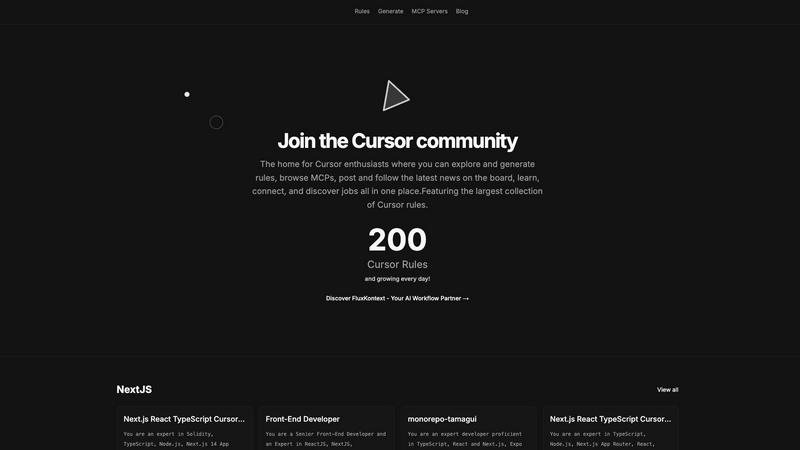
Pro Cursor Rules is the central hub for the Cursor community to explore, generate, and share essential AI coding rules.
Last updated: February 28, 2026
Visual Comparison
DigitalMagicWand

Pro Cursor Rules
Feature Comparison
DigitalMagicWand
AI Text Analysis and Humanization
This feature includes two powerful tools. The Accurate AI Detector provides a one-click analysis to determine if text is human or AI-generated, offering clear confidence scores for informed decision-making. Complementing this is the Undetectable AI Text Humanizer, which uses proprietary algorithms to rewrite AI-generated text. It eliminates statistical patterns that trigger detectors while preserving the original message, producing natural-sounding writing suitable for academic, professional, and creative contexts.
Advanced Audio Processing and Separation
DigitalMagicWand offers specialized tools for musicians and audio enthusiasts. Digital Ear™ Piano converts piano audio recordings into precise MIDI data, capturing the nuance of performance for easy editing and scoring. For audio isolation, UnMixIt™ Pro separates songs into studio-grade stems like vocals, drums, and bass for remixing and production. The standard UnMixIt™ tool simplifies creating karaoke tracks or isolating vocal tracks from any song quickly and without technical expertise.
Intelligent Image Generation and Editing
This suite allows for both creation and manipulation of images. Users can generate stunning images or scalable vector (.svg) art from simple text descriptions, receiving professional-quality visuals with accurate text rendering. The AI Image Editor acts as a powerful, instruction-based tool where users can type commands to perform complex edits like swapping backgrounds, removing objects, or restoring photos, making advanced photo editing accessible to all.
Precision Image Utility Tools
Focused on specific, common image tasks, these tools provide reliable, automated results. The Instant Background Removal tool uses smart algorithms to cleanly and accurately separate subjects from their backgrounds, producing professional cutouts. While an older app for replacing or removing objects is noted, the guidance is to use the more capable AI Image Editor for these comprehensive editing needs, ensuring users have the best tool for the job.
Pro Cursor Rules
The Largest Collection of Cursor Rules
This is the cornerstone feature of the platform. It provides a vast, searchable, and categorized library of pre-built Cursor rules contributed by the community. Users can browse rules by technology, such as Next.js, React, TypeScript, or Tailwind CSS, and instantly find expert-crafted prompts for specific roles like Senior Front-End Developer or for particular project setups like monorepos with Tamagui. This repository serves as an essential educational resource and a powerful starting point for any customization need.
Rule Generation Tool
Beyond browsing, the platform empowers users to create their own rules. The generation tools facilitate the process of building structured, effective prompts tailored to individual or team requirements. This feature guides users in defining clear roles, constraints, coding styles, and technology stacks for the AI, transforming vague ideas into precise, actionable Cursor rules that yield consistent and high-quality results during development sessions.
MCP Servers Directory
Pro Cursor Rules integrates access to MCP (Model Context Protocol) servers, a key component for extending Cursor's capabilities. This directory helps users discover and implement servers that connect the AI to external data sources, tools, and APIs. By providing this resource, the platform ensures users can not only instruct their AI but also expand its knowledge and functionality, covering a more complete spectrum of advanced Cursor customization and setup.
Community Hub & News Board
The platform is designed as a living community, not just a static database. It includes features for users to share their own rules, follow contributors, discuss best practices, and stay updated with the latest news and announcements through the community board. This social layer emphasizes connection and collective growth, allowing users to learn from peers, showcase their expertise, and keep pace with the evolving landscape of AI-assisted development.
Use Cases
DigitalMagicWand
Academic and Professional Writing Integrity
Educators, students, and professionals can use the AI Text Detector to verify the originality of essays, reports, and articles. Subsequently, the AI Humanizer tool allows content creators and marketers to refine AI-assisted drafts into natural, undetectable text, ensuring their work meets authenticity standards for publication, submission, or client delivery without the risk of being flagged by detection software.
Music Production and Practice
Musicians and producers can transcribe live piano performances into editable MIDI files with Digital Ear™ for composition and arrangement. DJs and remix artists can use UnMixIt™ Pro to isolate vocals and instrument stems from existing songs to create custom mashups, remixes, or practice tracks. Hobbyists can also easily create karaoke versions of songs for personal entertainment or performance.
Marketing and Content Creation
Marketing teams, bloggers, and social media managers can generate unique, high-quality images and vector logos directly from text descriptions, eliminating the need for stock photos or graphic designers for simple projects. The AI Image Editor allows for rapid creation of product mockups, background changes for ads, and professional photo edits, streamlining the content creation pipeline.
Personal Photo Management and Restoration
Individuals can use the platform to enhance personal photos. The background removal tool can quickly create clean cutouts for invitations or collages. The AI Image Editor can restore old family photos by removing scratches and damage, erase unwanted objects or photobombers from vacation pictures, and creatively alter images for fun or social media, all through simple text instructions.
Pro Cursor Rules
Accelerating Project Onboarding
A developer starting a new project with a specific stack, such as Next.js 14, TypeScript, and Supabase, can visit Pro Cursor Rules. Instead of spending hours crafting the perfect AI instructions, they can instantly find and apply a community-vetted rule tailored to that exact technology combination. This immediately aligns the Cursor AI with project best practices, coding conventions, and relevant libraries, dramatically reducing setup time and accelerating initial development.
Learning Best Practices Through Examples
A programmer new to a framework or concept, like React Three Fiber or OnchainKit, can use the platform as a learning tool. By exploring the rules built by experts for these technologies, they can deconstruct the prompts to understand what context, priorities, and patterns seasoned developers consider important. This provides practical, actionable insight into professional workflows and architectural decisions within that domain.
Standardizing Team Development
A development team lead can utilize Pro Cursor Rules to create and distribute a standardized rule for the entire team. By generating a consistent rule that enforces the company's coding style, preferred libraries (e.g., Zustand for state, Zod for validation), and review standards, they ensure uniform AI assistance across all developers. This promotes code consistency, reduces stylistic debates, and streamlines collaboration and code review processes.
Extending AI Capabilities with MCPs
A developer working on a niche or data-intensive project needs their AI assistant to access specialized information. They can use the MCP Servers directory on Pro Cursor Rules to find a server that connects Cursor to internal documentation, a specific database schema, or a unique API. This use case transforms the AI from a general-purpose coder into a domain-specific expert with relevant, real-time context for more accurate and informed assistance.
Overview
About DigitalMagicWand
DigitalMagicWand is a comprehensive online platform that provides a suite of specialized, AI-powered tools for processing and creating digital content. At its core, the platform is designed to simplify complex digital tasks, making advanced artificial intelligence technology accessible to everyone, regardless of their technical skill level. It serves as a centralized hub for transforming images, audio, video, and text through intuitive, purpose-built applications. The main value proposition of DigitalMagicWand lies in its ability to replace hours of manual, specialized work with fast, automated, and high-quality results. Whether you are a content creator needing to edit photos, a musician looking to transcribe audio, a writer ensuring the authenticity of text, or a marketer generating visual assets, DigitalMagicWand offers a reliable and powerful solution. It demystifies AI by applying it to practical, everyday creative and professional challenges, empowering users to enhance, transform, and generate content with confidence and ease.
About Pro Cursor Rules
Pro Cursor Rules is the foundational platform and central hub for the Cursor AI code editor community. At its core, it addresses a fundamental need for developers: effectively customizing and controlling the powerful AI assistant within Cursor. The platform is built for anyone who uses Cursor, from novices seeking to improve their workflow to experienced developers crafting complex, context-aware AI instructions. Its primary value proposition is simplifying the discovery, creation, and sharing of "Cursor rules"—the custom instructions and system prompts that define how the AI behaves for specific tasks, frameworks, or personal coding styles. By providing the largest organized collection of these rules, Pro Cursor Rules eliminates the guesswork and manual effort of building effective AI prompts from scratch. It fosters a community-centric environment where users can learn from shared expertise, connect with like-minded developers, and continuously enhance their tool. The platform extends beyond just rules, integrating resources like MCP (Model Context Protocol) servers and a community blog, making it a comprehensive, one-stop destination for mastering Cursor customization and unlocking greater productivity in software development.
Frequently Asked Questions
DigitalMagicWand FAQ
What types of files can I process with DigitalMagicWand?
DigitalMagicWand supports a wide range of common digital file formats. For images, you can upload standard formats like JPG and PNG. The audio tools work with popular files such as MP3 and WAV. The text tools process pasted text directly. Specific tools, like the vector art generator, output specialized formats like SVG. It is designed to work with the files most users already have.
Do I need any technical or design skills to use these tools?
No, advanced technical or design skills are not required. A fundamental principle of DigitalMagicWand is to make powerful AI tools accessible through simple, intuitive interfaces. For most apps, you simply upload your file or type a text description, and the AI handles the complex processing. The platform guides you through straightforward steps to achieve professional results.
How accurate is the AI Text Detector?
The AI Text Detector is built to provide accurate, reliable results. It analyzes text against known patterns of AI writing models like ChatGPT and Claude, delivering a clear confidence score for each check. This helps you understand the likelihood that content is AI-generated, supporting more informed decisions than manual guesswork. For the most critical assessments, it is one part of a broader evaluation process.
Can I use the generated images or audio for commercial projects?
Yes, content created using DigitalMagicWand's generation tools, such as images from text or vector art, is typically intended for your use, including commercial projects like marketing materials, website graphics, or product designs. It is always recommended to review the specific Terms of Service for each tool for detailed licensing information to ensure compliance with your intended use case.
Pro Cursor Rules FAQ
What exactly is a Cursor rule?
A Cursor rule is a set of custom instructions or a system prompt that configures how the Cursor AI editor's assistant behaves. It defines the AI's role (e.g., "Senior Front-End Developer"), its expertise areas (e.g., React, TypeScript), coding style preferences, and specific constraints to follow. Think of it as a detailed job description and style guide you give to your AI pair programmer to ensure it provides relevant, consistent, and high-quality suggestions tailored to your project's needs.
Is Pro Cursor Rules free to use?
Based on the available information from the website context, the core functionality of Pro Cursor Rules—browsing the extensive library of community rules, accessing the MCP server directory, and reading the community blog—appears to be freely accessible. Users can explore and utilize these vast resources without an indicated cost. Some advanced community features may require signing in.
How do I add my own rule to the collection?
The platform encourages community contribution. After signing in, you can use the "Generate" tools to formally create your rule. The process involves defining the rule's title, description, relevant technologies (tags), and the full prompt text. Once submitted, your rule becomes part of the public collection, allowing other developers to discover, use, and learn from your expertise, thereby contributing back to the community's shared knowledge base.
What are MCP Servers and why are they important?
MCP (Model Context Protocol) Servers are external services that provide additional context, data, or tools to the Cursor AI. While a rule tells the AI how to think and code, an MCP Server gives it what to think about—specific data. For example, a server could provide real-time API documentation, internal company schemas, or live database information. The directory on Pro Cursor Rules helps you find these servers, which is crucial for making the AI aware of your unique project context beyond public knowledge.
Alternatives
DigitalMagicWand Alternatives
DigitalMagicWand is an online platform that provides AI-powered tools for processing images, audio, video, and text. It belongs to the category of AI assistants, designed to help users enhance and create digital content through artificial intelligence. This all-in-one approach makes it a versatile solution for various creative and professional tasks. Users often explore alternatives for several practical reasons. These can include budget constraints, as pricing models vary widely. Others may seek a tool specialized in just one area, like image editing or text generation, rather than a full suite. Platform compatibility, such as needing a desktop application versus a web service, or different user interface preferences also drive the search for other options. When evaluating an alternative, focus on your core needs. Identify which type of media processing is most important for your projects. Consider your budget and whether a subscription or one-time purchase fits better. Also, assess the learning curve and the level of customer support offered, as these factors significantly impact long-term satisfaction and productivity.
Pro Cursor Rules Alternatives
Pro Cursor Rules is a dedicated platform in the AI assistant category, specifically for users of the Cursor code editor. It functions as a central hub where individuals can explore a large collection of rules, generate their own custom rules, and connect with a community of other enthusiasts. Its core purpose is to simplify and enhance the process of customizing Cursor. Users often explore alternatives for several fundamental reasons. These can include seeking different pricing models, such as free tiers or one-time purchases. Others may look for platforms with a specific feature focus, like more advanced rule management or integration with other developer tools. Platform compatibility, like needing a desktop application versus a web service, is another common consideration. When evaluating an alternative, focus on the essentials that match your needs. Consider the core functionality: does it allow you to effectively discover, create, and manage Cursor rules? Assess the strength and activity of its user community for support and shared knowledge. Finally, examine the overall value, weighing the features provided against the cost and your specific workflow requirements.