
ImaginePro vs Img Editor
Side-by-side comparison to help you choose the right product.

ImaginePro
ImaginePro transforms text into stunning, high-quality visuals instantly with advanced AI technology and effortless.
Last updated: March 1, 2026

Img Editor
Create breathtaking AI-generated images in seconds with Img Editor's powerful and intuitive technology.
Last updated: February 28, 2026
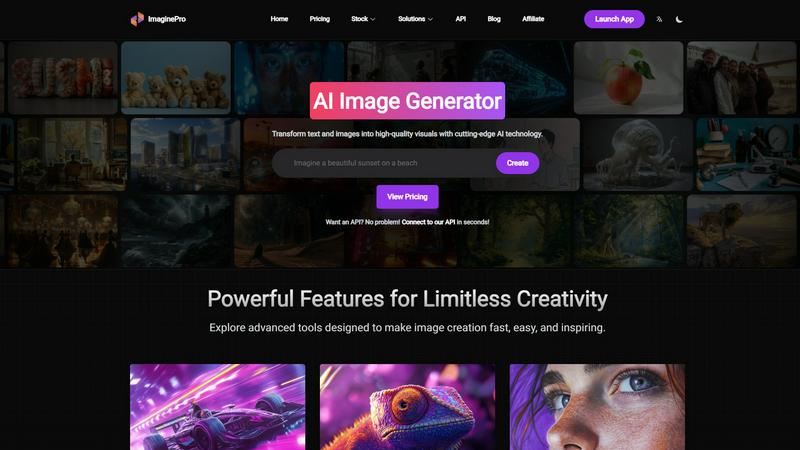
Visual Comparison
ImaginePro
Img Editor

Feature Comparison
ImaginePro
Instant Masterpieces
ImaginePro leverages top-tier AI models to generate professional-quality images in seconds. This feature is ideal for creating content tailored for social media, marketing materials, or any project requiring high visual appeal. Users can quickly produce eye-catching visuals without the need for extensive editing.
Creative Control
The platform offers users the ability to fine-tune their images with precise style references, colors, and effects. This feature allows for detailed adjustments to every element of the image, ensuring that the final output aligns perfectly with the user’s vision. It enhances the creative process and results in customized images.
High-Quality Images
ImaginePro guarantees the generation of lifelike, high-resolution images that stand out in any application. This feature is particularly beneficial for commercial use, where polished and professional visuals are essential. Users can create images that look realistic and are ready for immediate use.
Background Removal
Effortlessly remove backgrounds from images with ImaginePro’s dedicated background removal tool. This feature is invaluable for creating product images for e-commerce, professional portraits, social media content, and graphic design projects. It simplifies the editing process, allowing users to focus on the main subject of their images.
Img Editor
Text to Image
Img Editor offers a robust text-to-image feature that enables users to input descriptive prompts and receive stunning AI-generated images in response. This functionality is particularly useful for artists and designers who wish to visualize concepts without the need for extensive graphic design skills.
Image Editing
The platform includes powerful image editing tools that allow users to refine and enhance their generated images. From adjusting colors to cropping and applying filters, Img Editor equips users with the essential tools to perfect their visuals easily.
Prompt Generator
Img Editor features an intuitive prompt generator that helps users brainstorm ideas and create effective prompts for image generation. This tool is especially beneficial for those who may struggle with wording or who seek inspiration to generate unique images.
High-Quality Outputs
Users can choose from various image quality settings, including 1K, 2K, and 4K outputs. The flexibility in quality options ensures that users can produce images that meet their specific needs, whether for personal use or professional projects.
Use Cases
ImaginePro
Social Media Marketing
ImaginePro is perfect for marketers looking to create engaging content for social media platforms. Users can generate stunning visuals that enhance posts and advertisements, making them more appealing to the target audience and increasing engagement rates.
E-commerce Product Displays
Online retailers can utilize ImaginePro to create high-quality product images that attract customers. By removing backgrounds and enhancing visual appeal, users can display products in a professional manner, which is crucial for driving sales in a competitive market.
Graphic Design Projects
Graphic designers can leverage ImaginePro to speed up their workflow. The ability to quickly generate custom images allows designers to focus on the creative aspects of their projects without getting bogged down by time-consuming image creation processes.
Digital Art and Photo Manipulation
ImaginePro serves as a powerful tool for digital artists and photographers. Users can create unique compositions and manipulate images easily, providing a platform for artistic expression and experimentation without the need for extensive technical skills.
Img Editor
Artistic Visualization
Artists can leverage Img Editor to transform their creative ideas into visual representations, making it easier to conceptualize projects or share their visions with collaborators. This is especially useful for sketching out ideas before committing them to traditional media.
Graphic Design Projects
Graphic designers can utilize Img Editor to generate unique graphics for marketing materials, websites, or social media campaigns. The ability to create custom visuals quickly can significantly enhance their workflow and productivity.
Marketing and Advertising
Marketers can harness the power of Img Editor to create eye-catching and relevant visuals for their campaigns. With the tool's user-friendly interface, they can produce compelling images that resonate with their target audiences and enhance brand messaging.
Educational Content Creation
Educators and content creators can use Img Editor to generate illustrative images for presentations, lesson plans, or online courses. The platform allows for quick creation of visuals that can enhance learning experiences and engage students effectively.
Overview
About ImaginePro
ImaginePro is a cutting-edge AI image generation tool that empowers users to turn their textual ideas into visually stunning images in mere seconds. Designed for a diverse audience, from professional designers and marketers to casual creatives, ImaginePro harnesses advanced artificial intelligence to deliver high-quality visuals suitable for various applications such as social media marketing, e-commerce product displays, and graphic design projects. The platform stands out for its user-friendly interface that allows users to create polished images effortlessly. With unique features like background removal and the capability to integrate text behind images, ImaginePro provides unparalleled creative control, ensuring that even those with minimal editing skills can produce commercial-ready visuals. By offering flexible pricing plans, it caters to users at all experience levels, making high-quality image generation accessible to everyone.
About Img Editor
Img Editor is a groundbreaking and entirely free AI image generation platform that serves as a creative ally for individuals across various artistic fields. Whether you are an artist aiming to visualize intricate ideas, a designer in search of distinctive graphics, or a marketer looking to craft engaging visuals for campaigns, Img Editor is tailored to meet these diverse needs. By harnessing advanced AI technology, the platform quickly transforms your concepts into breathtaking images. Users can generate up to 10 images daily without any cost, and additional generations can be unlocked through community contributions. This makes Img Editor an accessible solution for anyone who desires to create high-quality visuals without the financial strain typically associated with similar tools. Its user-friendly interface is designed to accommodate all skill levels, ensuring that everyone can navigate its features effortlessly and bring their creative visions to life.
Frequently Asked Questions
ImaginePro FAQ
What types of images can I create with ImaginePro?
ImaginePro allows you to create a wide range of images, including illustrations, product displays, social media graphics, and more, all tailored to your specific needs and preferences.
Is ImaginePro suitable for beginners?
Yes, ImaginePro is designed with a user-friendly interface that makes it accessible for beginners. The straightforward process of generating images requires no complex prompts or prior experience in graphic design.
Can I integrate ImaginePro into my existing workflow?
Absolutely. ImaginePro offers an API that allows developers to programmatically generate images, making it easy to integrate into existing applications or automated content pipelines.
How does the background removal feature work?
The background removal feature uses AI technology to intelligently detect and remove backgrounds from images. This allows users to isolate subjects and create clean, professional visuals for various applications.
Img Editor FAQ
Is Img Editor really free to use?
Yes, Img Editor is completely free to use, allowing users to generate up to 10 images daily without any cost. Users can also earn additional generations by contributing to the community.
Do I need any technical skills to use Img Editor?
No, Img Editor is designed with a user-friendly interface that caters to individuals of all skill levels. Whether you are a beginner or an experienced designer, you will find it easy to navigate and utilize the platform's features.
What quality options are available for generated images?
Img Editor offers various quality settings, including 1K, 2K, and 4K outputs. Users can select the quality that best suits their needs, whether for casual use or professional-grade projects.
Can I edit images after generating them?
Yes, Img Editor includes image editing tools that allow users to refine and enhance their generated images. You can adjust colors, apply filters, and make other modifications to achieve the desired look.
Alternatives
ImaginePro Alternatives
ImaginePro is an advanced AI image generator that belongs to the image and photo editing category. This tool helps users create high-quality visuals from text prompts quickly and efficiently, making it a popular choice among marketers, designers, and casual users alike. However, many users often seek alternatives due to various reasons, including pricing structures, feature sets, and specific platform needs that may not be met by ImaginePro. When searching for an alternative to ImaginePro, it's essential to consider factors such as the quality of image generation, user-friendliness, and the availability of unique features like background removal or customization options. Additionally, evaluating pricing plans and customer support can help ensure that the alternative you choose aligns with your creative and professional requirements.
Img Editor Alternatives
Img Editor is an innovative, free AI image generation platform designed to help users from diverse creative backgrounds create stunning visuals effortlessly. It falls under the category of image and photo editing tools, providing capabilities for both image generation and editing. Users often seek alternatives to Img Editor for various reasons, such as pricing structures, specific feature sets, or compatibility with different platforms. As the creative landscape evolves, individuals may find themselves in need of a tool that better aligns with their unique requirements, whether that involves advanced editing options, improved collaboration features, or enhanced user interfaces. When choosing an alternative to Img Editor, it is essential to consider several factors. Users should evaluate the range of features offered, including the quality of image generation and editing capabilities. Additionally, the platform's user-friendliness, community engagement opportunities, and any associated costs should be taken into account. Ultimately, selecting the right tool will depend on the specific needs and goals of the user, ensuring that they find a platform that effectively supports their creative endeavors.