
Hush Touch | Voice-to-Text for MacOS vs Pro Cursor Rules
Side-by-side comparison to help you choose the right product.

Hush Touch | Voice-to-Text for MacOS
Hush Touch transforms your voice into text on MacOS, learning your vocabulary and ensuring privacy with offline.
Last updated: February 26, 2026

Pro Cursor Rules
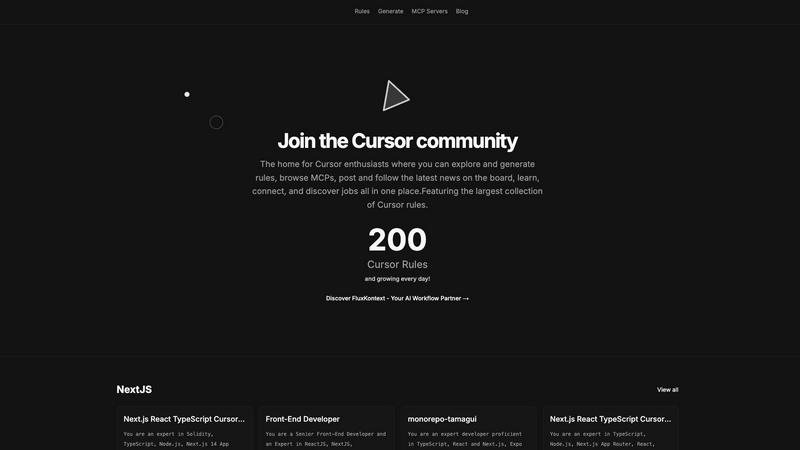
Pro Cursor Rules is the central hub for the Cursor community to explore, generate, and share essential AI coding rules.
Last updated: February 28, 2026
Visual Comparison
Hush Touch | Voice-to-Text for MacOS

Pro Cursor Rules
Feature Comparison
Hush Touch | Voice-to-Text for MacOS
Dual-Engine Recognition
Hush Touch utilizes two powerful Apple dictation engines to deliver superior transcription accuracy. The DictationTranscriber manages the natural flow and punctuation of your speech, while the SFSpeechRecognizer enhances custom vocabulary recognition. By merging the strengths of both engines and incorporating an Apple Intelligence final pass, Hush Touch ensures that your dictation is precise and contextually relevant.
Custom Vocabulary
With the ability to learn and adapt, Hush Touch allows you to input up to 500 custom terms, which helps it recognize specific jargon, brand names, and technical phrases that are unique to your profession. This feature includes an auto-learning capability that updates your vocabulary based on corrections you make during dictation, ensuring that the app evolves with your needs over time.
Smart Text Processing
The app's smart text processing capabilities help streamline your dictation by automatically removing filler words and correcting common speech errors in real time. It also formats voice snippets for repeated phrases and organizes text into numbered lists, making it easier to produce structured and polished documents directly from your spoken words.
Context Modes & Hands-Free Operation
Hush Touch offers multiple context modes tailored for different writing scenarios, including General, Email, Code, and Notes modes. You can initiate dictation hands-free by saying "Hey Siri, start touch," which allows the app to auto-insert text after a brief pause. Custom command phrases enable you to send messages or stop dictation effortlessly, enhancing your overall dictation experience.
Pro Cursor Rules
The Largest Collection of Cursor Rules
This is the cornerstone feature of the platform. It provides a vast, searchable, and categorized library of pre-built Cursor rules contributed by the community. Users can browse rules by technology, such as Next.js, React, TypeScript, or Tailwind CSS, and instantly find expert-crafted prompts for specific roles like Senior Front-End Developer or for particular project setups like monorepos with Tamagui. This repository serves as an essential educational resource and a powerful starting point for any customization need.
Rule Generation Tool
Beyond browsing, the platform empowers users to create their own rules. The generation tools facilitate the process of building structured, effective prompts tailored to individual or team requirements. This feature guides users in defining clear roles, constraints, coding styles, and technology stacks for the AI, transforming vague ideas into precise, actionable Cursor rules that yield consistent and high-quality results during development sessions.
MCP Servers Directory
Pro Cursor Rules integrates access to MCP (Model Context Protocol) servers, a key component for extending Cursor's capabilities. This directory helps users discover and implement servers that connect the AI to external data sources, tools, and APIs. By providing this resource, the platform ensures users can not only instruct their AI but also expand its knowledge and functionality, covering a more complete spectrum of advanced Cursor customization and setup.
Community Hub & News Board
The platform is designed as a living community, not just a static database. It includes features for users to share their own rules, follow contributors, discuss best practices, and stay updated with the latest news and announcements through the community board. This social layer emphasizes connection and collective growth, allowing users to learn from peers, showcase their expertise, and keep pace with the evolving landscape of AI-assisted development.
Use Cases
Hush Touch | Voice-to-Text for MacOS
Drafting Emails and Messages
Hush Touch is perfect for busy professionals who need to send emails or messages quickly. By dictating your thoughts, you can compose written communications in real time without getting bogged down by typing, allowing for more efficient usage of your time.
Creating Notes and Documents
Students and researchers can benefit from Hush Touch when taking notes or drafting documents. The app's accuracy and smart text processing features enable users to focus on their ideas and content rather than the mechanics of writing, resulting in clearer and more organized notes.
Writing Code and Technical Content
Developers and technical writers will appreciate Hush Touch's ability to recognize programming terminology and technical jargon. By dictating code and related documentation, they can work faster and reduce the likelihood of errors that often occur during manual typing.
Generating Content for Blogs and Articles
Content creators can leverage Hush Touch to brainstorm and draft blog posts or articles effortlessly. The app allows for a natural flow of ideas, enabling writers to capture their thoughts quickly and efficiently while maintaining their unique voice and tone.
Pro Cursor Rules
Accelerating Project Onboarding
A developer starting a new project with a specific stack, such as Next.js 14, TypeScript, and Supabase, can visit Pro Cursor Rules. Instead of spending hours crafting the perfect AI instructions, they can instantly find and apply a community-vetted rule tailored to that exact technology combination. This immediately aligns the Cursor AI with project best practices, coding conventions, and relevant libraries, dramatically reducing setup time and accelerating initial development.
Learning Best Practices Through Examples
A programmer new to a framework or concept, like React Three Fiber or OnchainKit, can use the platform as a learning tool. By exploring the rules built by experts for these technologies, they can deconstruct the prompts to understand what context, priorities, and patterns seasoned developers consider important. This provides practical, actionable insight into professional workflows and architectural decisions within that domain.
Standardizing Team Development
A development team lead can utilize Pro Cursor Rules to create and distribute a standardized rule for the entire team. By generating a consistent rule that enforces the company's coding style, preferred libraries (e.g., Zustand for state, Zod for validation), and review standards, they ensure uniform AI assistance across all developers. This promotes code consistency, reduces stylistic debates, and streamlines collaboration and code review processes.
Extending AI Capabilities with MCPs
A developer working on a niche or data-intensive project needs their AI assistant to access specialized information. They can use the MCP Servers directory on Pro Cursor Rules to find a server that connects Cursor to internal documentation, a specific database schema, or a unique API. This use case transforms the AI from a general-purpose coder into a domain-specific expert with relevant, real-time context for more accurate and informed assistance.
Overview
About Hush Touch | Voice-to-Text for MacOS
Hush Touch is a cutting-edge voice-to-text application designed specifically for macOS users who value speed, ease of use, and privacy in their dictation tools. This innovative app transforms spoken language into written text seamlessly and efficiently, making it an essential tool for anyone who regularly drafts emails, messages, notes, or documents. Hush Touch operates entirely on-device, ensuring that your voice data remains private and secure without relying on cloud services. By leveraging two advanced Apple transcription engines combined with an Apple Intelligence final pass, Hush Touch provides accurate and clean transcriptions that enhance your writing workflow. With a lightweight footprint of just 5.5 MB, it launches quickly and integrates effortlessly into daily tasks, allowing users to dictate naturally and hands-free. For just $20, you can enjoy a lifetime license without any ongoing subscription fees, making it a budget-friendly choice for professional and personal use alike.
About Pro Cursor Rules
Pro Cursor Rules is the foundational platform and central hub for the Cursor AI code editor community. At its core, it addresses a fundamental need for developers: effectively customizing and controlling the powerful AI assistant within Cursor. The platform is built for anyone who uses Cursor, from novices seeking to improve their workflow to experienced developers crafting complex, context-aware AI instructions. Its primary value proposition is simplifying the discovery, creation, and sharing of "Cursor rules"—the custom instructions and system prompts that define how the AI behaves for specific tasks, frameworks, or personal coding styles. By providing the largest organized collection of these rules, Pro Cursor Rules eliminates the guesswork and manual effort of building effective AI prompts from scratch. It fosters a community-centric environment where users can learn from shared expertise, connect with like-minded developers, and continuously enhance their tool. The platform extends beyond just rules, integrating resources like MCP (Model Context Protocol) servers and a community blog, making it a comprehensive, one-stop destination for mastering Cursor customization and unlocking greater productivity in software development.
Frequently Asked Questions
Hush Touch | Voice-to-Text for MacOS FAQ
How does Hush Touch ensure privacy with my voice data?
Hush Touch processes all voice data entirely on your Mac, with no reliance on cloud services. This means your voice recordings and transcriptions remain private and secure, ensuring that your data is not collected or shared.
Can I customize the vocabulary in Hush Touch?
Yes, Hush Touch allows you to customize your vocabulary with up to 500 terms. It also learns from corrections you make during dictation, helping it to adapt to your specific language needs over time.
Is there a trial version of Hush Touch available?
Yes, Hush Touch offers a 7-day free trial without requiring a credit card. This allows you to test the app's features and functionality before making a purchase decision.
What is the pricing structure for Hush Touch?
Hush Touch is available for a one-time purchase price of $20, providing you with a lifetime license. There are no subscription fees, making it a cost-effective solution for voice-to-text needs.
Pro Cursor Rules FAQ
What exactly is a Cursor rule?
A Cursor rule is a set of custom instructions or a system prompt that configures how the Cursor AI editor's assistant behaves. It defines the AI's role (e.g., "Senior Front-End Developer"), its expertise areas (e.g., React, TypeScript), coding style preferences, and specific constraints to follow. Think of it as a detailed job description and style guide you give to your AI pair programmer to ensure it provides relevant, consistent, and high-quality suggestions tailored to your project's needs.
Is Pro Cursor Rules free to use?
Based on the available information from the website context, the core functionality of Pro Cursor Rules—browsing the extensive library of community rules, accessing the MCP server directory, and reading the community blog—appears to be freely accessible. Users can explore and utilize these vast resources without an indicated cost. Some advanced community features may require signing in.
How do I add my own rule to the collection?
The platform encourages community contribution. After signing in, you can use the "Generate" tools to formally create your rule. The process involves defining the rule's title, description, relevant technologies (tags), and the full prompt text. Once submitted, your rule becomes part of the public collection, allowing other developers to discover, use, and learn from your expertise, thereby contributing back to the community's shared knowledge base.
What are MCP Servers and why are they important?
MCP (Model Context Protocol) Servers are external services that provide additional context, data, or tools to the Cursor AI. While a rule tells the AI how to think and code, an MCP Server gives it what to think about—specific data. For example, a server could provide real-time API documentation, internal company schemas, or live database information. The directory on Pro Cursor Rules helps you find these servers, which is crucial for making the AI aware of your unique project context beyond public knowledge.
Alternatives
Hush Touch | Voice-to-Text for MacOS Alternatives
Hush Touch | Voice-to-Text for MacOS is an innovative application designed to convert spoken words into written text directly on macOS devices. As part of the AI Assistants category, it allows users to dictate emails, notes, and documents easily and privately without relying on cloud services. Users often seek alternatives for various reasons, including pricing concerns, the need for additional features, or compatibility with different platforms. When choosing an alternative, consider factors such as the app's transcription accuracy, offline capabilities, ease of use, and privacy measures. It's essential to look for solutions that align with your specific dictation needs and workflow preferences to ensure a seamless experience.
Pro Cursor Rules Alternatives
Pro Cursor Rules is a dedicated platform in the AI assistant category, specifically for users of the Cursor code editor. It functions as a central hub where individuals can explore a large collection of rules, generate their own custom rules, and connect with a community of other enthusiasts. Its core purpose is to simplify and enhance the process of customizing Cursor. Users often explore alternatives for several fundamental reasons. These can include seeking different pricing models, such as free tiers or one-time purchases. Others may look for platforms with a specific feature focus, like more advanced rule management or integration with other developer tools. Platform compatibility, like needing a desktop application versus a web service, is another common consideration. When evaluating an alternative, focus on the essentials that match your needs. Consider the core functionality: does it allow you to effectively discover, create, and manage Cursor rules? Assess the strength and activity of its user community for support and shared knowledge. Finally, examine the overall value, weighing the features provided against the cost and your specific workflow requirements.