
Genstory vs Seedance 2 AI Video Generator
Side-by-side comparison to help you choose the right product.

Genstory
Create stunning novels, comics, and cinematic videos effortlessly with Genstory's powerful AI storybook generator.
Last updated: February 27, 2026

Seedance 2.0 turns your text, images, or clips into professional cinematic videos quickly and easily.
Last updated: March 1, 2026
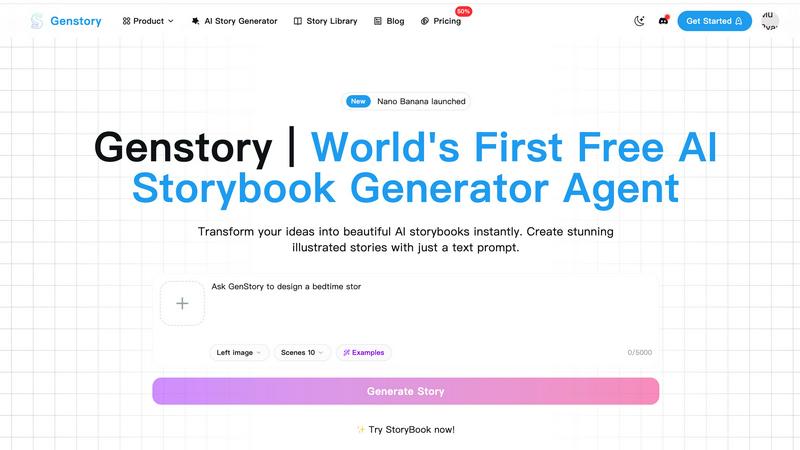
Visual Comparison
Genstory
Seedance 2 AI Video Generator

Feature Comparison
Genstory
Lightning-Fast Generation
Genstory offers an unparalleled speed in story creation, completing the entire process—from text generation to illustration—in just seconds. This allows users to quickly transform their ideas into a finished product, making it easy to enjoy stories on the go.
Simple and Intuitive Interface
The platform is designed with the user in mind. There are no complex commands to learn; users can simply engage in natural conversation with the AI to guide the creation process. This intuitive approach makes storytelling accessible for all ages.
Multi-Dimensional Output
Genstory supports various output formats, allowing users to generate stories in PDF format for easy printing or as interactive web stories. This versatility ensures that sharing and enjoying stories is a seamless experience.
Beautiful Illustrations
Each story generated by Genstory is complemented by stunning AI-generated artwork that enhances the narrative. These visuals bring the characters and scenes to life, making the storytelling experience more immersive and engaging for readers.
Seedance 2 AI Video Generator
Multimodal Input Flexibility
Seedance 2.0 offers three distinct generation modes to suit different creative starting points. You can begin with a text prompt to create a video from a concept, use an image to animate and extend a specific visual style, or upload existing footage to restyle and modify it. This flexibility ensures that whether you have a clear idea, a visual reference, or raw material, the tool can accommodate your workflow and help bring your vision to life efficiently.
Reference-First Generation for Consistency
A standout feature is the reference-first workflow, which significantly reduces guesswork. By uploading a reference image or video, you anchor the AI's output to specific visual elements like character appearance, art style, color palette, and camera angles. This leads to much higher consistency across generated frames compared to relying on text prompts alone, making it ideal for projects requiring stable characters or a cohesive look throughout a scene.
Integrated Audio-Video Synthesis
The tool goes beyond silent clips by offering joint audio and video generation in a single pass. This includes the ability to generate synchronized sound effects, background music, and voiceovers. Notably, it supports accurate lip-sync for over ten languages, allowing for the creation of talking-head videos or narrated content that feels polished and professionally assembled without needing separate audio editing software.
High-Quality Output Specifications
Seedance 2.0 is built for professional use, supporting video outputs of up to 1080p resolution at a cinema-standard 24 frames per second for smooth motion. It offers versatile aspect ratios including 16:9, 9:16, and 1:1, optimized for everything from widescreen displays to social media stories. Videos are generated in the universal MP4 (H.264) format, ensuring compatibility with all major platforms and editing suites right from export.
Use Cases
Genstory
Personalized Bedtime Stories
Parents can use Genstory to quickly create unique bedtime stories that feature their child as the main character. This personal touch not only makes storytime more exciting but also fosters a deeper bond between parents and children.
Educational Content Creation
Educators can leverage Genstory to develop visual narratives that explain complex concepts in a fun and engaging way. This is particularly useful for ESL teachers, special education instructors, or anyone looking to inspire creativity in the classroom.
Story Prompts for Creative Writing
Writers and storytellers can utilize Genstory to generate prompts or entire story ideas, providing a valuable source of inspiration. This feature can help overcome writer's block and spark the imagination.
Collaborative Storytelling
Genstory encourages collaboration by allowing users to share their generated stories with friends and family. This fosters a community of creativity where ideas can be exchanged and improved upon, enhancing the storytelling experience.
Seedance 2 AI Video Generator
Social Media Content Creation
Creators and influencers can rapidly produce engaging, platform-specific video content for Instagram Reels, TikTok, or YouTube Shorts. By quickly iterating on text prompts or animating still images, they can maintain a consistent posting schedule with high-quality, eye-catching clips that resonate with their audience, all without a full production crew or extensive editing time.
Marketing and Advertising Campaigns
Marketing teams and agencies can use Seedance 2.0 to prototype and produce ad creatives at speed. The ability to generate multiple versions of a product demo or promotional clip allows for efficient A/B testing. The reference-first workflow ensures brand assets and mascots remain visually consistent across different ad variations, streamlining the campaign development process.
Concept Visualization and Storyboarding
Filmmakers, writers, and designers can bring their ideas to life visually during the pre-production phase. By inputting descriptive text or concept art, they can generate short, cinematic clips that help visualize scenes, characters, or moods. This is invaluable for pitching ideas, creating dynamic storyboards, and aligning creative vision before committing to expensive live-action shoots.
Educational and Explainer Video Production
Educators and corporate trainers can create clear, engaging explainer videos. The integrated audio generation and lip-sync capabilities are particularly useful for creating narrated content or animated presentations. Complex topics can be broken down into short, visually compelling videos that enhance learning and retention for viewers.
Overview
About Genstory
Genstory is an innovative AI story generator designed to bring your creative ideas to life through beautifully illustrated digital storybooks. Utilizing advanced AI technology, Genstory enables parents, educators, and storytellers to craft unique narratives with ease. By simply entering a natural language prompt, users can watch as Genstory automatically generates a complete storybook filled with engaging plots and vivid illustrations. This tool is perfect for those looking to create personalized bedtime stories, educational materials, or simply to explore the art of storytelling. With its user-friendly interface and rapid generation capabilities, Genstory makes the process of story creation accessible to everyone, transforming moments of inspiration into tangible works of art.
About Seedance 2 AI Video Generator
Seedance 2 AI Video Generator is a comprehensive software tool designed to transform creative ideas into polished, cinematic videos through artificial intelligence. At its core, it simplifies the complex process of video production by allowing users to generate content from three primary inputs: written text descriptions, reference images, or existing source footage. This all-in-one platform is engineered for speed and efficiency, enabling a fast workflow that bypasses the need for heavy, traditional editing software and technical expertise. The main value proposition of Seedance 2.0 lies in its emphasis on control and consistency. Unlike tools that rely solely on unpredictable text prompts, Seedance 2.0 utilizes reference-driven generation to anchor the style, characters, and visual feel of the output, resulting in more reliable and coherent videos. It is built specifically for creators, marketers, and agencies who require high-quality video output at scale for purposes like advertising, social media content, and product demonstrations without incurring significant production time or overhead. By combining multiple generation modes with features like integrated audio synthesis and multilingual lip-sync, it provides a production-ready solution for turning concepts into finished clips swiftly.
Frequently Asked Questions
Genstory FAQ
How does Genstory work?
Genstory works by using advanced AI technology to transform simple text prompts into complete illustrated storybooks. Users describe their story ideas, and the AI generates the narrative along with accompanying visuals.
Can I customize the stories generated by Genstory?
Yes, after the AI generates a story, users have the opportunity to review and customize the content as they see fit. This allows for personal touches and adjustments to align the story with individual preferences.
What formats can I export my stories in?
Genstory allows users to export their stories in multiple formats, including PDF for printing and interactive web formats for easy sharing online. This flexibility makes it convenient to enjoy stories in various ways.
Is Genstory suitable for all ages?
Absolutely! Genstory is designed to be user-friendly and accessible for individuals of all ages. Whether you are a parent, teacher, or aspiring author, anyone can create and enjoy stories using this platform.
Seedance 2 AI Video Generator FAQ
What are the main input methods for Seedance 2.0?
Seedance 2.0 provides three primary input methods: Text-to-Video, Image-to-Video, and Video-to-Video. You can start generation by typing a descriptive text prompt, uploading a reference image to animate, or providing source footage to restyle or extend. This multimodal approach offers maximum flexibility depending on your available assets and creative goals.
How does Seedance 2.0 ensure character and style consistency?
The platform uses a reference-first generation model. When you provide a reference image or video clip, the AI uses it as a visual anchor. This guides the output to maintain consistent details like a character's appearance, clothing, art style, and color scheme throughout the generated video, leading to more coherent and reliable results than text prompts alone can guarantee.
What video quality and format does it output?
Seedance 2.0 can generate videos at a maximum resolution of 1080p (Full HD) with a frame rate of up to 24fps for smooth, cinematic playback. It supports common aspect ratios like 16:9, 9:16, and 1:1. All videos are exported in the widely compatible MP4 format using the H.264 codec, ready for use on social media, websites, or in professional editing software.
Does Seedance 2.0 include audio generation?
Yes, it features integrated audio-video synthesis. This means it can generate synchronized audio elements alongside the video in a single process. This includes sound effects, background music, and voiceovers with accurate lip-sync support for over ten languages, allowing you to create fully realized video clips without needing separate audio production tools.
Alternatives
Genstory Alternatives
Genstory is an innovative AI story generator that empowers users to instantly create novels, comics, and cinematic videos. Designed for parents, educators, and creative individuals, it leverages advanced AI technology to transform simple prompts into fully illustrated digital storybooks. This tool falls under the category of design tools, focusing on storytelling and visual content creation. Users often seek alternatives to Genstory due to various reasons, including pricing structures, feature sets, and compatibility with different platforms or devices. When searching for an alternative, it is essential to consider factors such as ease of use, the quality of generated content, the range of outputs available, and any specific needs aligned with storytelling or educational purposes.
Seedance 2 AI Video Generator Alternatives
Seedance 2 AI Video Generator is a tool in the AI video creation category. It allows users to transform text descriptions, images, and existing video clips into cinematic-style videos. The platform emphasizes a fast, all-in-one workflow with features for maintaining visual consistency and providing easy control over the output. Users often explore alternatives for various practical reasons. These can include budget constraints, as pricing models differ widely between services. Others may seek specific features not offered, require integration with different platforms, or need a user interface that better matches their skill level and creative process. When evaluating other options, consider your primary needs. Look at the core capability to generate video from your preferred inputs, like text or images. Assess the quality and style of the output, the speed of generation, and the overall ease of use. Also, review the cost structure and any limitations on usage to find a tool that aligns with your project scale and frequency.