Customer Connect CRM vs SocialCal
Side-by-side comparison to help you choose the right product.

Customer Connect CRM
Customer Connect CRM gathers all your leads in one place for faster follow-ups and more closed deals.
Last updated: February 28, 2026

SocialCal
SocialCal schedules and publishes your content to ten platforms with one click.
Last updated: February 28, 2026
Visual Comparison
Customer Connect CRM

SocialCal
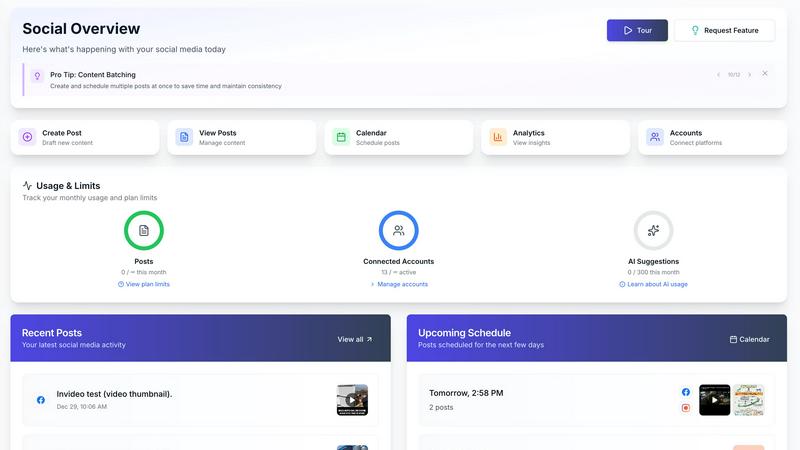
Feature Comparison
Customer Connect CRM
Centralized Lead Management
This feature provides a single, unified location for all potential customer interactions. It automatically gathers inquiries from connected sources like website contact forms and business email accounts (e.g., Gmail, Office 365), as well as manually added leads. This ends the need to search across multiple inboxes and documents, ensuring every inquiry is captured and visible from the moment it arrives, preventing valuable opportunities from being lost in the clutter.
Visual Sales Board
The system uses a clear, card-based visual interface to display each lead. Every card contains essential information such as the lead's source, estimated value, and the next required action. You can fully customize this board to match your specific sales process stages, creating a tailored workflow that provides an instant, at-a-glance understanding of your entire sales pipeline and where each deal stands.
Intelligent AI Assistance
Customer Connect includes smart AI tools designed to save time and increase effectiveness. These features assist teams in prioritizing leads and crafting faster, more relevant responses to incoming inquiries. By helping to accelerate follow-up, this AI functionality directly increases the likelihood of converting a lead into a customer, addressing one of the most critical factors in sales success.
Customizable Pipelines & Automation
The CRM allows you to build sales pipelines that reflect your unique business operations. You can define custom stages, tags, and fields for different services or customer types. Furthermore, the system offers automation rules to handle repetitive tasks, such as sending notifications or moving leads between stages based on specific triggers. This reduces manual administrative work and ensures consistency in your sales process.
SocialCal
Multi-Platform Publishing
SocialCal allows you to publish content to ten different social media platforms with a single click. This includes major networks like Instagram, X (Twitter), LinkedIn, TikTok, YouTube, and newer platforms like Threads and Bluesky. This feature eliminates the repetitive task of logging into each platform individually, copying content, and manually posting. It streamlines your workflow, ensuring your message reaches your entire audience across all channels simultaneously, saving you hours of work each week.
Drag & Drop Visual Calendar
The platform features an intuitive visual calendar that uses a drag-and-drop interface for scheduling. This allows you to plan your content strategy visually over days, weeks, or months. You can easily move posts around to optimize your publishing timeline, see your content mix at a glance, and ensure a consistent posting schedule. This visual approach to planning makes content management straightforward and helps maintain a balanced and strategic presence across all your connected accounts.
AI-Powered Caption Writer
SocialCal includes an AI caption writer tool to help you overcome creative blocks and save time. You can generate engaging captions in multiple tones and styles tailored to your brand voice. This feature assists in crafting compelling text for your posts, ensuring your content is not only visually scheduled but also contextually strong. It is a valuable tool for maintaining a consistent and engaging narrative across all your social media updates.
Unified Analytics Dashboard
Track and measure the performance of your content across all connected platforms from one centralized analytics dashboard. This feature provides clear insights into key metrics like engagement, reach, and audience growth. By consolidating data from ten different platforms, it gives you a holistic view of your social media strategy's effectiveness, allowing you to make informed decisions and refine your content based on what resonates best with your audience.
Use Cases
Customer Connect CRM
Small Business Sales Team Coordination
A small but growing team can use Customer Connect to ensure everyone has immediate access to the same lead information. When an inquiry comes in, it appears for the whole team in the shared sales board, eliminating confusion over who is handling which customer. The clear visual layout and notifications prevent duplicate work and ensure timely follow-up, allowing the team to operate more cohesively and professionally.
Freelancer or Consultant Client Management
For solo entrepreneurs like freelancers or consultants, the system acts as a simple yet powerful hub for all client communications and project inquiries. Instead of managing leads through personal email, they can track potential projects, client discussions, and follow-up dates in one dedicated place. This provides structure and professionalism to their operations, helping them never miss a reply and efficiently manage their sales pipeline without overhead.
Service-Based Business Inquiry Handling
Businesses like hotels, event venues, or consultancies that receive high-value inquiries for services or bookings can use Customer Connect to manage these requests systematically. Inquiries from web forms, email, and phone calls are centralized. Staff can quickly assess, categorize, and follow up on each request using a customized pipeline (e.g., Inquiry, Proposal Sent, Booking Confirmed), ensuring a smooth customer journey and maximizing conversion rates.
Streamlining Quote-to-Contract Processes
For businesses that need to send proposals or contracts, Customer Connect can integrate with tools like Oneflow for digital contracts. This creates a seamless flow from the initial lead capture in the CRM to sending and tracking contracts. It closes the loop between sales activity and formal agreement, saving significant time and reducing the administrative friction that can delay deal closure.
SocialCal
For Solopreneurs and Content Creators
Individual creators and solopreneurs can manage their entire personal brand across multiple platforms without being overwhelmed. SocialCal allows them to batch-create content, schedule it efficiently using the visual calendar, and maintain a consistent online presence. This frees up over 15 hours a week, which can be redirected towards content creation, community engagement, or other business tasks, all while growing their audience effectively.
For Small Marketing Teams and Agencies
Small teams and digital agencies can manage multiple client accounts from a single SocialCal dashboard. The platform streamlines client management by allowing teams to organize, schedule, and preview content for different brands in one place. This centralized approach improves collaboration, ensures timely posting for all clients, and provides consolidated analytics reports to demonstrate campaign value and ROI efficiently.
For Businesses Managing Product Launches
Businesses planning a coordinated product or campaign launch across social media can use SocialCal to schedule all related content in advance. The multi-platform publishing ensures announcements go live simultaneously everywhere. The visual grid planner helps preview the Instagram feed aesthetic, and the first-comment feature keeps captions clean by auto-posting hashtags in comments, creating a professional and synchronized launch strategy.
For Repurposing Long-Form Content
Creators and marketers can efficiently repurpose long-form content, like a YouTube video or blog post, into multiple social media snippets. SocialCal allows you to schedule the main video on YouTube, create teaser clips for TikTok and Instagram Reels, post key quotes on X (Twitter) and LinkedIn, and share images on Pinterest, all from one dashboard. This maximizes the reach and lifespan of your core content.
Pricing Comparison
Customer Connect CRM
Customer Connect CRM offers four straightforward pricing tiers designed to scale with your business needs, each including a 14-day free trial.
Basic: Priced at €9.90 per user per month, this plan is for freelancers and consultants. It includes 1 user, email & calendar integration, an essential dashboard, email notifications, and 1 sales pipeline.
Small: Priced at €19.90 per user per month, this plan is for small teams. It includes unlimited users, AI features for leads and deals, 1 integration, 1 automation, tags & custom fields, and 1 sales pipeline.
Medium: Priced at €39.90 per user per month, this plan is for growing teams. It includes all Small features plus advanced dashboards & reports, email & SMS notifications, 3 integrations, 3 automations, roles & permissions, and 3 sales pipelines.
Enterprise: Priced at €79.90 per user per month, this plan is for larger organizations. It includes everything in the Medium plan, plus 10 integrations & automations, dedicated onboarding & Customer Success, tailored support & security, and 10 sales pipelines. Yearly billing is available and offers a discount equivalent to two free months.
SocialCal
SocialCal positions itself as the most affordable scheduler on the market, designed to provide essential features without an enterprise price tag. The platform emphasizes saving users over 80% compared to other tools that can cost $50 or more per month. SocialCal offers its core functionality, including multi-platform publishing, smart scheduling, AI captions, and analytics, for a price point around $9. This makes it a cost-effective solution for solopreneurs, creators, and small teams. A free trial is available for users to test the platform before committing.
Overview
About Customer Connect CRM
Customer Connect CRM is a straightforward customer relationship management system built from the ground up for small to medium-sized businesses. Its core purpose is to solve a fundamental business problem: the loss of sales opportunities due to disorganized communication and slow follow-up. The system consolidates all customer inquiries, whether they arrive via website forms, email inboxes, or direct messages, into a single, visual workspace. This eliminates the chaos of scattered spreadsheets and overloaded email accounts. The primary value proposition is simplicity and effectiveness. Customer Connect is designed to be used immediately, without complex training or technical expertise, allowing business owners and their teams to focus on closing deals rather than managing software. By providing clear oversight of every lead and integrating smart AI features to accelerate response times, it directly supports business growth by ensuring no potential customer is forgotten.
About SocialCal
SocialCal is a comprehensive social media management platform designed to simplify and centralize the workflow for content creators, marketers, and businesses. It addresses the fundamental challenge of managing multiple social media accounts by unifying content creation, scheduling, and analytics into a single, powerful dashboard. The platform supports posting across ten major platforms, including Facebook, Instagram, Threads, TikTok, YouTube, LinkedIn, Pinterest, Telegram, Bluesky, and X (Twitter). Its primary value proposition is efficiency. By eliminating the need to juggle multiple apps and logins, SocialCal saves users significant time, up to 15 hours or more per week. This allows them to focus on creating quality content and engaging with their audience. Built with a back-to-basics, user-friendly approach, it is specifically designed for solopreneurs, creators, and small teams who need powerful functionality without the complexity or high cost of enterprise-grade software. SocialCal provides the essential tools for scheduling, organizing, and repurposing content, all built for simplicity, speed, and tangible results.
Frequently Asked Questions
Customer Connect CRM FAQ
What is Customer Connect CRM?
Customer Connect CRM is a user-friendly customer relationship management system designed specifically for small to medium-sized businesses. It focuses on the fundamental task of gathering all customer inquiries into one place and providing tools for fast, organized follow-up. It is built for simplicity and effectiveness, helping businesses close more deals without the complexity of large, expensive CRM platforms.
How does Customer Connect differ from other CRM systems?
The key difference is its dedicated focus on simplicity and ease of use. It is built with the understanding that many teams avoid complicated tools. Customer Connect requires no extensive training and removes technical barriers. It provides a visual, intuitive overview of your leads and sales process, allowing you to manage customer relationships effectively from day one without unnecessary features.
What channels can I collect leads from?
You can collect leads from multiple channels to ensure nothing is missed. The system supports connecting website contact forms, business email inboxes (such as Gmail and Office 365), and leads added manually from other sources like social media direct messages or phone calls. All these inquiries are automatically gathered into your centralized Customer Connect sales board.
Is Customer Connect suitable for a solo entrepreneur or freelancer?
Absolutely. The system is intentionally built to scale from a single user upwards. For freelancers and solo consultants, it provides the essential structure needed to manage client inquiries and projects professionally without the cost or complexity of systems designed for large corporations. It helps you stay organized and responsive, which is crucial for building a successful independent business.
SocialCal FAQ
Which social media platforms does SocialCal support?
SocialCal supports posting and scheduling to ten major platforms: X (Twitter), Instagram, Facebook, LinkedIn, YouTube, TikTok, Threads, Bluesky, Pinterest, and Telegram. This covers feeds, stories, reels, videos, pins, and threads, providing wide coverage for your social media strategy.
How does SocialCal save me time?
SocialCal saves time by centralizing all your social media tasks. Instead of logging into ten different apps, you create content once in the dashboard and publish it everywhere with one click. Features like bulk scheduling, the drag-and-drop calendar, and AI caption writing automate and streamline planning and publishing, potentially saving users 15 or more hours every week.
Is SocialCal suitable for managing multiple clients?
Yes, SocialCal is built to handle multiple clients efficiently. The platform includes client profile management, allowing you to separate and organize content, schedules, and analytics for different brands or clients all from one master account. This makes it an ideal and affordable tool for freelancers, consultants, and small agencies.
Can I preview my posts before they go live?
Absolutely. SocialCal offers a preview function that lets you see exactly how your post will appear on each platform before it is published. This includes a specialized Visual Grid Planner for Instagram, which shows how individual posts will look together in your feed, allowing for perfect aesthetic planning.
Alternatives
Customer Connect CRM Alternatives
Customer Connect CRM is an AI-powered customer relationship management tool designed to simplify lead management. It belongs to the category of AI Assistants, focusing on helping businesses gather leads in one place and use automation for faster follow-ups. Users often explore alternatives for various reasons. These can include budget constraints, the need for more advanced or specific features, or a requirement to integrate with other business platforms. The search for a different tool is a normal part of finding the perfect operational fit. When evaluating other options, consider your core needs. Key factors are the platform's ease of use, the depth of its automation and AI capabilities, how well it scales with your business, and the overall value for the investment. A clear understanding of your process will guide you to the right solution.
SocialCal Alternatives
SocialCal is a social media management tool that helps you schedule and publish content to multiple platforms from one central dashboard. It belongs to the category of software designed to save time and streamline the workflow for anyone active on social media. People often look for different tools for various reasons. Your budget, the specific social media platforms you use, or the need for certain advanced features can all lead you to explore other options. It's a normal part of finding the right tool for your unique needs and goals. When evaluating any social media scheduler, consider a few key points. Look at the platforms it supports to ensure it works where your audience is. Check the pricing to see if it fits your budget. Finally, assess the core features like scheduling, analytics, and content creation aids to see if they match your workflow.