CleanPaste.org vs DigitalMagicWand
Side-by-side comparison to help you choose the right product.

CleanPaste.org
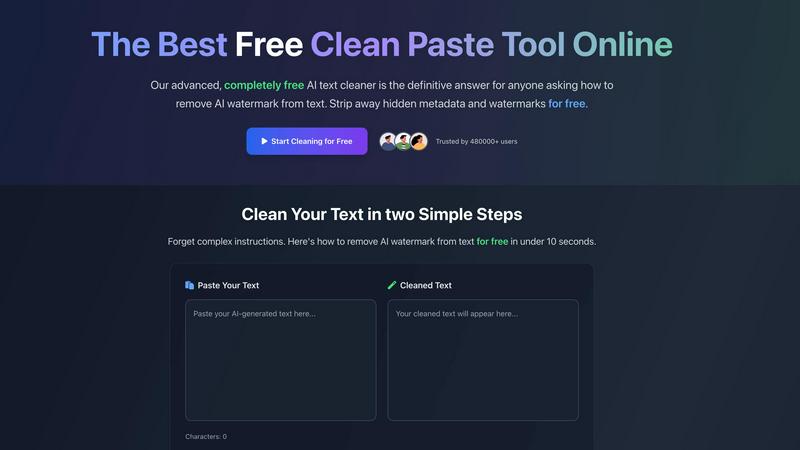
CleanPaste.org is a free tool that instantly removes invisible characters and AI watermarks from your text.
Last updated: March 2, 2026

DigitalMagicWand
DigitalMagicWand is a suite of AI tools that creates and refines images, audio, video, and text with precision.
Last updated: March 18, 2026
Visual Comparison
CleanPaste.org
DigitalMagicWand

Feature Comparison
CleanPaste.org
Instant One-Click Processing
The core functionality of CleanPaste.org is built for speed and simplicity. Users can paste their text and receive cleansed results instantly with a single click. There is no complex setup, no waiting for processing queues, and no need to navigate through multiple menus. This immediate, streamlined approach respects the user's time and integrates seamlessly into any writing or editing workflow, making the cleansing of text as simple as copying and pasting.
Comprehensive Invisible Character Removal
This feature employs advanced algorithms to perform a deep scan of submitted text. It is engineered to detect and strip out a wide array of hidden artifacts that are not visible in standard text editors. This includes zero-width spaces, non-printing formatting characters, and embedded metadata that can be carried over from various word processors, web pages, and AI platforms. The result is text that is visually clean and free from underlying technical clutter.
AI Watermark Removal Mode
A dedicated function addresses the modern challenge of AI-generated content. This mode specifically targets and removes the statistical patterns and subtle linguistic artifacts that act as AI watermarks. By stripping these identifiers, the tool helps ensure the text presents with a natural, human-like quality, significantly improving its chances of passing through AI content detection systems without being flagged.
100% Free with No Limitations
CleanPaste.org is committed to being an accessible public utility. Every feature, from basic invisible character cleaning to advanced AI watermark removal, is available to all users without any cost. The service operates with no mandatory user registration, no tiered premium plans, and no caps on the number of cleanses or the length of text submitted. This removes all barriers to access for individuals at any level.
DigitalMagicWand
AI Text Analysis and Humanization
This feature includes two powerful tools. The Accurate AI Detector provides a one-click analysis to determine if text is human or AI-generated, offering clear confidence scores for informed decision-making. Complementing this is the Undetectable AI Text Humanizer, which uses proprietary algorithms to rewrite AI-generated text. It eliminates statistical patterns that trigger detectors while preserving the original message, producing natural-sounding writing suitable for academic, professional, and creative contexts.
Advanced Audio Processing and Separation
DigitalMagicWand offers specialized tools for musicians and audio enthusiasts. Digital Ear™ Piano converts piano audio recordings into precise MIDI data, capturing the nuance of performance for easy editing and scoring. For audio isolation, UnMixIt™ Pro separates songs into studio-grade stems like vocals, drums, and bass for remixing and production. The standard UnMixIt™ tool simplifies creating karaoke tracks or isolating vocal tracks from any song quickly and without technical expertise.
Intelligent Image Generation and Editing
This suite allows for both creation and manipulation of images. Users can generate stunning images or scalable vector (.svg) art from simple text descriptions, receiving professional-quality visuals with accurate text rendering. The AI Image Editor acts as a powerful, instruction-based tool where users can type commands to perform complex edits like swapping backgrounds, removing objects, or restoring photos, making advanced photo editing accessible to all.
Precision Image Utility Tools
Focused on specific, common image tasks, these tools provide reliable, automated results. The Instant Background Removal tool uses smart algorithms to cleanly and accurately separate subjects from their backgrounds, producing professional cutouts. While an older app for replacing or removing objects is noted, the guidance is to use the more capable AI Image Editor for these comprehensive editing needs, ensuring users have the best tool for the job.
Use Cases
CleanPaste.org
For Students Submitting Academic Work
Students using AI tools for research assistance or draft generation can use CleanPaste.org as a final check before submission. The tool removes hidden characters and metadata that may inadvertently be copied from source materials or AI platforms, ensuring the submitted essay or paper is clean. More importantly, it helps humanize the text, reducing the risk of it being flagged by academic integrity software and allowing the student's own voice and analysis to stand clear.
For Content Creators and Bloggers
Professional writers and bloggers who utilize AI for ideation or drafting can integrate CleanPaste.org into their editing process. It cleans the text of invisible formatting artifacts that can disrupt publishing platforms and helps remove AI watermarks. This ensures the final article maintains the creator's intended brand voice and reads as authentically human, which is crucial for building trust and engagement with their audience.
For Business and Professional Communication
Professionals who draft reports, proposals, marketing copy, or emails with AI assistance can rely on CleanPaste.org to polish their output. The tool ensures that all business communications are free from hidden formatting that could cause display issues for recipients and that the language flows naturally. This preserves a professional image and ensures the message's clarity and authenticity are never compromised by technical artifacts.
For Non-Native English Speakers
Individuals who use AI tools to help draft or refine text in English can use CleanPaste.org to finalize their writing. While the AI provides a strong foundation, the tool helps by removing tell-tale robotic patterns or watermarks, resulting in content that sounds more natural and fluid. This empowers users to communicate more effectively and confidently in professional or academic settings.
DigitalMagicWand
Academic and Professional Writing Integrity
Educators, students, and professionals can use the AI Text Detector to verify the originality of essays, reports, and articles. Subsequently, the AI Humanizer tool allows content creators and marketers to refine AI-assisted drafts into natural, undetectable text, ensuring their work meets authenticity standards for publication, submission, or client delivery without the risk of being flagged by detection software.
Music Production and Practice
Musicians and producers can transcribe live piano performances into editable MIDI files with Digital Ear™ for composition and arrangement. DJs and remix artists can use UnMixIt™ Pro to isolate vocals and instrument stems from existing songs to create custom mashups, remixes, or practice tracks. Hobbyists can also easily create karaoke versions of songs for personal entertainment or performance.
Marketing and Content Creation
Marketing teams, bloggers, and social media managers can generate unique, high-quality images and vector logos directly from text descriptions, eliminating the need for stock photos or graphic designers for simple projects. The AI Image Editor allows for rapid creation of product mockups, background changes for ads, and professional photo edits, streamlining the content creation pipeline.
Personal Photo Management and Restoration
Individuals can use the platform to enhance personal photos. The background removal tool can quickly create clean cutouts for invitations or collages. The AI Image Editor can restore old family photos by removing scratches and damage, erase unwanted objects or photobombers from vacation pictures, and creatively alter images for fun or social media, all through simple text instructions.
Overview
About CleanPaste.org
CleanPaste.org is a fundamental online utility designed to restore digital text to its purest, most authentic state. In today's digital workflow, text is often processed through multiple platforms and AI tools, accumulating hidden artifacts that compromise its integrity. These artifacts include invisible formatting characters, zero-width spaces, embedded metadata, and subtle statistical patterns known as AI watermarks. CleanPaste.org directly addresses this core problem by providing a straightforward, no-cost solution to cleanse text of these unseen elements. Its primary value is delivering clean, human-presenting text through an instantaneous, one-click process. The tool is completely free, requiring no registration, imposing no usage limits, and charging no fees. It serves a wide audience, from students and academics to professional content creators, marketers, and business communicators. For anyone who uses AI assistance in drafting essays, articles, reports, or communications, CleanPaste.org acts as an essential final step. It ensures the output is not only free of technical clutter but is also optimized to pass scrutiny from AI detection systems, thereby preserving the originality and perceived authenticity of the work. By focusing on this foundational need, CleanPaste.org empowers users to confidently present their content, knowing it reflects a natural, human-written quality.
About DigitalMagicWand
DigitalMagicWand is a comprehensive online platform that provides a suite of specialized, AI-powered tools for processing and creating digital content. At its core, the platform is designed to simplify complex digital tasks, making advanced artificial intelligence technology accessible to everyone, regardless of their technical skill level. It serves as a centralized hub for transforming images, audio, video, and text through intuitive, purpose-built applications. The main value proposition of DigitalMagicWand lies in its ability to replace hours of manual, specialized work with fast, automated, and high-quality results. Whether you are a content creator needing to edit photos, a musician looking to transcribe audio, a writer ensuring the authenticity of text, or a marketer generating visual assets, DigitalMagicWand offers a reliable and powerful solution. It demystifies AI by applying it to practical, everyday creative and professional challenges, empowering users to enhance, transform, and generate content with confidence and ease.
Frequently Asked Questions
CleanPaste.org FAQ
How does CleanPaste.org remove invisible characters?
CleanPaste.org uses specialized algorithms designed to scan text at a deep level. These algorithms are programmed to identify patterns and character codes that correspond to non-printing elements, such as zero-width spaces, formatting metadata, and other hidden artifacts. When you paste your text and initiate the clean process, the tool instantly analyzes the content, isolates these invisible components, and strips them out, returning only the visible, intended text to you.
Is CleanPaste.org truly free? What is the catch?
Yes, CleanPaste.org is completely free. There is no catch, no hidden fees, and no premium version. The tool is offered as a fundamental utility for everyone. We do not require user registration, we do not impose usage limits on the number of cleanses or text length, and we do not sell user data. The goal is simply to provide an effective solution for cleaning text without any barriers to access.
What types of hidden characters does the tool remove?
The tool is designed to remove a comprehensive range of invisible characters. This includes zero-width spaces often used in complex formatting, hidden metadata embedded by word processors and websites, non-printing formatting commands, and the specific statistical patterns known as AI watermarks that are sometimes left in AI-generated text. It provides a thorough cleansing to restore text to a basic, clean state.
Will using CleanPaste.org guarantee my content passes AI detection?
While CleanPaste.org is highly effective at removing AI watermarks and humanizing text, no tool can provide an absolute 100% guarantee against all AI detection systems, as these systems continuously evolve. However, by stripping the identifiable artifacts and patterns that detectors commonly look for, CleanPaste.org significantly improves the likelihood that your content will be perceived as human-written, making it a powerful and essential step in the process.
DigitalMagicWand FAQ
What types of files can I process with DigitalMagicWand?
DigitalMagicWand supports a wide range of common digital file formats. For images, you can upload standard formats like JPG and PNG. The audio tools work with popular files such as MP3 and WAV. The text tools process pasted text directly. Specific tools, like the vector art generator, output specialized formats like SVG. It is designed to work with the files most users already have.
Do I need any technical or design skills to use these tools?
No, advanced technical or design skills are not required. A fundamental principle of DigitalMagicWand is to make powerful AI tools accessible through simple, intuitive interfaces. For most apps, you simply upload your file or type a text description, and the AI handles the complex processing. The platform guides you through straightforward steps to achieve professional results.
How accurate is the AI Text Detector?
The AI Text Detector is built to provide accurate, reliable results. It analyzes text against known patterns of AI writing models like ChatGPT and Claude, delivering a clear confidence score for each check. This helps you understand the likelihood that content is AI-generated, supporting more informed decisions than manual guesswork. For the most critical assessments, it is one part of a broader evaluation process.
Can I use the generated images or audio for commercial projects?
Yes, content created using DigitalMagicWand's generation tools, such as images from text or vector art, is typically intended for your use, including commercial projects like marketing materials, website graphics, or product designs. It is always recommended to review the specific Terms of Service for each tool for detailed licensing information to ensure compliance with your intended use case.
Alternatives
CleanPaste.org Alternatives
CleanPaste.org is a fundamental tool in the AI assistant category, designed to restore text to a pure, human-presentable state. It works by removing invisible formatting, metadata, and AI-generated watermarks, providing a clean foundation for any written work. Users often seek alternatives for various foundational reasons. These include the need for different feature sets, such as batch processing or integration with other platforms. Others may look for tools that operate offline or offer a different approach to privacy and data handling. When evaluating an alternative, focus on the core principles. A reliable tool should effectively strip invisible characters and AI signatures without altering your original message. Consider the simplicity of the process, the tool's commitment to data security, and whether its approach aligns with your need for authentic, uncluttered text.
DigitalMagicWand Alternatives
DigitalMagicWand is an online platform that provides AI-powered tools for processing images, audio, video, and text. It belongs to the category of AI assistants, designed to help users enhance and create digital content through artificial intelligence. This all-in-one approach makes it a versatile solution for various creative and professional tasks. Users often explore alternatives for several practical reasons. These can include budget constraints, as pricing models vary widely. Others may seek a tool specialized in just one area, like image editing or text generation, rather than a full suite. Platform compatibility, such as needing a desktop application versus a web service, or different user interface preferences also drive the search for other options. When evaluating an alternative, focus on your core needs. Identify which type of media processing is most important for your projects. Consider your budget and whether a subscription or one-time purchase fits better. Also, assess the learning curve and the level of customer support offered, as these factors significantly impact long-term satisfaction and productivity.