
CIOOffice: the CIO-Software vs Zovo
Side-by-side comparison to help you choose the right product.

CIOOffice: the CIO-Software
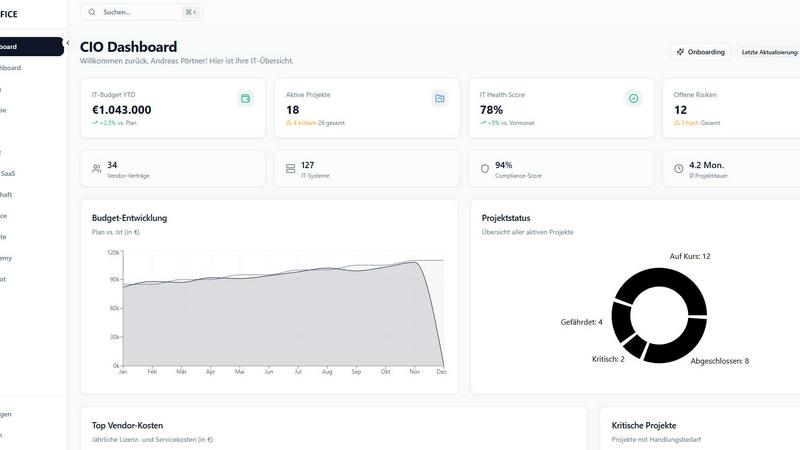
CIOOffice simplifies IT management for CIOs by integrating strategy, budgets, projects, and vendor oversight in one.
Last updated: February 26, 2026

Zovo offers 20 privacy-first Chrome extensions for developers and writers, unlocking tools with one simple subscription.
Last updated: February 26, 2026
Visual Comparison
CIOOffice: the CIO-Software
Zovo

Feature Comparison
CIOOffice: the CIO-Software
IT Strategy Management
This feature allows users to define strategic objectives, plan actionable measures, and track progress transparently. With templates and tools available, IT leaders can align their strategies with overall business goals effectively.
Budget Management
CIOOffice simplifies financial oversight by managing OPEX, CAPEX, and forecasts in a clear manner. Users receive automated alerts for budget deviations, ensuring that financial resources are optimally allocated and monitored.
Project Portfolio Management
With this feature, organizations can categorize, prioritize, and maintain oversight of their entire project portfolio. This functionality helps in managing resources effectively and ensuring that strategic initiatives are executed successfully.
Governance and Risk Management
CIOOffice provides tools to identify and manage IT risks, ensuring compliance with regulations and facilitating audit preparations. This feature is crucial for maintaining the integrity and security of IT operations within organizations.
Zovo
BeLikeNative
BeLikeNative is a flagship extension that helps users improve their writing by providing instant rewrites in 80 different languages. This tool is designed for anyone looking to communicate more effectively in a foreign language or enhance their overall writing skills. With just one keystroke, users can transform their text to sound more natural, making it an essential tool for students, professionals, and anyone who values clear communication.
Tab Suspender Pro
Tab Suspender Pro is designed to optimize memory usage by automatically suspending inactive tabs. This feature is particularly beneficial for users who frequently multitask or work with numerous tabs open. By intelligently detecting which tabs are not in use, it frees up valuable system resources, helping to speed up your browser and enhance your overall browsing experience.
Clipboard History Pro
Clipboard History Pro ensures that users never lose track of copied text again. This feature allows for the storage of up to 10,000 clips, enabling instant searches and smart pasting of previously copied items. Ideal for writers, researchers, and anyone who regularly copies and pastes information, this tool significantly improves efficiency and accuracy when handling text.
JSON Formatter Pro
JSON Formatter Pro simplifies the process of working with JSON data by providing a user-friendly interface for formatting, validating, and exploring JSON files. It includes features for beautifying and minifying code, as well as tree exploration for easier navigation. This tool is particularly useful for developers and data analysts who need to handle JSON data regularly, offering a streamlined way to visualize and manipulate complex data structures.
Use Cases
CIOOffice: the CIO-Software
Enhancing IT Strategy Alignment
Organizations can use CIOOffice to align IT initiatives with their overall business strategy. By defining clear objectives and tracking progress, CIOs can ensure that IT efforts contribute directly to organizational goals.
Optimizing Budget Control
CIOOffice enables IT managers to maintain a comprehensive view of their budgets, helping them to identify cost-saving opportunities. With automated warnings for budget discrepancies, decision-makers can react quickly to financial challenges.
Streamlining Project Management
The project portfolio management feature allows companies to categorize and prioritize projects efficiently. This streamlining helps teams focus on the most critical initiatives that drive value for the business.
Strengthening Compliance and Governance
With tools for risk assessment and compliance tracking, CIOOffice assists organizations in preparing for audits and ensuring that they meet necessary regulatory requirements. This capability is vital for maintaining trust and credibility in the market.
Zovo
Enhancing Language Skills
BeLikeNative can be used by language learners who want to practice writing in a new language. By providing instant rewrites, it helps users learn how to construct sentences and use vocabulary more effectively, making it a valuable tool for students and professionals alike.
Memory Management During Browsing
Tab Suspender Pro is perfect for users who often have multiple tabs open while working on projects. By suspending inactive tabs, it helps conserve memory and keeps the browser running smoothly, allowing for a more organized and efficient workflow.
Efficient Text Management
Clipboard History Pro is ideal for professionals and students who frequently copy and paste information. Whether compiling research notes or drafting documents, this tool ensures users can easily retrieve and manage their clipboard history, significantly enhancing productivity.
Simplifying Data Handling
JSON Formatter Pro is essential for developers who work with APIs or data interchange formats. It enables them to format and validate JSON data quickly, making it easier to debug and understand complex data structures, thus streamlining their development process.
Overview
About CIOOffice: the CIO-Software
CIOOffice is a cutting-edge, cloud-based platform specifically designed to meet the needs of Chief Information Officers (CIOs), IT managers, and digital leaders within enterprises and mid-sized organizations. This all-encompassing IT management solution integrates essential functions such as IT strategy management, project portfolio oversight, budget control, vendor management, and performance analytics into one cohesive and user-friendly interface. By adopting CIOOffice, organizations can significantly enhance transparency across their IT operations, streamline workflows, and empower informed decision-making through real-time data insights. The platform not only supports digital transformation initiatives by standardizing governance practices but also encourages collaboration between IT and business teams, all while ensuring compliance with stringent security standards and GDPR regulations. In summary, CIOOffice is an indispensable tool for modernizing IT management, driving operational efficiency, and ultimately bolstering business growth.
About Zovo
Zovo is an innovative suite of 20 Chrome extensions designed to enhance the productivity and efficiency of users while browsing the internet. Created by a solo developer with over a decade of experience and a robust track record of $400K earned on Upwork, Zovo stands out for its commitment to user privacy and community engagement. The flagship extension, BeLikeNative, empowers more than 3,300 users to write like native speakers in 80 languages with just one keystroke. The entire suite includes various tools such as Tab Suspender Pro, JSON Formatter Pro, and Clipboard History Pro, among others. Zovo prioritizes user feedback, allowing members to vote on features and shape the roadmap, ensuring that each extension meets real-world needs. With no data harvesting, no investors, and a strong focus on user-driven development, Zovo represents a refreshing approach to browser extensions that put users first.
Frequently Asked Questions
CIOOffice: the CIO-Software FAQ
What types of organizations can benefit from using CIOOffice?
CIOOffice is designed for enterprises and mid-sized companies, particularly those with dedicated IT leadership such as CIOs and IT managers. It is tailored to meet the complexities of IT management in these organizations.
How does CIOOffice help with digital transformation?
CIOOffice supports digital transformation by standardizing governance practices and enhancing collaboration between IT and business teams. This unified approach helps organizations adapt to changing market demands effectively.
Is CIOOffice compliant with data protection regulations?
Yes, CIOOffice adheres to stringent security standards and is compliant with GDPR regulations, ensuring that organizations can manage their data responsibly and securely.
What kind of support is available for CIOOffice users?
CIOOffice offers various support options, including email support for lower-tier plans and priority support for business and professional plans. Additionally, dedicated support is available for enterprise customers.
Zovo FAQ
What kind of data does Zovo collect?
Zovo is committed to privacy and does not collect any user data. All data processed by the extensions remains on the user's device, ensuring complete confidentiality and security.
How often are new extensions released?
New extensions are typically released every month. Members receive early access to these tools, usually one to two weeks before they are available to the public.
Can I request features for Zovo extensions?
Yes, users are encouraged to submit feature requests directly. The developer reviews all requests, and the most requested features are prioritized in the development roadmap.
How can I contact support if I have issues?
Users can reach out directly to the developer via email or Discord for any questions or problems. There are no automated bots or ticket queues, ensuring a personal touch in customer support.
Alternatives
CIOOffice: the CIO-Software Alternatives
CIOOffice: the CIO-Software is a centralized cloud platform designed specifically for Chief Information Officers, IT managers, and digital leaders within enterprises and mid-sized companies. It belongs to the productivity and management category, offering a comprehensive solution for managing IT strategy, budgets, projects, and vendor relationships in a single, user-friendly interface. Users often seek alternatives to CIOOffice for various reasons, including pricing concerns, specific feature requirements, or compatibility with existing platforms. When exploring alternatives, it’s essential to consider the platform's alignment with your organization’s needs, ease of use, scalability, and the ability to support collaboration across teams. Ultimately, the right choice should enhance your IT management capabilities while fitting within your budgetary constraints.
Zovo Alternatives
Zovo is a suite of 20 privacy-focused Chrome extensions designed specifically for developers and writers. With tools like JSON Formatter, Tab Suspender, and Clipboard History, Zovo enhances productivity while prioritizing user privacy and data security. Users often seek alternatives to Zovo for various reasons, including pricing, feature sets, or compatibility with different platforms. It is essential to consider factors such as usability, the range of features, and the commitment to user privacy when evaluating alternatives to ensure that you find a solution that meets your specific needs. When searching for an alternative, it's crucial to identify what functionalities are most important to you. A good alternative should offer a similar level of privacy, a variety of tools, and a user-friendly experience. Additionally, consider whether the alternative has a community-driven approach to feature development, as this can enhance the overall user experience and provide tools that genuinely meet your needs.