BRCKS vs Refbox
Side-by-side comparison to help you choose the right product.

BRCKS is a construction project platform that connects your team's WhatsApp updates into one organized hub without disruption.
Last updated: April 4, 2026

Refbox is a floating app that keeps your reference images and notes visible above any workspace.
Last updated: February 28, 2026
Visual Comparison
BRCKS

Refbox
Feature Comparison
BRCKS
BRCKS Bot for WhatsApp
The BRCKS Bot allows your team to update projects directly from WhatsApp, the tool they already use daily. By simply texting the bot, users can log tasks, check off checklist items, ask for project information, and share updates. This feature eliminates the need for app switching and ensures all communication, even if it starts on WhatsApp, is automatically captured and organized within the main BRCKS platform, creating a complete project record without changing team habits.
Checklists and Task Management
This feature provides a structured way to assign, track, and monitor tasks and daily site activities. Project managers can create detailed checklists for each phase of work, assign them to specific team members or trades, and see real-time progress as items are completed. It replaces informal, unreliable to-do lists and verbal instructions with a clear, accountable system that ensures every critical action is documented and followed through, from first fix to final sign-off.
Client Portal
The Client Portal offers homeowners and clients a beautiful, read-only window into their project's progress. They can view key updates, see photos of milestones, and stay informed without gaining access to internal team tools or communication. This feature keeps clients positively engaged and in the loop, managing their expectations transparently while preventing them from disrupting the operational workflow of the construction team.
Unified Project Feed and Files
This is the central hub of a BRCKS project. The Feed collates all project updates, messages, completed tasks, and shared files into one chronological timeline. Combined with a dedicated space for all project files, notes, and meeting recordings, it ensures that every piece of information is stored in one searchable location. This eliminates time wasted digging through emails and separate apps, giving the entire team a single source of truth.
Refbox
Always-on-Top Floating Frames
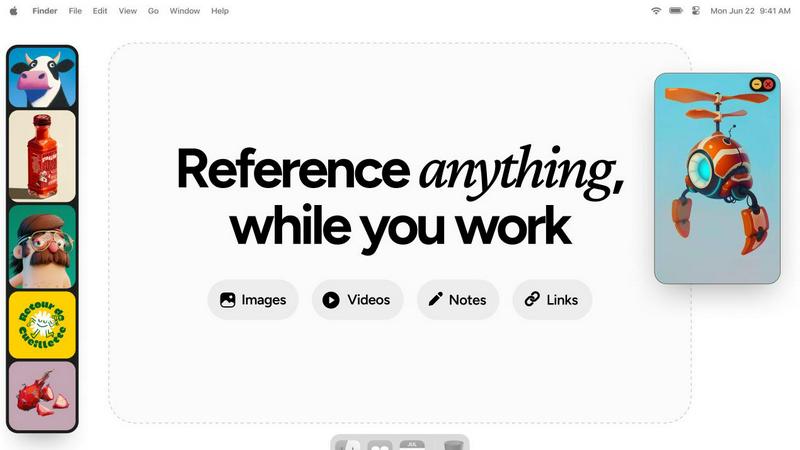
This is the foundational feature of Refbox. It allows you to pin any image, GIF, or video reference into a resizable frame that stays visible above all other application windows. This eliminates the need for disruptive window switching, keeping your reference material directly in your line of sight as you work in your primary creative software, preserving your focus and workflow continuity.
Centralized Reference Library (The Box)
All your media is gathered into a central, organized sidebar called the Box. You can import references by dragging files from your computer, pasting image links or screenshots from the web, or using the clipboard. This creates a single source of truth for your project's inspiration, moving you away from scattered folders and browser tabs to a streamlined, searchable collection.
Multiple Viewing Modes
Refbox provides flexible ways to interact with your references. View your entire collection in a dense Masonry grid within the Box, float individual items as separate windows, or use a full-screen gallery mode ideal for secondary monitors. You can also flip through items like a slideshow for quick comparison, ensuring you have the right visual context at any moment.
Integrated Notes and Tools
Beyond images, Refbox lets you create markdown-enabled notes with styling and checklists, turning it into a full reference hub. Practical tools are built-in, including a color picker to sample colors from any media, GIF frame-by-frame playback, pixel-perfect rendering for pixel art, and the ability to crop images or take website screenshots directly by pasting a URL.
Use Cases
BRCKS
Streamlining Day-to-Day Site Communication
Site managers and foremen use BRCKS to replace chaotic group chats and sporadic emails. Daily instructions, material requests, and progress photos are all posted in the project feed or via the BRCKS Bot. This ensures every subcontractor receives the same information, questions are answered visibly for all, and a clear, searchable record of all daily communication is maintained, drastically reducing miscommunication and repeated conversations.
Managing Subcontractor Work and Accountability
Main contractors use BRCKS to onboard and manage all subcontracting trades efficiently. They can invite unlimited subcontractors for free, assigning them specific checklists and tasks relevant to their scope. Subcontractors can access their schedules, mark tasks complete, and raise issues within the platform. This creates formal accountability, provides a clear view of who is responsible for what, and streamlines the process of tracking work completion across multiple trades.
Keeping Homeowners Informed and Confident
Builders and renovators use the BRCKS Client Portal to provide a professional client experience. Instead of fielding constant phone calls for updates, they can direct clients to the portal to see recent photos, completed milestones, and general progress notes. This transparent approach builds trust, reduces administrative time spent on client updates, and minimizes misunderstandings about the project's status and next steps.
Centralizing Project Documentation and Decisions
Project leads use BRCKS as the definitive archive for all project-related information. Meeting notes, approved drawings, material specifications, change order requests, and site photographs are all uploaded and stored in the project files. When questions arise about past decisions or specific details, team members can quickly search and find the correct document or note, preventing errors and disputes based on outdated or incorrect information.
Refbox
Digital Illustration and Concept Art
Illustrators and concept artists can keep mood boards, anatomical references, color palettes, and style guides pinned around their canvas. This allows for constant visual comparison and inspiration without breaking concentration to search through files, enabling a more fluid and accurate creative process from sketch to final piece.
UI/UX and Graphic Design
Designers can float brand guidelines, logo variations, typography samples, and competitor website screenshots directly over their design tools like Figma or Adobe XD. This ensures every design decision is made with immediate reference to critical assets and specifications, boosting both speed and consistency in the design workflow.
3D Modeling and Animation
3D artists and animators can pin orthographic reference images, texture maps, character turnarounds, and motion study videos next to their 3D viewport. Having these crucial references always visible allows for more accurate modeling, sculpting, and animation, as artists can match proportions, poses, and movements without guesswork.
Motion Graphics and Video Editing
Editors and motion designers can keep storyboards, style frames, asset lists, and video clips accessible in floating windows above their timeline software. This facilitates quick visual checks and ensures the final product aligns perfectly with the planned creative direction, all while maintaining an efficient editing flow.
Overview
About BRCKS
BRCKS is a fundamental construction project management and communication platform designed to bring order and clarity to residential building projects. It is built for the entire project team: from main contractors and site managers to every subcontracting trade and the homeowners themselves. The core problem BRCKS solves is communication chaos. In construction, critical information, tasks, photos, and decisions are typically scattered across WhatsApp messages, personal emails, and various documents, leading to missed details, delays, and costly rework. BRCKS provides a single, centralized platform to keep all project conversations, checklists, tasks, files, photos, and meeting notes in one accessible place. Its unique value proposition is achieving this consolidation without disrupting existing workflows. The platform integrates seamlessly with tools teams already use, like WhatsApp, through the BRCKS Bot, allowing updates to flow automatically into the managed platform. This back-to-basics approach means no complex training is needed. BRCKS is designed to be simple, practical, and immediately useful, helping construction teams save time, reduce risk, and deliver projects more smoothly by ensuring nothing gets lost and everyone is on the same page.
About Refbox
Refbox is a fundamental desktop application designed to solve a persistent problem in creative workflows: the disruptive act of window switching. At its core, Refbox is a floating reference manager that allows artists, designers, animators, and other visual professionals to keep their inspiration and resources visible at all times. It functions by letting users pin images, GIFs, videos, and notes into always-on-top frames that float above any other application. This foundational approach eliminates the need to constantly alt-tab between a creative software and a folder, browser, or note-taking app, thereby preserving a state of deep focus and flow.
The tool is built for professionals across disciplines like 3D art, animation, UI/UX design, illustration, concept art, motion graphics, photography, and pixel art. Its main value proposition is organized visual access without distraction. Users can gather media from the web, their computer, or clipboard into a central sidebar and then choose how to view it: in a Masonry grid, as individual floating windows on the desktop, or in a full-screen gallery for secondary monitors. By integrating markdown-enabled notes and clickable bookmarks directly into the reference ecosystem, Refbox consolidates the entire inspirational toolkit into one always-accessible space. It is the essential companion for any creative who needs their references at their fingertips, not buried in tabs and folders.
Frequently Asked Questions
BRCKS FAQ
How does BRCKS work with WhatsApp?
BRCKS integrates with WhatsApp through the BRCKS Bot. Your team members can simply send a message to the bot as they normally would in a group chat. The bot intelligently logs these updates, tasks, or photos directly into the corresponding project within the BRCKS platform. This means communication stays on the familiar tool, but all the information is automatically organized and saved in one central, manageable place for the project manager.
Do my subcontractors have to pay to use BRCKS?
No, one of the foundational principles of BRCKS is that subcontractors get full and free access to the projects they are working on. You can invite every trade without any extra cost. They can view their tasks, access the project calendar, upload files, and mark off checklists at no charge. You only pay for the seats required by your own core company team members who need full administrative access.
Is BRCKS difficult to learn and implement?
BRCKS is designed with a back-to-basics, practical approach specifically for construction teams. The interface is built to be intuitive and straightforward. Most importantly, because it works alongside tools like WhatsApp via the BRCKS Bot, there is little to no disruption to existing workflows. Teams can start benefiting from organized communication without lengthy training sessions or a steep learning curve, adopting it naturally as they work.
What kind of projects is BRCKS best suited for?
BRCKS is purpose-built for residential construction projects. This includes new home builds, renovation projects, extension work, and refurbishments. It is ideal for main contractors, small to medium-sized building firms, and the trades that work with them. The platform scales to manage multiple projects simultaneously, making it suitable for builders and project managers overseeing several residential jobs at once.
Refbox FAQ
What types of files does Refbox support?
Refbox supports a wide range of media essential for creative work. You can import standard image files (JPG, PNG, WebP, SVG), animated GIFs, and various video formats. It also supports text-based notes and can generate image screenshots directly from website URLs you paste into the application.
How does Refbox help maintain focus?
Refbox is built on the principle of reducing friction. By allowing references to float in always-on-top windows, it completely eliminates the disruptive cycle of minimizing your work to find a file or browser tab. Your inspiration stays visually accessible, which helps you maintain a state of deep focus, or flow, for much longer periods.
Can I use Refbox with multiple monitors?
Yes, Refbox is excellent for multi-monitor setups. You can use the full-screen gallery mode to turn a secondary monitor into a dedicated reference display. Alternatively, you can spread individual floating frames across multiple screens, organizing your workspace to keep your primary screen clear for your main creative application.
Is there a way to organize different projects?
Yes, Refbox uses a system called Collections. You can create different Collections for each project, client, or theme. Switching between these Collections is instant with a single click, allowing you to keep your references neatly separated and quickly access the exact set of visuals you need for your current task.
Alternatives
BRCKS Alternatives
BRCKS is a construction project management and communication software. It falls into the category of productivity and management tools designed specifically for the building industry. Its purpose is to centralise day-to-site communication, tasks, and documentation that often get scattered across emails, messaging apps, and paper. Users may look for alternatives to BRCKS for various practical reasons. These can include budget constraints, the need for different feature sets, or specific requirements like integration with other business platforms. Some teams might also seek tools that cater to different project scales or company sizes beyond residential construction. When evaluating alternatives, focus on core needs. Consider the software's ease of use for your entire team, its ability to organise conversations and files securely, and how well it tracks tasks and decisions. The goal is to find a practical solution that brings clarity and reduces miscommunication on site, without unnecessary complexity.
Refbox Alternatives
Refbox is a fundamental desktop application in the productivity and management category. It serves as a floating reference manager, designed to keep images, notes, and videos visible above other software to prevent disruptive window switching and maintain creative focus. Users may look for alternatives for foundational reasons like budget, specific feature needs, or compatibility with their operating system. Some may require a simpler tool, while others seek more advanced organizational capabilities not present in their current solution. When evaluating an alternative, consider the core need: persistent visual access to reference material. Key factors include the ability to keep content always on top, support for various file types, and organizational methods that fit your workflow without adding complexity or distraction.