
Ayn8n vs Hush Touch | Voice-to-Text for MacOS
Side-by-side comparison to help you choose the right product.

Ayn8n
Ayn8n provides over 5,000 AI templates to automate and simplify your essential workflows.
Last updated: February 28, 2026

Hush Touch | Voice-to-Text for MacOS
Hush Touch transforms your voice into text on MacOS, learning your vocabulary and ensuring privacy with offline.
Last updated: February 26, 2026
Visual Comparison
Ayn8n
Hush Touch | Voice-to-Text for MacOS

Feature Comparison
Ayn8n
Extensive Pre-Built Workflow Library
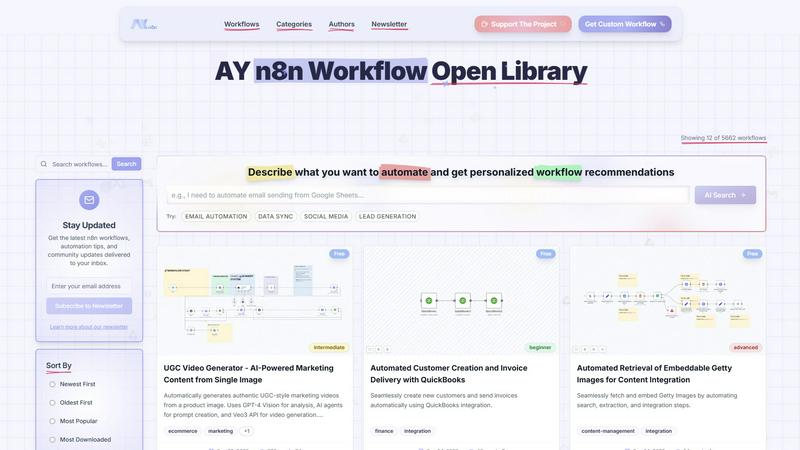
The platform hosts a massive and growing collection of over 6,150 ready-to-use n8n workflows. These are meticulously categorized by function—such as Integration, Content Management, Analytics, and Sales & CRM—allowing users to quickly find solutions for their specific needs. Each workflow can be imported directly into a user's n8n instance, providing a powerful jumpstart for any automation project and eliminating the need to build common processes from the ground up.
AI-Powered Search and Discovery
Beyond traditional filters, Ayn8n incorporates an intelligent AI Search function. Users can describe what they want to automate in plain language (e.g., "email automation" or "lead generation") and receive personalized workflow recommendations. This feature lowers the barrier to entry, helping those unfamiliar with technical terminology find the perfect template to begin their automation journey efficiently.
Community-Driven Curation and Sharing
Ayn8n operates as an open hub where users can both consume and contribute workflows. This model fosters a vibrant community where developers and "vibe coders" can share their automation solutions. Workflows are attributed to their authors and include metrics like download counts, helping users identify popular and trusted templates. This collaborative environment accelerates learning and continuous improvement of available automations.
Advanced Filtering and Sorting System
To navigate the extensive library, users can employ multiple, granular filters. Workflows can be sorted by date, popularity, or download count. Furthermore, they can be filtered by complexity level (Beginner, Intermediate, Advanced), price (Free or Paid), and specific categories. This precise filtering ensures that users of all skill levels and budgets can find workflows that match their exact technical capability and requirements.
Hush Touch | Voice-to-Text for MacOS
Dual-Engine Recognition
Hush Touch utilizes two powerful Apple dictation engines to deliver superior transcription accuracy. The DictationTranscriber manages the natural flow and punctuation of your speech, while the SFSpeechRecognizer enhances custom vocabulary recognition. By merging the strengths of both engines and incorporating an Apple Intelligence final pass, Hush Touch ensures that your dictation is precise and contextually relevant.
Custom Vocabulary
With the ability to learn and adapt, Hush Touch allows you to input up to 500 custom terms, which helps it recognize specific jargon, brand names, and technical phrases that are unique to your profession. This feature includes an auto-learning capability that updates your vocabulary based on corrections you make during dictation, ensuring that the app evolves with your needs over time.
Smart Text Processing
The app's smart text processing capabilities help streamline your dictation by automatically removing filler words and correcting common speech errors in real time. It also formats voice snippets for repeated phrases and organizes text into numbered lists, making it easier to produce structured and polished documents directly from your spoken words.
Context Modes & Hands-Free Operation
Hush Touch offers multiple context modes tailored for different writing scenarios, including General, Email, Code, and Notes modes. You can initiate dictation hands-free by saying "Hey Siri, start touch," which allows the app to auto-insert text after a brief pause. Custom command phrases enable you to send messages or stop dictation effortlessly, enhancing your overall dictation experience.
Use Cases
Ayn8n
Marketing and Social Media Automation
Users can automate repetitive marketing tasks to save significant time and maintain consistency. This includes workflows for AI-driven social post creation and scheduling across platforms like X and LinkedIn, automated lead generation from business directories, and even generating UGC-style marketing videos from a single product image. These automations help maintain an active, engaging online presence with minimal daily effort.
Data Synchronization and Integration
A common challenge is moving and syncing data between different business applications. Ayn8n provides workflows to seamlessly migrate data between platforms, such as from Airtable to PostgreSQL, or to keep CRM records, spreadsheets, and databases in sync automatically. This eliminates manual data entry errors and ensures all systems have access to the same, up-to-date information.
Content Management and Creation
For content teams and creators, Ayn8n offers automations that streamline production and distribution. Workflows can automate the retrieval of embeddable assets like Getty Images, generate AI music for projects, audit website content for SEO and LLM-friendliness, and even automate the promotion of new blog posts to social media channels, thereby increasing content reach and impact.
Sales, CRM, and Administrative Operations
Sales and operations teams can leverage workflows to automate critical but time-consuming processes. This includes automatically creating new customer records and sending invoices in QuickBooks, processing incoming emails and attachments, and executing personalized outreach campaigns by scraping and processing data from platforms like LinkedIn, thereby improving lead engagement and closing efficiency.
Hush Touch | Voice-to-Text for MacOS
Drafting Emails and Messages
Hush Touch is perfect for busy professionals who need to send emails or messages quickly. By dictating your thoughts, you can compose written communications in real time without getting bogged down by typing, allowing for more efficient usage of your time.
Creating Notes and Documents
Students and researchers can benefit from Hush Touch when taking notes or drafting documents. The app's accuracy and smart text processing features enable users to focus on their ideas and content rather than the mechanics of writing, resulting in clearer and more organized notes.
Writing Code and Technical Content
Developers and technical writers will appreciate Hush Touch's ability to recognize programming terminology and technical jargon. By dictating code and related documentation, they can work faster and reduce the likelihood of errors that often occur during manual typing.
Generating Content for Blogs and Articles
Content creators can leverage Hush Touch to brainstorm and draft blog posts or articles effortlessly. The app allows for a natural flow of ideas, enabling writers to capture their thoughts quickly and efficiently while maintaining their unique voice and tone.
Overview
About Ayn8n
Ayn8n, developed by AY Automate LLC, is an open library and community hub for n8n workflows. At its core, it is a comprehensive platform designed to democratize automation by providing a vast, searchable repository of over 6,150 pre-built workflows. This resource serves as a foundational tool for anyone looking to implement automation without starting from scratch. It caters to a wide audience, from beginners seeking simple "vibe coding" solutions to advanced developers needing complex integration templates. The library covers essential business domains such as marketing, CRM, data processing, content management, and e-commerce. By leveraging the fair-code power of n8n, Ayn8n enables users to discover, share, customize, and deploy automated processes that enhance productivity and operational efficiency. Its value proposition lies in reducing the time, cost, and technical expertise required to build robust automations, making advanced workflow capabilities accessible to all.
About Hush Touch | Voice-to-Text for MacOS
Hush Touch is a cutting-edge voice-to-text application designed specifically for macOS users who value speed, ease of use, and privacy in their dictation tools. This innovative app transforms spoken language into written text seamlessly and efficiently, making it an essential tool for anyone who regularly drafts emails, messages, notes, or documents. Hush Touch operates entirely on-device, ensuring that your voice data remains private and secure without relying on cloud services. By leveraging two advanced Apple transcription engines combined with an Apple Intelligence final pass, Hush Touch provides accurate and clean transcriptions that enhance your writing workflow. With a lightweight footprint of just 5.5 MB, it launches quickly and integrates effortlessly into daily tasks, allowing users to dictate naturally and hands-free. For just $20, you can enjoy a lifetime license without any ongoing subscription fees, making it a budget-friendly choice for professional and personal use alike.
Frequently Asked Questions
Ayn8n FAQ
What is n8n, and do I need it to use Ayn8n?
n8n is a fair-code licensed workflow automation tool that allows you to connect different apps and services. Ayn8n is a library of pre-built workflows designed specifically for the n8n platform. To use a workflow from Ayn8n, you need to have an n8n instance (either self-hosted or via n8n.cloud) to import and run the workflow file. Ayn8n provides the blueprint, and n8n is the engine that executes it.
Are the workflows on Ayn8n free to use?
Ayn8n offers a mix of both free and paid workflows. You can use the platform's filtering system to view "Free Only" workflows. Many of the over 6,150 workflows are available at no cost, contributed by the community. Paid workflows are also available, typically offering more specialized or complex automation solutions.
How do I import a workflow from Ayn8n into my n8n instance?
The process is straightforward. First, browse the Ayn8n library and select the workflow you want. Download the workflow template file (usually a .json file). Then, within your n8n editor, use the "Import from File" function to upload the downloaded JSON file. The workflow will appear in your editor, where you can configure any necessary credentials (like API keys) and activate it.
I'm new to automation. Is Ayn8n suitable for beginners?
Absolutely. Ayn8n is designed for users of all skill levels. Beginners should start by filtering workflows by "Beginner" complexity. These workflows are simpler and often come with clearer instructions. Using pre-built templates is an excellent educational tool, as you can import them and see how they are constructed, learning the fundamentals of n8n nodes and logic hands-on.
Hush Touch | Voice-to-Text for MacOS FAQ
How does Hush Touch ensure privacy with my voice data?
Hush Touch processes all voice data entirely on your Mac, with no reliance on cloud services. This means your voice recordings and transcriptions remain private and secure, ensuring that your data is not collected or shared.
Can I customize the vocabulary in Hush Touch?
Yes, Hush Touch allows you to customize your vocabulary with up to 500 terms. It also learns from corrections you make during dictation, helping it to adapt to your specific language needs over time.
Is there a trial version of Hush Touch available?
Yes, Hush Touch offers a 7-day free trial without requiring a credit card. This allows you to test the app's features and functionality before making a purchase decision.
What is the pricing structure for Hush Touch?
Hush Touch is available for a one-time purchase price of $20, providing you with a lifetime license. There are no subscription fees, making it a cost-effective solution for voice-to-text needs.
Alternatives
Ayn8n Alternatives
Ayn8n is an AI-powered automation platform that provides a vast library of over 5,000 prebuilt workflow templates. It falls into the category of AI assistants and workflow automation tools, designed to help users connect apps and automate tasks without needing to build everything from scratch. Its foundation is the n8n fair-code automation engine. Users often explore alternatives for several practical reasons. These can include budget constraints, as pricing models vary widely between tools. Others may need specific integrations that a platform does not support, or they might require a different user experience that better matches their team's technical skill level. The search for the right tool is a common step in building an efficient digital workflow. When evaluating an alternative, focus on a few core aspects. First, assess the available integrations and whether they connect the apps you use daily. Next, consider the learning curve and the quality of support or documentation. Finally, examine the pricing structure to ensure it aligns with your expected usage and scales affordably with your needs.
Hush Touch | Voice-to-Text for MacOS Alternatives
Hush Touch | Voice-to-Text for MacOS is an innovative application designed to convert spoken words into written text directly on macOS devices. As part of the AI Assistants category, it allows users to dictate emails, notes, and documents easily and privately without relying on cloud services. Users often seek alternatives for various reasons, including pricing concerns, the need for additional features, or compatibility with different platforms. When choosing an alternative, consider factors such as the app's transcription accuracy, offline capabilities, ease of use, and privacy measures. It's essential to look for solutions that align with your specific dictation needs and workflow preferences to ensure a seamless experience.