
Cosy
Cosy automates Slack onboarding and member introductions, saving you hours of manual effort while boosting community.
VisitPublished on:
November 13, 2025
Pricing:
About Cosy
Cosy is a dedicated Slack application meticulously designed to enhance your Slack workspace by transforming it into a dynamic and self-sustaining community hub. Tailored specifically for community managers, founders, and team leaders, Cosy addresses the need for deeper connections among members while reducing the manual effort typically associated with community management. The primary value proposition of Cosy lies in its powerful automation capabilities and insightful community health tools. By automating essential tasks such as onboarding new members and facilitating introductions, Cosy saves administrators valuable hours each week. Additionally, it features a user-friendly member directory and content discovery functions that are seamlessly integrated into the Slack environment. This allows community leaders to focus on strategic initiatives and meaningful engagement rather than getting bogged down in repetitive tasks. At its core, Cosy operates under the principle that a thriving community is built on consistent welcomes, easy access to information, and valuable discussions. By providing a structured framework to achieve these aims, Cosy empowers leaders to nurture the human elements that are essential for community growth.
Features of Cosy
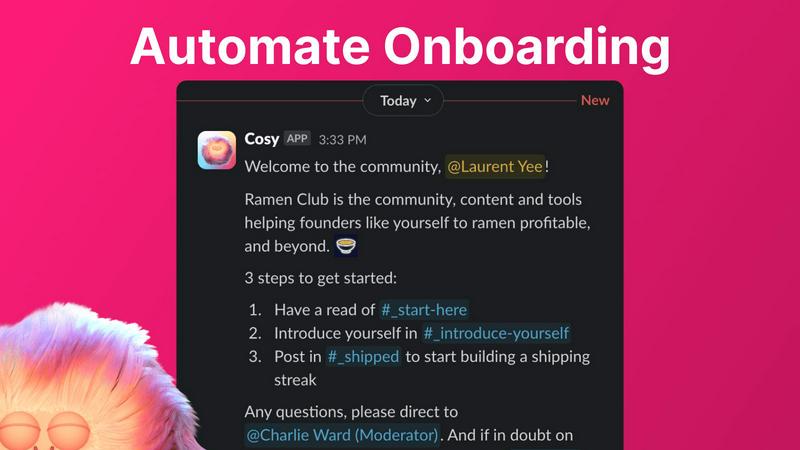
Automate Onboarding
Cosy simplifies the onboarding process by allowing you to create and automate up to 10 distinct welcome DM sequences. These messages can be sent from you, a team member, or the Cosy bot when a new member joins your Slack workspace. This feature ensures that every new member is welcomed promptly, even outside of regular hours, allowing you to save time and ensure no new member goes unnoticed.
Connect Your Members
With Cosy, you can effortlessly grow member engagement by automatically introducing community members to each other. This feature allows opted-in members to be introduced via DMs at customizable intervals, fostering connections and conversations within the community. Members can engage with each other without any manual effort from community leaders, promoting a vibrant and interactive environment.
Member Directory
Cosy offers a comprehensive, searchable member directory that can be accessed directly within Slack. You can customize member profiles with up to 10 fields, making it easy for members to find and connect with one another based on shared interests or expertise. This feature enhances the community experience by enabling members to discover valuable connections without leaving the Slack platform.
Content Highlights
Instantly surface the most engaging content within your community using Cosy's content highlights feature. You can quickly retrieve the top 10 most engaging posts in a specific channel or across all public channels with easy-to-use slash commands. This feature helps community leaders keep track of relevant discussions and ensures that valuable content is not overlooked.
Use Cases of Cosy
Streamlining Community Onboarding
Cosy is ideal for community managers who want to streamline their onboarding process. By automating welcome messages and follow-ups, community leaders can ensure that new members feel welcomed and informed from the moment they join, allowing them to integrate seamlessly into the community.
Enhancing Member Connections
Utilizing the member introduction feature, community leaders can foster relationships between members with minimal effort. This not only enhances engagement but also helps create a more interconnected community, encouraging collaboration and networking among members.
Facilitating Content Discovery
For communities that generate a lot of content, Cosy’s content highlights feature is invaluable. It allows members to easily find and engage with the most relevant discussions, ensuring that important topics remain front and center, keeping community members actively involved.
Building a Vibrant Community Culture
By utilizing the member directory and automated introductions, community managers can cultivate a culture of connection and support. Members can easily identify and reach out to others with similar interests or experiences, enhancing the sense of belonging and community cohesion.
Frequently Asked Questions
What is Cosy and how does it work?
Cosy is a Slack application designed to automate community management tasks, such as onboarding new members and introducing them to each other. It provides tools like a member directory and content discovery features, all within the Slack environment.
How does Cosy automate onboarding?
Cosy automates onboarding by allowing community leaders to create customized welcome DM sequences that are sent to new members upon joining. These messages can be tailored for personalization and can be triggered immediately or after a set delay.
Can members search for other members easily?
Yes, Cosy provides a searchable member directory where members can fill out profiles with relevant information. This allows other members to search for and connect with individuals based on specific keywords or interests.
Is there a trial period for Cosy?
Yes, Cosy offers a free plan for up to 250 members and a 30-day trial for unlimited members, allowing potential users to explore the features and benefits before committing to a paid plan.
Explore more in this category:
Similar to Cosy

Free collection of online developer utilities, code formatters, and digital converters designed to streamline your daily workflow.


Visual financial timelines for couples and young professionals: model cash flow, life events, and shared goals.

The #1 Native Form Builder Plugin for Framer - No Code, No Embeds, No External Platforms.

Plan and review LinkedIn prospecting, outreach flows, post previews, and campaign progress in one workspace.

Practical, independent guides to home repairs, maintenance, costs, troubleshooting, and everyday fixes.

Highlight faster. Study in flow with custom shortcuts and a workflow built around you. Print smarter, or turn any page into a tiled poster.
